UK Phone numbers in InfoPath 2010
I was working with a client recently who wanted to be able to submit InfoPath forms with a UK style phone number field of 5 numeric+space+6numeric format, ‘01234 123456’.
I had to do a fair amount of looking around in InfoPath and the web , but finally came across a quite neat solution of pattern matching.
Firstly I had to make the text box accept the data type Text (string)
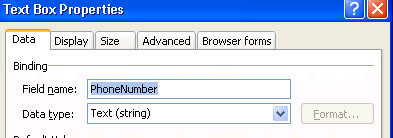
I then created a validation rule for the PhoneNumber control, for the condition I used “PhoneNumber” “does not match pattern”

and selected “Select a pattern…” in the final box, this brings up the Data Entry Pattern dialog box.

From this you can now choose “Custom pattern” I used pattern \d\d\d\d\d \d\d\d\d\d\d to format my input.

With the addition of a screen tip the validation rule is complete


 SharePoint (and Project Server) Shenanigans
Hi Neil, Some UK phone numbers have 3 digit STD and eight digit local number or 4 digit STD and 7 digit local number. Also perfectly reasonable to use brackets, e.g. (029) 2073 9000. And there are some areas of the country where numbers including STD are 10 digit, not the normal 11 digit. Most people today will look up numbers on their mobile which may well display the number as +442920739000 or +44(0)2920739000. etc, etc. Have you come across a way to allow all valid forms but still exclude truly invalid numbers?