Archive
In a hotel with wired and no wireless? No problem with Windows 7 #TEE12
Let me give you a handy tip whilst working in a hotel.
The scenario…
You are in a hotel that does have internet access but doesn’t have wifi, or in this case, the wifi is so hammered with all the TechEd attendants that it just isn’t worth it.
However, you do have a wired connection, but now my tablet / mobiles are useless since they rely on wifi and I don’t want data roaming charges.
Well a quick Google / Bing and I found this:
How to turn your laptop into a wireless hotspot:
It talks about some software, but for the command line steps on my Windows 7 laptop worked a treat:
- Start > Search… CMD
- Right click on the command prompt and select “Run as administrator…”
- Type: netsh wlan set hostednetwork mode=allow ssid=<My Network Name> key=<My Password>
- netsh wlan start hostednetwork
- Go to Change Adaptor Settings, right click on the network adaptor connected to the internet and select Properties
- Sharing Tab
- Check: Allow other network users to connect…
- Select the new network adaptor
- Click OK

Ta daa, instant wireless hotspot from a wired connection and no 3rd party software installed to achieve.
Now back to the work I missed whilst at TechEd Europe 2012!

Passed my MOS #SharePoint #PowerPoint 2010 exams #SP2010 #PS2010 #ProjectServer #MSProject
A quick post to say that I have started my journey to becoming a Microsoft Office Master and I am now officially a Microsoft Office Specialist in SharePoint and PowerPoint 2010.

Now you may be wondering why I would be taking the Microsoft Office Specialist exams when I have SharePoint and Project Server server certifications and I work as a consultant. Surely I know this stuff and how does it help my career?
Well I’m glad you asked! There are several reasons why I am interested in the MOS Specialist and Master exams:
- When you become too deep into the technical, you sometimes need a refresher on how out of the box items work. This is my way of keeping my hand in.
- For users we train at Corporate Project Solutions, I wanted to know how well our courses prepared them for the exam (very well it would appear!).
- For our trainee’s within CPS, would it help them to becoming a well rounded SharePoint / Office professional in the marketplace (yes, it definitely would).
- Lastly (and possibly the most important), SharePoint solutions are not just about SharePoint. It is about the integration with the Microsoft ecosystem (Office, Project Server, Team Foundation Server, SQL Server). By understanding the surrounding technologies, solutions I design and implement will be more supportable and upgradeable in future.
For revision material, I used the following book and of course practiced on the applications themselves:
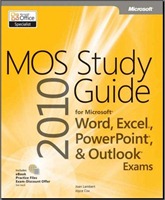 |
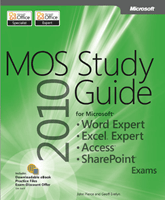 |
I will be working on the Word and Excel Expert exams next (a fair bit more prep to do first) and then I may take the Office 365 exam when it is released also, just to see how it compares to the SharePoint 2010 exam.
The Office 365 Study Guide is due out soon and I expect receive my copy in the next week or two from my pre-order.
 |
As an interesting thing to note, during my research I found it difficult to find an examination centre that would allow me to just take the exam. However, one place in London was very good, professional and I would recommend:
- Good facilities
- Helpful staff
- Flexible time scales
- Central location (near Holborn)
- There is a coffee shop outside for last minute revision before you go in
- What more could you want!
Full details about the all the exams can be found here:
|
Certification |
Exam number |
|---|---|
|
MOS: Microsoft Office Word 2010 |
|
|
MOS: Microsoft Office Word 2010 Expert |
|
|
MOS: Microsoft Office Excel 2010 |
|
|
MOS: Microsoft Office Excel 2010 Expert |
|
|
MOS: Microsoft Office PowerPoint 2010 |
|
|
MOS: Microsoft Office Outlook 2010 |
|
|
MOS: Microsoft Office Access 2010 |
|
|
MOS: Microsoft SharePoint 2010 |
|
|
MOS: Microsoft Office OneNote 2010 |
|
|
MOS: Microsoft Office 365 |
Exam 77-891* |
To learn more about the MOS Master certification, details are here:

And lastly as a shameless plug for the company I work for… If you would like to learn more about the training Corporate Project Solutions provides, click on the image below:

If anybody has any questions about the details above, get in contact

Presenting and staffing at TechEd Europe 2012 next week #TEE12
Just a quick blog post to say that I will be presenting at TechEd Europe 2012 next week with my slide deck:
Integrating Project Server & SharePoint 2010
Deployment Approaches, Integration Options
& making the most of the SharePoint Enterprise Features

Code: OSP02-LNC
- Level: 300
- Category: Office, Office 365 & SharePoint
- Presenter: Giles Hamson
- Date: Wednesday, June 27th 2012
- Time: 13:30 to 14:15 (45 mins)
- Location: Hall 2
The key focus of this session is to understand three popular approaches to implementing SharePoint and Project Server together and the key benefits to each method.
In addition you will also learn:
- Understanding how SharePoint and Project Server work together
- Using the enterprise features of SharePoint to leverage Project Server data
- How SharePoint and Project Server techniques differ and can cause issues with implementation
I will also be staffing the Microsoft stand to discuss Project Server, Project, SharePoint & Office with anyone who stops by. So if you have any questions about the product set or you just want to say hello, come along.
My Schedule:
- Tuesday: Booth 13:30 till 15:30
- Wednesday: Presentation 13:30 till 14:15 (link)
- Flight out Wednesday night – Airport for 7pm ish.
Look forward to seeing you there!

Forefront 2010 Protection for SharePoint
Recently I have looking at some performance issues relating to Forefront 2010 Protection for SharePoint (FPSP).
Most people will be be familiar with Forefront Endpoint Protection (FEP) for Windows clients and servers, but with FPSP installed on your SharePoint servers you can benefit from the following features.
- Stops malware more effectively through integration of multiple industry-leading scanning engines
- Blocks dangerous attachments from being posted or downloaded with file filtering
- Prevents the upload or download of out-of-policy content with keyword filtering
In essence FPSP sits in-between your SharePoint service and its content and can scan content on upload and download, and this can can have an impact on both server performance and content upload and download times, it does this by installing its own API (VSAPI) ISAPI filter into IIS.
Another thing to be aware of is that the service account used by FPSP has some specific permission needs
1) Member of local Admins on each SharePoint server
2) Member of Farm Administrators
3) Member of the SQL Sysadmin role on the database server.
Watch out for number 3 as your DBA’s might have something to say.
By default FPSP installs with 4 scanning processes (this can be changed).
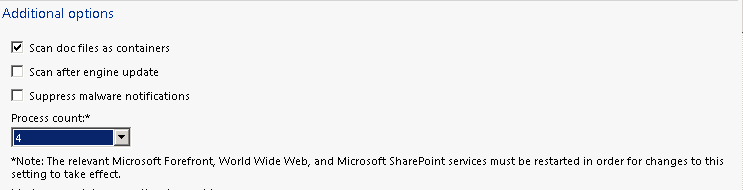
The scanning process show up in Task manager as FSCRealtimeScanner.exe, and they can consume quite a lot of memory.

and by default SharePoint will create 10 AntiVirus threads (again this can be changed) for each w3wp process SharePoint creates.
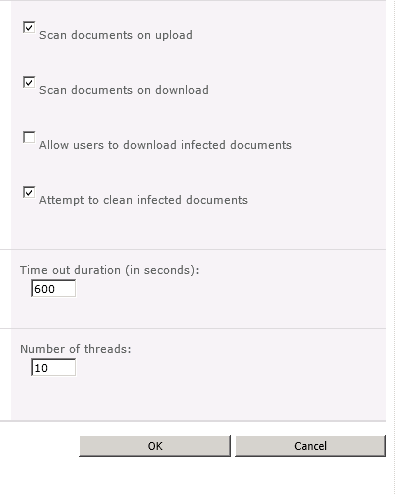
So if SharePoint is using 3 W3wp processes there will by default be 30 threads of execution served by 4 in memory processes, so you may need to play with these numbers to if you are seeing some performance issues.
Also don’t forget to add the appropriate folder exclusions in FEP for your SharePoint servers. If your using using SCCM to control FEP policies the following exclusions will be added automatically.

These are okay for a standard SharePoint 2007 or 2010 install, but if your install uses other locations don’t forget to add these.
A full list of location exclusions please see this article

#SharePoint 2007 full crawl schedule failing #in
So one of the members of support came over to discuss one of our managed service clients and their SharePoint 2007 implementation yesterday.
Now this client uses document management in a big way with a full crawl index taking approximately 40 hours to run. So understandably it is scheduled to run once a week over the weekend with incremental crawls scheduled every 20 minutes or so to bring new files into the search results.
The Problem
Although the incremental crawl was scheduling and completing as expected. The full crawl was missing the schedule time.
However, upon testing a manual full crawl the weekend before, this completed without issue.
The Solution
It would appear that the OWS Timer Service cache had corrupted in some way and had to be cleared out using the following method:
- Stop the OWSTIMER service on the problem SharePoint WFE server in the farm.
- On the problem server, navigate to:
Server 2003 location: Drive:\Documents and Settings\All Users\Application Data\Microsoft\SharePoint\Config\GUID and delete all the XML files from the directory.
Server 2008 location: Drive:\ProgramData\Microsoft\SharePoint\Config\GUID and delete all the XML files from the directory. - Delete all the XML file in the directory. NOTE: ONLY THE XML FILES, NOT THE .INI FILE.
- Open the cache.ini with Notepad and reset the number to 1. Save and close the file.
- Start the OWSTIMER service on the server and wait for XML files to begin to reappear in the directory.
- IIS Reset (just for good measure)
- Thanks to this blog post for some much need guidance:
http://blogs.tamtam.nl/duarte/2008/12/19/SharePoint2007TimerJobsNotWorking.aspx
If you remember way back to October last year, we solved a different issue with the same method in SharePoint 2010 when a web front-end was not responding properly after a content database restore:
And that’s it. Another problem solved…

Permissions delay when using Kerberos and Security Groups #SP2010 #SharePoint #in
At one of our clients recently we had a support issue concerning a delay in permissions being applied in a SharePoint 2010 environment.
Environment Details:
- SharePoint Server 2010 – Enterprise: SP1 – Dec 2011 CU
- Authentication: Kerberos
Scenario
- Site Administrators add an Active Directory security group into a SharePoint group for permissions.
- The security group has 9 users and permissions are applied accordingly.
- Later down the line a system admin adds a users into the security group giving it 10 members instead.
- No changes have been made to the SharePoint group security.
Problem
The 10th member is not immediately given the rights of the SharePoint group. However, after some time has passed (with no changes being made), the permissions are applied to the 10th member.
The amount of time is not fixed but is definitely no more than a standard working day.
Solution
After investigation and replicating the issue back at the office, we found this:
http://technet.microsoft.com/en-us/library/cc738673(v=ws.10).aspx
In particular, we found these settings:
| Maximum lifetime for user ticket | Determines the maximum amount of time (in hours) that a user’s TGT can be used. When a user’s TGT expires, a new one must be requested or the existing one must be renewed. By default, the setting is ten hours. |
| Maximum lifetime for user ticket renewal | Determines the longest period of time (in days) that a TGT can be used if it is repeatedly renewed. By default, the setting is seven days. |
So the issue is that the Kerberos token is being cached therefore the permissions are not being enforced until the token has expired.
Now, 10 hours to wait is a very long time but given that this is a forest wide setting, should we be changing this setting? In this case we also realised that the token is re-issued whenever a user logs back in.
So when these issues occur and a support issue comes in we ask them to just log off and log back in again and then we are back to where we should be!
All sorted then…
To see this in action, we took a video to prove the scenario:
Project Conference 2012 video presentations now available #PS2010 #ProjectServer #MSProject #in

Over the past couple of months, you may have seen posts about my presentation at the Project Conference held in Phoenix, AZ. Now that some time has passed, Microsoft has uploaded all the video presentations to the Project channel on Microsoft Showcase.
The Project team officially announced the availability here.

As part of the Microsoft Project Conference 2012, Corporate Project Solutions (my company) not only sponsored my presentation, but also the client I have been working for over the last couple of years, ARM.
So without further ado, I offer both video presentations for your consideration:

URL: http://www.microsoft.com/en-us/showcase/details.aspx?uuid=06fff348-8836-497b-a5eb-b5ed63a3b6c9

URL: http://www.microsoft.com/en-us/showcase/details.aspx?uuid=17a5610c-8d0f-49f2-869c-d6d1021d472a

If you would like to skim through the slides, I have uploaded them to SlideShare for your convenience:
Integrating SharePoint and Project Server 2010
8 Billion Reasons… Why ARM Chose Project Server 2010
Enjoy and if you have any questions about the above or would like to know more, please get in contact!

Excel formulas not auto calculating but F9 still works #in
As ever, when you work in IT you become the go to guy / gal for friends, family etc…
So today, whilst working on my TechEd Europe 2012 presentation, my girlfriend rang up, asked if I knew Excel and promptly forward me to a manager for a quick chat.
The problem
Excel is no longer auto calculating formulas for any spread sheet that is opened, yet if you press F9, suddenly the calculations kick into touch.
The solution
Essentially, automatic calculations have been turned off in the Excel client and we simply need to turn it back on again:
Excel 2003
- Menu: Tools > Options
- Click on the Calculation Tab and on the checkbox labelled Automatic, check it and click OK.
Excel 2007 / 2010
- Click on the Formulas ribbon
- Dropdown Icon: Calculation Options
- Check: Automatic

Problem solved 
Now you may be wondering what this is doing on a SharePoint (and Project Server) blog.
Well mostly it has nothing to do with the applications in this case, but you may just start pulling your hair out whilst working on an Excel Services spread sheet… you never know when this might come in handy.

Useful virtualisation links #SP2010 #SharePoint #in
Once again, writing tenders and needed to provide evidence of supported platforms for virtualisation:
Virtualisation support and licencing (SharePoint Server 2010)
Supported virtualisation platforms – listed here:
Virtualisation planning (SharePoint Server 2010)
Virtualisation notes (SharePoint Server 2010 – Bill Baer)
Office 365 / #SharePoint 2010 Accessibility Compliance Links #O365 #SP2010 #in
As part of responding to a tender, I needed to do some research on SharePoint 2010 / Office 365 and accessibility compliance. Here are some links that I found…
Office 365 / SharePoint 2010 – Accessibility Compliance
- http://blogs.technet.com/b/whymicrosoft/archive/2012/01/19/why-microsoft_3f00_-office-365-is-accessible.aspx
- http://sharepoint.microsoft.com/blog/Pages/BlogPost.aspx?PageType=4&ListId=%7b72C1C85B-1D2D-4A4A-90DE-CA74A7808184%7d&pID=431
Office 365 Help:
Conformance statement AA-level (SharePoint Foundation 2010)
Office Web Apps:


 SharePoint (and Project Server) Shenanigans
You must be logged in to post a comment.