Archive
Working with Enterprise Custom Fields via VBA Macros in MS Project 2010 #MSProject #ProjectServer #SharePoint #SP2010 #in
As per my previous post, my colleagues and I are working on various customisations to the Microsoft Project 2010 client in our SharePoint 2010 / Project Server 2010 integration project for an international company.
Primarily my job is to architect and implement SharePoint solutions but recently I have been getting heavily involved in Project Server and Microsoft Project.
Yesterday and today I have been having to dust off my VBA skills to aid a colleague and wil the help of MSDN forums, we were able to come to a solution.
We found that when querying Enterprise Custom Task Fields from Project Server using the GetFields method, it would return them as a string value as it was shown in the client, regardless of the field type.
If you use the same GetFields method to query a local task field, it will be returned as expected in accordance to the field type.
For Example:
Client Setup Details: 1 Day = 8 Hours (480 Minutes)
Enterprise Custom Task Field
- Field Name: EnterpriseDurationTest
- Field Type: Duration
- Field Source: Enterprise Custom Task Field (Project Server)
- Value: 1 Day
- GetFields Method return: 1 Day
Local Custom Task Field
- Field Name: LocalDurationTest
- Field Type: Duration
- Field Source: Local Task Field (Microsoft Project)
- Value: 1 Day
- GetFields Method return: 480 (returned in minutes)
Now this make comparison quite hard unless you start splitting the string returned from the enterprise custom field and hard coding the number of hours that make up a day.
As a work around, Jan De Messemaeker (Project MVP), helped provide an answer:
By simply taking the output of the Enterprise Custom Task Field and placing it into a spare local field, it will do the appropriate conversion for us and we can the query the local field to to our comparison.
This blog post is simply here as a reminder for myself (future projects etc.) but also as a thank you to the growing Project Server and Microsoft Project community.

Useful details and links when rolling out Microsoft Project 2010 #PS2010 #ProjectServer #SharePoint #SP2010 #MSProject #in
In my current project where we are integrating SharePoint Server 2010 and Project Server 2010, we are starting to go into the details of rolling out the Microsoft Project 2010 client globally.
Some of the features we are implementing require VBA macros in MS Project 2010 which are brought down to the client application via the Enterprise Global Template from Project Server.
The following details and links have been useful during my investigations:
ADM Templates for Office 2010 – AD Policy Templates:
- Information: http://technet.microsoft.com/en-us/library/cc179176.aspx
- Download: http://www.microsoft.com/downloads/details.aspx?displaylang=en&FamilyID=64b837b6-0aa0-4c07-bc34-bec3990a7956
How to Digitally Sign a VBA Macro in Microsoft Project:
Registry Key to change:
- \\HKEY_CURRENT_USER\Software\Microsoft\Office\14.0\MS Project\Security\VBAWarnings
Registry Option Values:
- 1 = Enable all macros (not recommended; potentially dangerous code can run)
- 2 = Disable all macros except digitally signed macros
- 3 = Disable all macros with notification
- 4 = Disable all macros without notification
- NB: The text in the options match those available in the Trust Center in File > Options of the Microsoft Project 2010 Client.
Useful JavaScript Function: PreSaveAction #SP2010 #SharePoint #PS2010 #ProjectServer #in
Just a quick blog post to talk about a standard JavaScript function that exists in SharePoint 2007 and 2010 – PreSaveAction().
Now I have done extra validation and functions on list forms in allsorts of ways before (some of which is blogged on this site) and it is only recently that this standard function has been brought to my attention. (Thanks @GlynClough via twitter).
Once I learned about this function I of course google’d about it to see what I could find and came across the following blog articles:
- http://www.endusersharepoint.com/2008/10/07/endusersharepointcom-extending-issues-and-tasks-part-3/
- http://www.allaboutmoss.com/index.php/tag/presaveaction/
These are excellent articles that explain the function, however in the way I tend to work in my projects it posed a problem.
We are essentially overriding a standard SharePoint JavaScript function and the articles assume that you can place a Content Editor Web Part onto the page to add the functionality.
Now in SharePoint 2010 this is less of a problem, since there are very good and official ways to add web parts to list form pages, even in a Publishing Site.
However, in Microsoft Office SharePoint Server 2007 utilising publishing sites, editing newform.aspx and editform.aspx pages caused many issues.
This forced the consultant / developer to create their own new / edit forms and pages in order to insert sometimes a very small amount of code.
Since most of my projects seem to involve the Publishing feature in one way or another, I typically place JavaScript reference files in the Master Page. This means that my JavaScript code is running on every page.
So, getting to the point of this article, I have modified the general example that is supplied on other sites to take into account this method of JavaScript development by simply querying what page I am on before I run my validation tests and functions.
Code Example:
Using #jQuery to attach regular expression validation to a #SharePoint list form field #SP2010 #PS2010 #ProjectServer #in
On one of my current projects I have had cause to ensure that no special characters are in the Title field of a SharePoint 2010 list form.
This is because we are using the Title field as the Plan Name in a Project Create process in Project Server 2010. As a result we need to ensure that the Event Handler we are creating has validated data that the PS2010 PSI Web Service can accept for the Plan Name.
I created the following script to validate the data being entered into the Title field of the list form as it is being entered.
I manipulate the Save Buttons in the ribbon and the list form to ensure that the user cannot enter invalid data into the form.
To ensure a good user experience, I add an extra <DIV> element next to the Title field to notify the user of what is going on.
Example Code:
Determining delegation mode and user via jQuery #in #ProjectServer #PS2010 #SP2010
In my current project I have recently had the requirement to determine whether Project Server 2010 was in delegation mode.
If the user was in delegation mode, we then passed the unique Display Name of the delegation user and passed it to a web service to return more data about the resource.
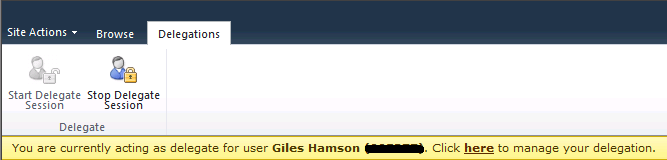
The information bar in PS2010 lets us know that we are in delegation mode and in jQuery we can interrogate this to get the information we need.
The following code uses jQuery to determine if we are in delegation mode and sets the Display Name and isDelegate variables accordingly:

#SP2010, #Project Server – Reporting Technologies vs. Data Sources
Recently I have been teaching myself PerformancePoint 2010 and connecting it to the Analysis Services cube as part of Project Server 2010.
During my investigation, I started thinking about all the Business Intelligence options that are available within the SharePoint / Microsoft stack and thought I would map out what I know so far.
Please bare in mind this is work in progress based on what I have personally used as part of my projects over the years and research on MSDN / TechNet and other sources.
I will be gradually updating this as I learn more about the technologies and I welcome any input from the SharePoint / EPM community.

Notes against the items can be found in the attached Excel spread sheet below:

Scaling Limitations for SharePoint and Project Server 2007 / 2010 #SP2010 #ProjectServer #EPM #WSS #MOSS
Just a useful link about SharePoint and Project Server scaling limitations that I keep losing.
SharePoint Foundation 2010 / SharePoint Server 2010 / Project Server 2010
SharePoint Server 2010 capacity management: Software boundaries and limits: http://technet.microsoft.com/en-us/library/cc262787.aspx
Windows SharePoint Services 3.0 / Microsoft Office SharePoint Server 2007
Plan for software boundaries (Office SharePoint Server): http://technet.microsoft.com/en-us/library/cc262787(office.12).aspx
Project Server 2007
Plan for software boundaries (Project Server): http://technet.microsoft.com/en-us/library/cc197693(office.12).aspx
October CU #SP2010 #PS2010 Updated information… #in
The SharePoint Team have updated the information about the October Cumulative Update.
http://blogs.msdn.com/b/sharepoint/archive/2010/11/06/details-and-workaround.aspx
Details Below:
Below are further details and a workaround for the SharePoint 2010 October Cumulative Update issue discovered yesterday.
Packages Impacted
The Cumulative Update packages affected are the Server Packages for SharePoint Foundation, SharePoint Server and Project Server 2010, specifically;
- SharePoint Server Package 2394320
- Project Server Package 2394322
The downloads for both of these packages have been removed from our servers. If you have already downloaded them you SHOULD NOT install them. They will be republished.
Issue Details
The October Cumulative Update for the packages listed above makes some changes and updates to the user profile database. Unfortunately there are certain situations where this update does not complete as expected and leaves the update in an inconsistent state. This causes issues with several SharePoint features that use the User Profile Application such as MySites, People and Expertise Search & Ratings.
Workaround
If you have already applied the October Cumulative Updates mentioned above, you should perform the following steps;
If you encounter any issues following these steps or have questions specific to your environment/deployment please call Microsoft Product Support for assistance.
Check the following locations for the Microsoft.Office.Server.dll to determine the version. If the version is 14.0.5128.5000 or greater, the October CU is applied.
- C:\Program Files\Common Files\Microsoft Shared\Web Server Extensions\14\ISAPI\Microsoft.Office.Server.dll
- C:\Windows\assembly\GAC_MSIL\Microsoft.Office.Server
\14.0.0.0__71e9bce111e9429c\Microsoft.Office.Server.dll
Using Central Administration perform the following steps
- Click on Manage Service Applications
- Select User Profile Service Application by clicking on it
- At the top of the screen on the Service Applications tab, click on Manage
- On the Manage Profile Service: User Profile Service Application page, click Manage User Permissions
- On the Permissions for User Profile Service Application dialog, you will need to
- Specify the desired user accounts and click the Add button to add them to the list
- By default SharePoint 2010 RTM has these accounts
- NT Authority\authenticated users
- All Authenticated Users
- Once the user accounts are in the list, you will need to set the permissions appropriately for your environment and click OK.
Packages NOT Impacted
The following Cumulate Update packages are NOT affected by this issue and are safe to install;
- SharePoint Foundation Server “Uber” Package 2394323
- SharePoint Foundation Server Package 2405789
- SharePoint Foundation Server Package 2427410
- SharePoint Foundation Server Package 2436034
This issue does not impact the 2007 versions of these products.
Important info about CU Oct 2010
More information as it comes – until further notice – don’t install the CU Oct 2010 update for SP2010 or PS2010.


 SharePoint (and Project Server) Shenanigans