Archive
#SP2010 Content Organizer, Incoming Email and Multi-function Printers #in #SharePoint
A very interesting post about the Content Organizer in SharePoint 2010, Incoming Email and integrating the solution with multi-function printers.
I know one day I will be dealing with this issue too.

#SharePoint Solution Installer–#SP2010 version #in
A colleague of mine has just pointed me in the direction of this:
http://netindonesia.net/blogs/andriyadi/archive/2010/02/27/sharepoint-2010-solution-installer.aspx
The SharePoint 2010 version of the SharePoint Solution Installer.
I haven’t tried it yet, but I shall re-package up my CodePlex solutions for 2010 to test them out.
Stay tuned.
Employee Absence Form + email notification to manager #in #SP2010 #SharePoint
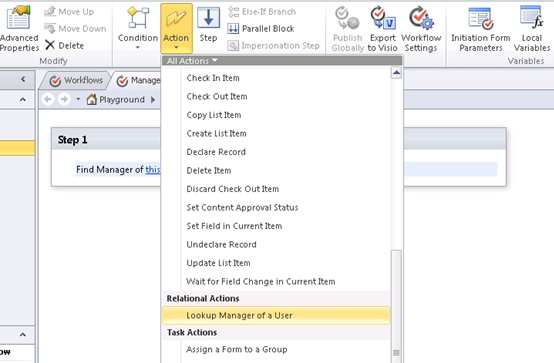
This post shows you how to utilise a little known workflow action in SharePoint Designer 2010, which allows a workflow to fire off an email to a user’s manager.
Note that your AD hierarchy needs to be correct for this to work.
Step 1 – Create a Custom List (Absence Log)
Here I created a basic custom list, adding the columns you see below;
- Member of Staff (Person or Group)
- Date of Absence (Date and Time)
- Reason for Absence (Single Line of Text)
- Estimated Duration (Choice)
- Line Manager (Person or Group)
Step 2 – Create List Workflow (SharePoint Designer 2010)
Now open up SharePoint Designer 2010, choose ‘Workflow’ on the left hand navigation and then create a new ‘List Workflow’ – selecting the Absence list.
- Create a New Action –> LOOKUP MANAGER OF A USER

I just won a free MSDN subscription… SharePoint Home Drive Web Part #in #SP2010 #SharePoint
A while ago I entered a competition that Liam Cleary (MVP) was running about Web Part contributions in the community. (Link)
Turns out I won. (Link) 
Thanks Liam, I shall be using the subscription for some new web part ideas I have.
The web part in question was my SharePoint Home Drive web part. This was developed for IT Administrators in schools to give access to Teacher’s & Student’s home drives within their intranet to aid SharePoint adoption.
It was released a couple of years ago and has been used in various educational institutions. It has also recently been tested in SharePoint 2010.
Competition Entry:
1. What the original problem was
Ensuring that users can access their home drives within SharePoint to aid adoption of the SharePoint Portal within the education establishment.
2. Why SharePoint was chosen
SharePoint was chosen due to its flexibility and support from third party vendors for the various applications currently in use.
SharePoint’s educational licensing costs allows schools to user enterprise scale solutions for a fraction of the cost.
3. What the solution was (end-to-end)
To aid education establishments in providing a single collaboration portal connecting all appropriate solutions into one place including:
- File Shares
- Cashless Catering
- MIS integration
- E-Learning
- + others
4. How it helped
Although all the 3rd party vendors provided web parts etc. for the various applications, users were still having to go away from the solution to access their personal files.
Document libraries will be used for future years of children as the architecture catches up with the change in solution, however for current student data, financials did not allow for the required increase in storage in the SQL database.
Training of document libraries for non-IT staff in terms of uploading files and the understanding of metadata was troublesome and take up of the collaboration solution was slow among some staff and students.
Shared folders on the network were easily integrated using the Page Viewer Web Part in File / Folder mode and a Search Server Content Source of the Network Share.
However, this method could not easily be implemented for a user’s home drive, due to the dynamic nature of the UNC path.
Typically, this is set up in Active Directory using the user’s ADUserName (SAMAccountName) as the folder name for the share.
To solve this, I created a Web Part that allows administrators to specify the UNC path of the file share; it will then inject the AD username after the UNC path.
This provides a File Explorer view of the user’s home drive within the SharePoint Portal.
This was developed to be an interim solution until Document Libraries were fully adopted by end users and the SQL storage could be bought with future budget.
The SharePoint Home Drive web part was released to the community via CodePlex in June 2009 and has recently been tested in SharePoint 2010 environments also.
Compatibility of the Web Part also includes WSS 3.0 and SharePoint Foundation 2010.
Web Part URL: http://gileshhomedrive.codeplex.com/


 SharePoint (and Project Server) Shenanigans