Archive
Traffic light indicators for schedule
One query that we receive a lot from our clients is about setting up automatic traffic light (or RAG) indicators for their project schedule. This is a very well documented request, but a recent client wanted a slight variation – the project schedule indicator to have its tolerance based on a percentage, instead of a hard-coded value. The following formula solves this issue:
IIf([Baseline Duration]=0,"No Baseline",
Switch([Baseline Start]=ProjDateValue(‘NA’) Or [Baseline Finish]=ProjDateValue(‘NA’),"No baseline",
[Duration Variance]<=0,"On schedule",
[Duration]/[Minutes per day]>([Tolerance for schedule in percent]/100)+([Baseline Duration]/[Minutes Per Day]),"Outside tolerance",
[Duration]/[Minutes per day]<=([Tolerance for schedule in percent]/100)+([Baseline Duration]/[Minutes Per Day]),"Within tolerance"
))
This is for the task schedule RAG, and will return values based on a number field called “Tolerance for schedule in Percent” to indicate whether the task duration has increased beyond its allowed tolerance.
You will also need to set up RAG graphical indicators for this field as well, with the following values, as per the screenshot below:
No baseline = Question Mark
On schedule = Green
Within tolerance = Amber
Outside tolerance = Red

Of course, your indicators could be different to those that I have chosen, as well as the text. Just make sure to update the formula if you want to change the returned text.
Hopefully this will shorten your chin-scratching time when attempting to do something similar!
Lester

SharePoint Timer Job Servers
Recently, while helping out a client, they asked a question about timer jobs running on their Farm.
The client in question has a large farm with multiple servers, web applications and content databases and was concerned about multiple servers appearing to run the same timer jobs on the same web application at different times.
If you have a web application with multiple content databases, or a farm with multiple servers it will be completely normal to see the servers running timer jobs changing, you can try to override this behaviour by setting a preferred timer server in Central Administration for a content database even thought this setting doesn’t even seem to be mentioned in TechNet.
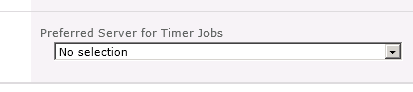
As each content database can have a different server assigned to run its timer jobs on of the ways to determine this is to have a look in SQL at contentDB in the TimerLock table
In SharePoint 2007 the actual timer server name was in the contentDB, but in 2010 this was changed to a GUID that represented the object, so you have to join the contentDB to the ConfigDB, the following SQL allows you tell which server currently has the timer lock for a contentDB.
select a.lockedby, b.name
from <contentdb_Name>.dbo.TimerLock a inner join SharePoint_Config.dbo.Objects b
on a.lockedby = b.Id
Happy SharePointing in 2013
Follow @NeilKing41


 SharePoint (and Project Server) Shenanigans