Archive
Year 2013 Passed, A new to come..
For me the year starts with some big fireworks display, as Dubai has plan to create a world record of biggest fireworks at new year. It was fun to witness such historic moment, at the same time a little guilt that this enormous amount of money could be used to something more useful.

via All about Enterprise Project Management (EPM) http://khurramjamshed.blogspot.com/2014/01/year-2013-passed-new-to-come.html
   The author of the blog has an extensive experience of working as an EPM Consultant. Currently he is located in Dubai, UAE and working for Microsoft partner organization as Project Server specialist. He has a thorough experience of providing Project Management technical/functional consultancy to all sort of organizations. He is a certified PMP, a Project Server MCITP, and also received a MS community contributor award 2011.
This article has been cross posted from khurramjamshed.blogspot.com/ (original article) |

#ProjectServer 2013/2010 Dec CU is available #sp2013 #ps2013
You can find the details of Project Server 2013/2010 installation package here: http://blogs.technet.com/b/projectsupport/archive/2013/12/12/microsoft-project-server-2010-and-2013-december-cu-announcement.aspx
Note, as usual, that this should be applied to test environment first prior to production. Also Mar 2013 CU is been set as baseline for all Project Sever 2013 CUs, so install Mar 2013 CU first.
Dec CU includes fix to one of the commonly encountered issue:
- Assume that you change values for fields such as Project Owner and Name on a Project Detail Page (PDP) in Project Web App. When you save and refresh the page, the values are reverted to what they were before the change.
Happy patching and Happy New Year to everyone ….
via All about Enterprise Project Management (EPM) http://khurramjamshed.blogspot.com/2013/12/projectserver-20132010-dec-cu-is.html
|
The author of the blog has an extensive experience of working as an EPM Consultant. Currently he is located in Dubai, UAE and working for Microsoft partner organization as Project Server specialist. He has a thorough experience of providing Project Management technical/functional consultancy to all sort of organizations. He is a certified PMP, a Project Server MCITP, and also received a MS community contributor award 2011.
This article has been cross posted from khurramjamshed.blogspot.com/ (original article) |

#ProjectServer and #SharePoint 2010 / 2013 December 2013 Cumulative Update #PS2010 #SP2010 #PS2013 #SP2013 #MSProject
 I am a Project Server and SharePoint consultant but my main focus currently is around Project Server.
I have been working with Project Server for nearly five years since 2007 for a Microsoft Gold Certified Partner in the UK, I have also been awared with the Microsoft Community Contributor Award 2011. I am also a certified Prince2 Practitioner. This article has been cross posted from pwmather.wordpress.com (original article) |
The Office 2013 December 2013 Cumulative Updates are now available, please see the links below:
http://support.microsoft.com/kb/2912738
***There is no Project Server 2013 Server Roll up package for December 2013 CU***
Project Server 2013 December 2013 CU:
http://support.microsoft.com/kb/2837668
Project 2013 December 2013 CU:
http://support.microsoft.com/kb/2837665
Also worth noting, if you haven’t done so already, install the March 2013 Public update: http://support.microsoft.com/kb/2768001 if installing the December 2013 CU.
The Office 2010 December 2013 Cumulative Updates are now available, please see the links below:
http://support.microsoft.com/kb/2911591
Project Server 2010 Server Roll up package December 2013 CU (Recommended):
http://support.microsoft.com/kb/2849972
Project Server 2010 December 2013 CU (Included in the Server Roll up package):
http://support.microsoft.com/kb/2849978 & http://support.microsoft.com/kb/2849988
Project 2010 December 2013 CU:
http://support.microsoft.com/kb/2849984
Remember SP1 or SP2 is a pre-requisite for the Office 2010 December 2013 CUs.
As always, test these updates on a replica test environment before deploying to production.
For more details see:


#ProjectOnline deployment experience #Office365 #Project #SharePoint #Cloud #PPM #EPM
|
I am a Project Server and SharePoint consultant but my main focus currently is around Project Server.
I have been working with Project Server for nearly five years since 2007 for a Microsoft Gold Certified Partner in the UK, I have also been awared with the Microsoft Community Contributor Award 2011. I am also a certified Prince2 Practitioner. This article has been cross posted from pwmather.wordpress.com (original article) |
I recently worked solely on a Project Online deployment from start to finish and wanted to share my thoughts and experiences with you. Just to be clear, this isn’t the first Project Online deployment I have worked on, I have been involved in many with CPS but this one I have seen through from the beginning to the end.
Overall the Project Online experience is very smooth and efficient. It was the perfect solution for this particular client I have just finished working for. They weren’t sure exactly what they needed or how long they were going to use the system for as another area of the business was already planning Project Server internally but these guys needed something now. Project Online was the perfect choice, no hardware needed, no internal IT involvement, no capital costs.
When working with Project Online, treat this as the separate product it is. Remember it is not Project Server online, it is Project Online. whilst these two products are similar they are different. Many of the features are very similar but you will also find some features not available in one or the other.
One of the key areas I would say you need ensure you fully understand, certainly if you have been working with Project Server for many years like myself, is the reporting side of things. Whilst the typical end user reporting in Project Online is very simple to use, you are limited by ODATA and don’t have the flexibility of the Reporting database access that we have all got used to. Remember, Project Online is a different product to Project Server 2013 on-premise, so don’t think of Project Online reporting as a limitation compared to Project Server on-premise.
For quick and simple deployments, for me, Project Online is the answer. The key advantages to consider with Project Online that can help form any business case needed are:
- The farm is maintained by Microsoft
- The farm is regularly patched with updates by Microsoft
- The system scalability is all handle by Microsoft
- The system continuity / back up is handled by Microsoft
- Any system issues are raised directly to Microsoft for resolution
- Project Online can be up and running within about 30 minutes
- No hardware required
- No capital costs
These aren’t all the advantages, just the key points i could think of at the time of writing.
Speak to your Gold PPM partner today for a free trial – you won’t be disappointed.


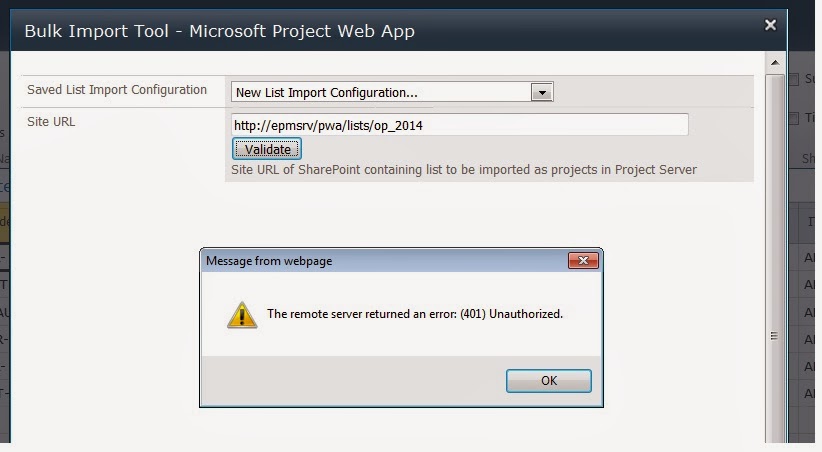
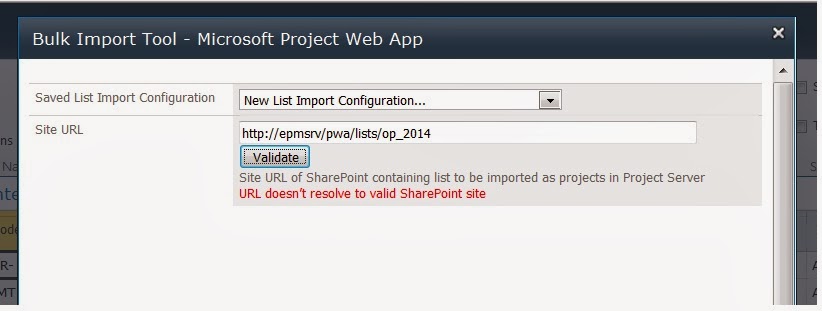
Bulk Import tool – (401) Unauthorized error #ProjectServer #PS2010 #SP2010
Before i proceed, please note that Bulk Import tool was released along with the release of Project Server 2010 and to be used with Project Server 2010. Till date, i am not sure, if Bulk Import tool without modification will work with Project Server 2013. This issue, and its resolution, is for Project Server 2010 environment.
Some time back Andrew Lavinsky had discuss Bulk Import tool feature in great detail through his blog, a blog worth every minute of your time. Please go through these blog posts if you are interested to use Bulk Import tool:
My post is to highlight the following issue you may come across while trying validating Site URL:
via All about Enterprise Project Management (EPM) http://khurramjamshed.blogspot.com/2013/12/bulk-import-tool-401-unauthorized-error.html
|
The author of the blog has an extensive experience of working as an EPM Consultant. Currently he is located in Dubai, UAE and working for Microsoft partner organization as Project Server specialist. He has a thorough experience of providing Project Management technical/functional consultancy to all sort of organizations. He is a certified PMP, a Project Server MCITP, and also received a MS community contributor award 2011.
This article has been cross posted from khurramjamshed.blogspot.com/ (original article) |

Free #Project 2013 App from CPS #Office365 #Office #Apps #ProjectServer #ProjectOnline
|
I am a Project Server and SharePoint consultant but my main focus currently is around Project Server.
I have been working with Project Server for nearly five years since 2007 for a Microsoft Gold Certified Partner in the UK, I have also been awared with the Microsoft Community Contributor Award 2011. I am also a certified Prince2 Practitioner. This article has been cross posted from pwmather.wordpress.com (original article) |
Just a quick post to highlight a new app that CPS have released for Project 2013, this is the Task Auditor app and can be downloaded using the link below:
http://office.microsoft.com/en-gb/store/task-auditor-WA104172076.aspx
The app can be seen below:

The home page gives a description of the app but also contains a check box to allow the use of Cookies – if you don’t allow the use of Cookies then the configuration settings will not be available and some of the checks might not be 100% accurate.
After checking the check box to allow Cookies, clicking on a task update the app to show the results for the particular task:

At this point also notice there are three tabs, Task, Configure and Help. If you don’t allow Cookies the Configure and Help Tabs will not be visible. The Task Tab displays the checks / tests results for the selected task. The Configure Tab allows the user the enter duration settings and date format:

This is to allow correct calculations for a couple of the checks. These settings are saved and only have to be updated once / as required.
The Help Tab gives details / support for the Configure Tab:

The tests carried out will depend on the type of task selected, Milestone, Summary Task, Work Task etc. The images below show a summary task selected and then a normal work task selected:
Summary Task:

Work Task:

Hovering over the checks, a tooltip gives more information on the check:

Take a look, its free 


Sharepoint 2013 “mark task complete”
A great new feature in 2013 is the ability for a user to “mark task complete” straight from the task list without having to edit the item and click.
Screenshot below illustrates what this is

The issue I had today is that -somehow- the column to tick that task was actually not showing anymore from the task views. The list is definitely a Tasks list but the content type although originally inheriting from the out-of-the-box Task parent Site Collection CT has some custom columns in the site Content Type level.
Cause of issue (why the column was gone): not found yet, may be the “completed” column was edited by a user with design rights, but the formula inside was correct.
Solution: that’s the bad news.
- Re-adding the column again didn’t work as it would not show the column as a Check Box magically but as a value “Yes/No” .. not useful.
- Recreating the view and making it exactly like an out-of-the-box task view did not work, same as above.
- Only solution was to re-create the list fully, and re-add the Custom Task Content Type, then remove the default “Task” Content Type. Once done task can be copy across if needed, as long as there no workflow in progress users will not be disturb as you may even change the URL to the original list later on.
Not a great finding on this feature I am afraid, but since nothing came up on a quick internet search I thought I would share it.
Have you ever wondered how to re-use this “mark as complete” in a fully customised list (not tasks App originally) ? One would think it’s the whole point of having such column, to be able to re-use it somewhere else, right. I could not.
Anyone ?

via François on Sharepoint http://sharepointfrancois.wordpress.com/2013/12/05/sharepoint-2013-mark-task-complete/
 French native Sharepoint Consultant living in London. A crossway between a designer, developer and system architect. Prefers stretching the limit of out-of-the-box features rather than breaking them into code. When not working with Microsoft Sharepoint François is often found on Web2.0 News sites and related social networking tools.
This article has been cross posted from sharepointfrancois.wordpress.com/ (original article) |

#ProjectServer #Project Conference 2014 #ProjectOnline #ProjConf #pm #pmot #projectmanagement #PPM
|
I am a Project Server and SharePoint consultant but my main focus currently is around Project Server.
I have been working with Project Server for nearly five years since 2007 for a Microsoft Gold Certified Partner in the UK, I have also been awared with the Microsoft Community Contributor Award 2011. I am also a certified Prince2 Practitioner. This article has been cross posted from pwmather.wordpress.com (original article) |
The Project Conference 2014 is fast approaching. This is the place to be for information on Microsoft Project, Microsoft Project Server and Project Online. For details see the links below:
http://www.msprojectconference.com/
http://blogs.msdn.com/b/jkalis/archive/2013/11/20/register-for-the-project-conference-2014-now.aspx

See you there!


Windows XP SP3 windows updates not working with 100% CPU–this will sort it!
So I am setting up my new environment at home and I decided to create a Windows XP client machine for myself for the rare occasion that I need it to try out some functionality with XP or Office 2003.
So I install Windows XP Service Pack 3 into Hyper-V on my Windows 8.1 Pro machine and I find that the Windows Update will not install anything. In fact it just kept running with no errors and the CPU would stay at 100%.
Well it turns out that the first thing the Windows Update checks for is updates to Internet Explorer and if you are not up to date with the latest security patch (November 2013 at the time of writing) then you will run into this issue.
The fix… install the latest security fix for either IE6, IE7 or IE8 and then run Windows Update.
That’s it, you’re all done 
Original article: http://news.softpedia.com/news/How-to-Fix-Windows-XP-Update-Problems-Causing-100-Percent-CPU-Usage-399865.shtml
And the fix was found in the comments:
“The secret is to install the LATEST Cumulative Security Update for your version of Internet Explorer. This stops Windows Update from searching for any IE updates and blocks this update bug.
This is a recurring problem so the current latest version changes each month.
The latest updates are dated November 2013 (as of writing this). Download and install the update that corresponds with your currently installed version of Internet Explorer:
IE6: WindowsXP-KB2888505-x86-ENU.exe
http://www.microsoft.com/en-us/download/details.aspx?id=41064
IE7: IE7-WindowsXP-KB2888505-x86-ENU.exe
http://www.microsoft.com/en-us/download/details.aspx?id=41071
IE8: IE8-WindowsXP-KB2888505-x86-ENU.exe
http://www.microsoft.com/en-us/download/details.aspx?id=41074”
Thanks to DougCuk for the comment!
For the latest security bulletins, go to this link assuming you are reading this after November 2013: http://technet.microsoft.com/en-us/security/dn481339

#SharePoint 2013 SP1 on the way … #SP2013 #Office2013
via All about Enterprise Project Management (EPM) http://khurramjamshed.blogspot.com/2013/11/sharepoint-2013-sp1-on-way-sp2013.html
|
The author of the blog has an extensive experience of working as an EPM Consultant. Currently he is located in Dubai, UAE and working for Microsoft partner organization as Project Server specialist. He has a thorough experience of providing Project Management technical/functional consultancy to all sort of organizations. He is a certified PMP, a Project Server MCITP, and also received a MS community contributor award 2011.
This article has been cross posted from khurramjamshed.blogspot.com/ (original article) |


 SharePoint (and Project Server) Shenanigans
You must be logged in to post a comment.