I just won a free MSDN subscription… SharePoint Home Drive Web Part #in #SP2010 #SharePoint
A while ago I entered a competition that Liam Cleary (MVP) was running about Web Part contributions in the community. (Link)
Turns out I won. (Link) 
Thanks Liam, I shall be using the subscription for some new web part ideas I have.
The web part in question was my SharePoint Home Drive web part. This was developed for IT Administrators in schools to give access to Teacher’s & Student’s home drives within their intranet to aid SharePoint adoption.
It was released a couple of years ago and has been used in various educational institutions. It has also recently been tested in SharePoint 2010.
Competition Entry:
1. What the original problem was
Ensuring that users can access their home drives within SharePoint to aid adoption of the SharePoint Portal within the education establishment.
2. Why SharePoint was chosen
SharePoint was chosen due to its flexibility and support from third party vendors for the various applications currently in use.
SharePoint’s educational licensing costs allows schools to user enterprise scale solutions for a fraction of the cost.
3. What the solution was (end-to-end)
To aid education establishments in providing a single collaboration portal connecting all appropriate solutions into one place including:
- File Shares
- Cashless Catering
- MIS integration
- E-Learning
- + others
4. How it helped
Although all the 3rd party vendors provided web parts etc. for the various applications, users were still having to go away from the solution to access their personal files.
Document libraries will be used for future years of children as the architecture catches up with the change in solution, however for current student data, financials did not allow for the required increase in storage in the SQL database.
Training of document libraries for non-IT staff in terms of uploading files and the understanding of metadata was troublesome and take up of the collaboration solution was slow among some staff and students.
Shared folders on the network were easily integrated using the Page Viewer Web Part in File / Folder mode and a Search Server Content Source of the Network Share.
However, this method could not easily be implemented for a user’s home drive, due to the dynamic nature of the UNC path.
Typically, this is set up in Active Directory using the user’s ADUserName (SAMAccountName) as the folder name for the share.
To solve this, I created a Web Part that allows administrators to specify the UNC path of the file share; it will then inject the AD username after the UNC path.
This provides a File Explorer view of the user’s home drive within the SharePoint Portal.
This was developed to be an interim solution until Document Libraries were fully adopted by end users and the SQL storage could be bought with future budget.
The SharePoint Home Drive web part was released to the community via CodePlex in June 2009 and has recently been tested in SharePoint 2010 environments also.
Compatibility of the Web Part also includes WSS 3.0 and SharePoint Foundation 2010.
Web Part URL: http://gileshhomedrive.codeplex.com/

Site Asset List View and jQuery issue and resolution #in
So recently I have been working on a project where we make use of the new Site Asset library capabilities in SharePoint 2010.
The Site Asset library comes with new functionality including pop-up previews of images and videos.
In particular, we are taking advantage of the fact that by uploading an image into the site library, 2 thumbnail versions are created for the list view preview and the pop-up preview.
This provides some good unique user experiences previously not seen in SharePoint out of the box before.
Anyway, to the jQuery issue:
It would appear that the Site Asset library (standard list view) uses the $ call for its JavaScript functions. This obviously conflicts with the standard way to call jQuery functionality:
This results in the error:
- Object doesn’t support this property or method
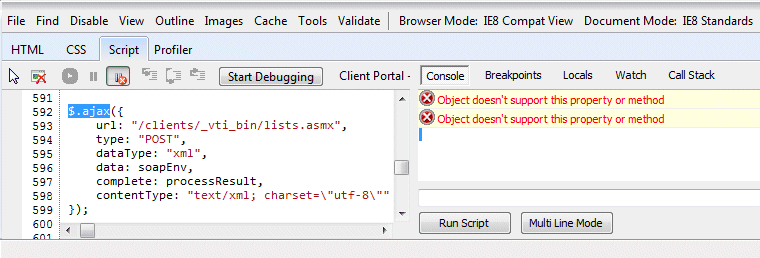
Resolution:
jQuery being implemented onto the master page doesn’t pose a problem since the SharePoint code is obviously called afterwards.
So by referencing jQuery in its longhand method:
you can use both the site asset functionality as well as any jQuery customisations that you may need to do.
Hopefully that helps out fellow SharePoint customisers out there.

Excellent SharePoint JavaScript function reference #in
Just found this post:
http://ruudheemskerk.net/archive/2010/08/03/helpful-sharepoint-javascript-functions.aspx
Which lists a lot of the useful functions I have been using recently.
I was going to write a post about it, but it would appear there is no need.
Enjoy.

Video Showcase – Home Drive #in #SP2010
SharePoint Home Drive 1.2
Provides a file explorer view to a home drive by appending the current users login name (SAMAccountName) to the UNC Path provided.
Utilised with Audiences (MOSS/SPS2010 only) this can by used based on user role.
Compatibility:
- Windows SharePoint Services 3.0
- Microsoft Office SharePoint Server 2007
- SharePoint Foundation 2010
- SharePoint Server 2010
#SP2010 Group List Items by External Data field–Field Display Missing #in
On an intranet I have been working on recently I came across a bug where the display of an External Data field in the 1st and 2nd level grouping is not shown when grouping by the BCS based item(s).
To provide a short term fix I created the following JavaScript to run on the page to solve the problem.
Essentially the values do exist in the DOM / HTML, but they are not displayed in the tags presented by the grouping.
NB: Please be aware that this solution relies upon JQuery.
#SP2010, #Project Server – Reporting Technologies vs. Data Sources
Recently I have been teaching myself PerformancePoint 2010 and connecting it to the Analysis Services cube as part of Project Server 2010.
During my investigation, I started thinking about all the Business Intelligence options that are available within the SharePoint / Microsoft stack and thought I would map out what I know so far.
Please bare in mind this is work in progress based on what I have personally used as part of my projects over the years and research on MSDN / TechNet and other sources.
I will be gradually updating this as I learn more about the technologies and I welcome any input from the SharePoint / EPM community.

Notes against the items can be found in the attached Excel spread sheet below:

Scaling Limitations for SharePoint and Project Server 2007 / 2010 #SP2010 #ProjectServer #EPM #WSS #MOSS
Just a useful link about SharePoint and Project Server scaling limitations that I keep losing.
SharePoint Foundation 2010 / SharePoint Server 2010 / Project Server 2010
SharePoint Server 2010 capacity management: Software boundaries and limits: http://technet.microsoft.com/en-us/library/cc262787.aspx
Windows SharePoint Services 3.0 / Microsoft Office SharePoint Server 2007
Plan for software boundaries (Office SharePoint Server): http://technet.microsoft.com/en-us/library/cc262787(office.12).aspx
Project Server 2007
Plan for software boundaries (Project Server): http://technet.microsoft.com/en-us/library/cc197693(office.12).aspx
October CU #SP2010 #PS2010 Updated information… #in
The SharePoint Team have updated the information about the October Cumulative Update.
http://blogs.msdn.com/b/sharepoint/archive/2010/11/06/details-and-workaround.aspx
Details Below:
Below are further details and a workaround for the SharePoint 2010 October Cumulative Update issue discovered yesterday.
Packages Impacted
The Cumulative Update packages affected are the Server Packages for SharePoint Foundation, SharePoint Server and Project Server 2010, specifically;
- SharePoint Server Package 2394320
- Project Server Package 2394322
The downloads for both of these packages have been removed from our servers. If you have already downloaded them you SHOULD NOT install them. They will be republished.
Issue Details
The October Cumulative Update for the packages listed above makes some changes and updates to the user profile database. Unfortunately there are certain situations where this update does not complete as expected and leaves the update in an inconsistent state. This causes issues with several SharePoint features that use the User Profile Application such as MySites, People and Expertise Search & Ratings.
Workaround
If you have already applied the October Cumulative Updates mentioned above, you should perform the following steps;
If you encounter any issues following these steps or have questions specific to your environment/deployment please call Microsoft Product Support for assistance.
Check the following locations for the Microsoft.Office.Server.dll to determine the version. If the version is 14.0.5128.5000 or greater, the October CU is applied.
- C:\Program Files\Common Files\Microsoft Shared\Web Server Extensions\14\ISAPI\Microsoft.Office.Server.dll
- C:\Windows\assembly\GAC_MSIL\Microsoft.Office.Server
\14.0.0.0__71e9bce111e9429c\Microsoft.Office.Server.dll
Using Central Administration perform the following steps
- Click on Manage Service Applications
- Select User Profile Service Application by clicking on it
- At the top of the screen on the Service Applications tab, click on Manage
- On the Manage Profile Service: User Profile Service Application page, click Manage User Permissions
- On the Permissions for User Profile Service Application dialog, you will need to
- Specify the desired user accounts and click the Add button to add them to the list
- By default SharePoint 2010 RTM has these accounts
- NT Authority\authenticated users
- All Authenticated Users
- Once the user accounts are in the list, you will need to set the permissions appropriately for your environment and click OK.
Packages NOT Impacted
The following Cumulate Update packages are NOT affected by this issue and are safe to install;
- SharePoint Foundation Server “Uber” Package 2394323
- SharePoint Foundation Server Package 2405789
- SharePoint Foundation Server Package 2427410
- SharePoint Foundation Server Package 2436034
This issue does not impact the 2007 versions of these products.
New vacancy at my company – CPS: Pre-Sales Consultant #in #SP2010 #SharePoint #EPM #PS2010
Job Title: Pre-sales Consultant
Industry: IT
Job-Type: Permanent
Location: Marlow, England
Salary: £45000 per annum Car Allowance
Please send CV’s to Victoria Kyle (victoria.kyle@cps.co.uk)
About Corporate Project Solutions (http://www.cps.co.uk)
Corporate Project Solutions partners with organisations to bring demonstrable improvements to their project and business performance through the provision of Portfolio, Programme and Project Management consultancy, the delivery of tailored training, the supply of talented resources and the implementation of the appropriate, class-leading Microsoft EPM and SharePoint technologies.
As a full-service consultancy and one of the UK’s leading implementation specialists, CPS can provide organisations with a complete end-to-end solution delivered on time and on budget.
With over fourteen years’ experience and a client list of more than 700 of the world’s most successful companies, CPS manages all projects in-line with Best Practice methodologies to deliver consistent and repeatable results.
CPS is an APMG Accredited Consulting Organisation.
Presales Technical Consultant
Applies technical/solution knowledge to qualify opportunities and identify requirements
Develops solutions that meet customer requirements, ensure seamless deployment, and advance the sale.
Leverages technical sales experience and information resources to educate sales teams, peers, and customers.
Education and experience
- Typically 5-8 years pre-sales and technical selling experience
- Technical and or solution experience in vertical industry
Knowledge and Skills Required
Demonstrates a solid knowledge of CPS’ breadth of solutions
- SharePoint 2007 / 2010
- CRM
- EPM
The ideal candidate will demonstrate deep technical capabilities in assigned area of specialisation and an awareness in competitive solutions knowledge. They will understand data business components and how IT is used to address business needs.
- Demonstrates current understanding of technical innovations & trends and their impact on solving customer business problems.
- Demonstrated ability to work as the lead for components of large complex projects
-
Has demonstrated hands-on level skills with SharePoint technologies.
Understands and applies basic financial and accounting concepts as well as capital investment concepts and applies them appropriately in positioning.
- Applies understanding of the customer’s value chain and business requirements when designing and proposing solutions:
- Communicates the value of the solution in terms of financial return and impact on customer business goals (future)
- Solid level of industry acumen; keeps current with trends and able to converse with client on issues and challenges
- Demonstrates solid questioning techniques and related communications skills with customer managers
- Demonstrates understanding of the competition as well as good positioning & strategy
- Gathers and assesses customer needs both business and technical
- Identifies related needs (lead generation opportunity expansion)
- Identifies site specific parameter and constraints that impact the solution
- Identifies required project steps
- Identifies likely problems areas that require attention
- Identifies probable competition and product roll-out data/ training needs.
- Architects an appropriate technical solution to meet the customers’ requirements
- Investigates and optimizes a solution to meet the requirements of an opportunity
- Adapts solution design to new requirements
- Establishes the validity of a solution and its components
- Identifies the growth path and scalability options of a solution and includes these in design activities
- Creates the appropriate test plan as required
- Anticipates some of the potential challenges for the proposed project plan
- Assesses likely competitive threats
- Assists with requests for expertise from peers
- Maintains excellent communications with customer management
- Represents CPS as technical expert with customers; shares knowledge in area of expertise
- Advances opportunities through the use of effective consultative selling techniques (future)
- Builds customer loyalty through being a trusted advisor
- Partners effectively with others in the account to ensure problem resolution and customer satisfaction
- Communicates and articulates the details of their component roles in a proposed customer solution
- Actively supports the account team with solution advice, proposals, presentations, and other customer communications
- Transfers knowledge to Presales peers via contributing participation in education programs
- Identifies overlooked opportunities within the account
- Analyses and provides support to deals in the pipeline where needed
- Facilitates smooth transition from sales to implementation by orienting the appropriate teams to the solution design
- Understands the roles and affectively engages other teams and resources within CPS and partners
- Contributes to the presales direction
- Has a high level understanding of the CPS product roadmaps
Important info about CU Oct 2010
More information as it comes – until further notice – don’t install the CU Oct 2010 update for SP2010 or PS2010.


 SharePoint (and Project Server) Shenanigans
You must be logged in to post a comment.