Archive
Quick Powershell to delete all items in my Sharepoint list
A quick post with a simple script I gathered a while back that comes in handy for data cleansing before releasing a site:
– how to delete the 100s of items in my list without doing it from the web interface (limited to the maximum displayed in a view)
Use the #powershell script below.
Warning: do this at your own risk, don’t get the wrong site/list or you will regret it 
<strong>
</strong> # script starts here…</div>
<div>[System.Reflection.Assembly]::Load(“Microsoft.SharePoint, Version=12.0.0.0, Culture=neutral, PublicKeyToken=71e9bce111e9429c”) | out-null
$oContentService = [Microsoft.SharePoint.Administration.SPWebService]::ContentService;
[Microsoft.SharePoint.Administration.SPWebApplicationCollection]$waColl = $oContentService.WebApplications;
$siteUrl = “http://SharepointSite”
$webName = “”
$spSite = new-object Microsoft.SharePoint.SPSite($siteurl)
$spWeb = $spSite.OpenWeb($webName)
$spList = $spWeb.Lists["List Name"]
foreach ($item in $spList.items)
{
$deaditem=$splist.GetItemById($item.ID)
$deaditem.Delete()
}</div>
<div>


via François on Sharepoint http://sharepointfrancois.wordpress.com/2012/10/31/quick-powershell-to-delete-all-items-in-my-sharepoint-list/
   French native Sharepoint Consultant living in London. A crossway between a designer, developer and system architect. Prefers stretching the limit of out-of-the-box features rather than breaking them into code. When not working with Microsoft Sharepoint François is often found on Web2.0 News sites and related social networking tools.
This article has been cross posted from sharepointfrancois.wordpress.com/ (original article) |

Colour Scheme Designer on the web to help you with your designs or perhaps #SharePoint themes
Whilst my colleague Paul was working with some InfoPath forms for a client, we decided we needed some complimentary colours for table cell shading.
After some searches on Google, we found the following: http://colorschemedesigner.com/
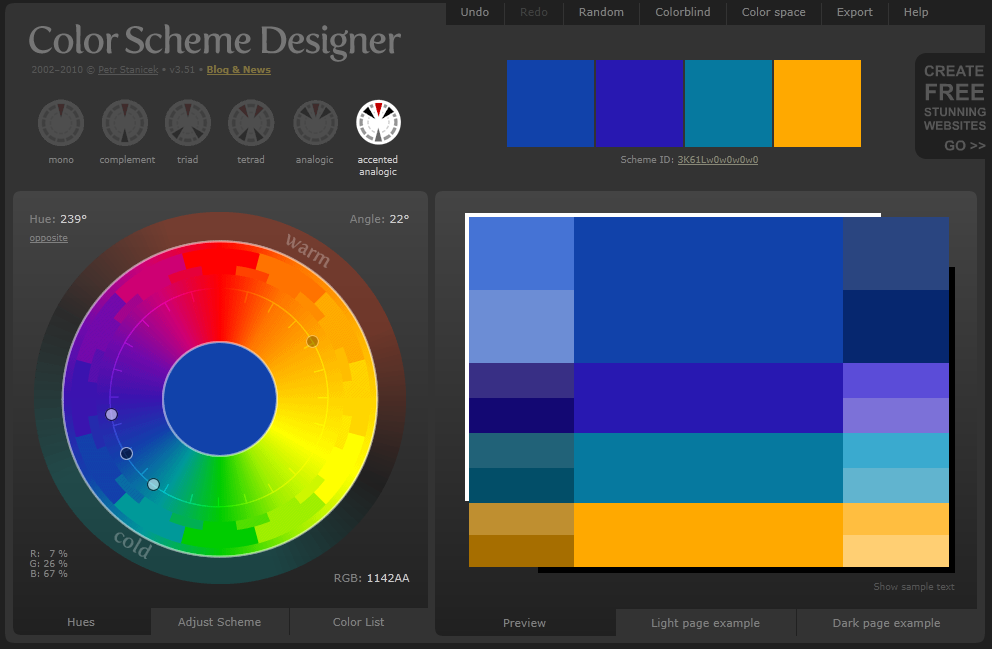
Very useful indeed.

How to upload a .wsp solution in SharePoint 2010
Have you ever gotten a .SharePoint 2010 wsp file and thought “Now what?”. Well there are two ways to do this. You can upload the .wsp to the solution gallary within the site collection and the create a sub-site based on the .wsp. The videos below shows this technique.
You can also create an entire site collection based on the .wsp. The video below shows this technique.
SharePoint 2013 Technical Preview Development Environment
Just a straight copy from the original post here http://blogs.msdn.com/b/uksharepoint/archive/2012/10/05/sharepoint-2013-technical-preview-development-environment-dependencies-versions-downloads.aspx?utm_source=feedburner&utm_medium=feed&utm_campaign=Feed%3A+UkSharepoint+%28UK+SharePoint+Team+Blog%29
I have worked with various incarnations of pre-release software installed on development machines. Getting the right combination of tools and versions isn’t very straightforward. If you ever wondered which version of Windows Server 2012, Visual Studio 2012, Office Developer Tools and other Add-ons to install (and from where) read on.
Release Previews
- Windows Server 2012 Release Candidate
- Visual Studio Ultimate 2012 RC
- July 2012 update from Visual Studio 2012 Preview
- Microsoft SharePoint Developer Tools for Visual Studio 2012 Preview
- (if you don’t have Internet connection on your Development machine to install via the Web Platform Installer, here are direct links):
- Windows Identity Foundation SDK
- Windows Identity Extensions (**Make sure you have Windows Identity Foundation installed which is a Windows Server 2012 Feature**)
- SharePoint Client Components
- Workflow Tools 1.0 Beta for Visual Studio 2012
- Workflow Client 1.0 Beta
- Microsoft SharePoint Developer Tools for Visual Studio 2012 Preview Bundle
- Microsoft Visual Studio Tools for Office 2012 Design Time – Preview
- Microsoft Visual Studio Tools for Applications 2012 – Preview
- SharePoint 2013 Preview SDK
RTMs
- Windows Server 2012 RTM Trial
- Visual Studio 2012 RTM Trial
- Microsoft SharePoint Developer Tools for Visual Studio 2012 RTM
- (if you don’t have Internet connection on your Development machine to install via the Web platform Installer, here are direct links)
- Windows Identity Foundation SDK
- Windows Identity Extensions (**Make sure you have Windows Identity Foundation installed which is a Windows Server 2012 Feature**)
- SharePoint Client Components
- Workflow Tools 1.0 Beta for Visual Studio 2012
- Workflow Client 1.0 Beta
- Microsoft SharePoint Developer Tools for Visual Studio 2012 Preview Bundle
- Microsoft Visual Studio Tools for Office 2012 Design Time – Preview for RTM
- Microsoft Visual Studio Tools for Applications 2012 Preview for RTM
- SharePoint 2013 Preview SDK
Cloud
- Sign Up for Office 365 Developer Preview Site and Install "Napa" Tools.
The obvious golden rule is not to mix RC and RTM versions of Windows Server, Visual Studio and SharePoint Developer Tools. Choose one and then stick to it. And please don’t underestimate the Cloud option. It is great if you want to try out the new Apps model and you are not that keen on setting up the Infrastructure, App domains or have enough HW to run VMs. Everything is set up for you in the cloud!

via Buzz Blog http://paulbuzzblog.wordpress.com/2012/10/08/sharepoint-2013-technical-preview-development-environment/
 Paul is a an expert SharePoint and Project Server developer and is responsible for designing and implementing custom solutions on client systems using the latest SharePoint and .NET technologies.
Paul has extensive experience with SharePoint systems across all sizes of implementation, ranging from small to large farms and has an excellent understanding of all the elements of SharePoint. This article has been cross posted from paulbuzzblog.wordpress.com (original article) |
SharePoint 2013 certifications
Not posted in a while and this is a very short post.
the post here http://jussionsharepoint.com/index.php/2012/09/14/the-definitive-guide-to-sharepoint-2013-certifications/
has an overview of some of the new exams for SharePoint 2013

via Buzz Blog http://paulbuzzblog.wordpress.com/2012/09/17/sharepoint-2013-certifications/
|
Paul is a an expert SharePoint and Project Server developer and is responsible for designing and implementing custom solutions on client systems using the latest SharePoint and .NET technologies.
Paul has extensive experience with SharePoint systems across all sizes of implementation, ranging from small to large farms and has an excellent understanding of all the elements of SharePoint. This article has been cross posted from paulbuzzblog.wordpress.com (original article) |
Error when accessing ServiceJobDefinitions.aspx page from Central Admin
So i went to manage a timer job and was presented with the following screen.

The ULS logs didn’t reveal too much information other than a nullreference exception.
There is however some more information in the widows application event log
There was an exception loading job definition "Microsoft.Office.Project.Server.Administration.ServerScheduledTimerJob" (id "48a2075b-37ac-4866-b498-997374621326"). Object reference not set to an instance of an object.

To fix the issue some PowerShell is needed to remove the job.
Run the following PowerShell script
$job = Get-SPTimerJob <guid of job>
$job.Delete()
The job definitions pages now loads 

via Buzz Blog http://paulbuzzblog.wordpress.com/2012/08/24/error-when-accessing-servicejobdefinitions-aspx-page-from-central-admin/
|
Paul is a an expert SharePoint and Project Server developer and is responsible for designing and implementing custom solutions on client systems using the latest SharePoint and .NET technologies.
Paul has extensive experience with SharePoint systems across all sizes of implementation, ranging from small to large farms and has an excellent understanding of all the elements of SharePoint. This article has been cross posted from paulbuzzblog.wordpress.com (original article) |

gantt charts in SSRS
This is just a quick post while I am in a meeting on how to create gantt charts within SSRS.
http://pnarayanaswamy.blogspot.co.uk/2010/09/range-bar-chart-gantt-chart-using-ssrs.html
I hope to expand on this post in the future with my own experiences.

via Buzz Blog http://paulbuzzblog.wordpress.com/2012/08/17/gantt-charts-in-ssrs/
|
Paul is a an expert SharePoint and Project Server developer and is responsible for designing and implementing custom solutions on client systems using the latest SharePoint and .NET technologies.
Paul has extensive experience with SharePoint systems across all sizes of implementation, ranging from small to large farms and has an excellent understanding of all the elements of SharePoint. This article has been cross posted from paulbuzzblog.wordpress.com (original article) |
Embedding PDF files with the Content Editor Web Part #SP2010 #SP2013 #MSProject
Whilst working on a proof of concept for a knowledge portal. We had the need to embed PDF documents into a web page and do some fancy jiggery pokery ™ around expanding the PDF view to full screen dynamically etc..
Anyway, along my travels I came across the query string API when referencing PDF documents for embedding purposes and figured it might useful for others as well. So without further ado…
Blog post on the Adobe site:
File Download: PDF Open Parameters
Just for my own reference:
After the file name start with a #, then each parameter uses an &.
My Personal Example:
Code Example:
To demonstrate this, I added a Content Editor Web Part with some code to show the PDF file inside an iFrame.
For the purposes of my client who wanted to see if the PDF would scale if we resized the screen, I then wrapped some jQuery around it to resize the div and iFrame.
Code Download
Options:
- http://example.org/doc.pdf#Chapter6
- http://example.org/doc.pdf#page=3
- http://example.org/doc.pdf#page=3&zoom=200,250,100
- http://example.org/doc.pdf#zoom=50
- http://example.org/doc.pdf#page=72&view=fitH,100
- http://example.org/doc.pdf#pagemode=none
- http://example.org/doc.pdf#pagemode=bookmarks&page=2
- http://example.org/doc.pdf#page=3&pagemode=thumbs
- http://example.org/doc.pdf#collab=DAVFDF@http://review_server/Collab/user1
- http://example.org/doc.pdf#page=1&comment=452fde0e-fd22-457c-84aa-2cf5bed5a349
- http://example.org/doc.pdf#fdf=http://example.org/doc.fdf
- Further examples from the documentation:
| Syntax | Description |
| nameddest=destination | Specifies a named destination in the PDF document. |
| page=pagenum | Specifies a numbered page in the document, using an integer value. The document’s first page has a pagenum value of 1. |
| comment=commentID | Specifies a comment on a given page in the PDF document. Use the page command before this command. For example:#page=1&comment=452fde0e-fd22-457c-84aa-2cf5bed5a349 |
| collab=setting | Sets the comment repository to be used to supply and store comments for the document. This overrides the default comment server for the review or the default preference. The setting is of the form store_type@location, where valid values for store_type are:lDAVFDF (WebDAV)lFSFDF (Network folder)lDB (ADBC)
For example: #collab=DAVFDF@http://review_server/Collab/user1 For more information on comment repositories, see Acrobat Online Collaboration: Setup and Administration. |
| zoom=scalezoom=scale,left,top | Sets the zoom and scroll factors, using float or integer values. For example, a scale value of 100 indicates a zoom value of 100%.Scroll values left and top are in a coordinate system where 0,0 represents the top left corner of the visible page, regardless of document rotation. |
| view=Fitview=FitHview=FitH,topview
=FitVview =FitV,leftview =FitBview =FitBHview =FitBH,topview =FitBVview=FitBV,left |
Set the view of the displayed page, using the keyword values defined in the PDF language specification. For more information, see the PDF Reference.Scroll values left and top are floats or integers in a coordinate system where 0,0 represents the top left corner of the visible page, regardless of document rotation.Use the page command before this command.Note:This parameter is not supported on the command line. |
| viewrect=left,top,wd,ht | Sets the view rectangle using float or integer values in a coordinate system where 0,0 represents the top left corner of the visible page, regardless of document rotation.Use the page command before this command.Note:This parameter is not supported on the command line. |
| pagemode
=bookmarkspagemode =thumbspagemode =none (default) |
Displays bookmarks or thumbnails. |
| scrollbar=1|0 | Turns scrollbars on or off. |
| search=wordList | Opens the Search panel and performs a search for any of the words in the specified word list. The first matching word is highlighted in the document.The words must be enclosed in quotation marks and separated by spaces. For example:#search=”word1 word2″You can search only for single words. You cannot search for a string of words. |
| toolbar=1|0 | Turns the toolbar on or off. |
| statusbar=1|0 | Turns the status bar on or off. |
| messages=1|0 | Turns the document message bar on or off. |
| navpanes=1|0 | Turns the navigation panes and tabs on or off. |
| highlight=lt,rt,top,btm | Highlights a specified rectangle on the displayed page. Use the page command before this command.The rectangle values are integers in a coordinate system where 0,0 represents the top left corner of the visible page, regardless of document rotation. |
| fdf=URL | Specifies an FDF file to populate form fields in the PDF file being opened. For example:#fdf=http://example.org/doc.fdfNote:The fdf parameter should be specified last in a URL. |
Project Server workspace ProjectUID filter web part
This is a great post containing a new filter web part that will send the projectGUID from a project server workspace to a web part.
http://epmsource.com/2011/10/09/projectuid-filter-provider-for-reporting-services-viewer-web-part/

via Buzz Blog http://paulbuzzblog.wordpress.com/2012/08/10/project-server-workspace-projectuid-filter-web-part/
|
Paul is a an expert SharePoint and Project Server developer and is responsible for designing and implementing custom solutions on client systems using the latest SharePoint and .NET technologies.
Paul has extensive experience with SharePoint systems across all sizes of implementation, ranging from small to large farms and has an excellent understanding of all the elements of SharePoint. This article has been cross posted from paulbuzzblog.wordpress.com (original article) |
Generate unique X and Y coordinates or grid references from a row number
I was creating an SSRS report and using a matrix table. I needed to be able to position data within each group by. To do this i needed create a X and Y number for each item where the 2 together would be unique.
This is an example of what i wanted
|
Row number |
x |
y |
|
1 |
0 |
1 |
|
2 |
0 |
2 |
|
3 |
0 |
3 |
|
4 |
1 |
1 |
|
5 |
1 |
2 |
|
6 |
1 |
3 |
|
7 |
2 |
1 |
|
8 |
2 |
2 |
|
9 |
2 |
3 |
And here is the SQL that creates it
SELECT  ROW_NUMBER() over (ORDER BY prj.ProjectName) as Row
            , ((ROW_NUMBER() over (ORDER BY prj.ProjectName)) - 1) / 3  as X
            ,  ((ROW_NUMBER() over (ORDER BY prj.ProjectName)) - 1) % 3  as   Y
This took a lot longer to work out that i care to admit. So hopefully someone else will find this useful
If you need more columns before the split then simply change the 3 to be what ever number you need.

via Buzz Blog http://paulbuzzblog.wordpress.com/2012/08/09/generate-unique-x-and-y-coordinates-or-grid-references-from-a-row-number/
|
Paul is a an expert SharePoint and Project Server developer and is responsible for designing and implementing custom solutions on client systems using the latest SharePoint and .NET technologies.
Paul has extensive experience with SharePoint systems across all sizes of implementation, ranging from small to large farms and has an excellent understanding of all the elements of SharePoint. This article has been cross posted from paulbuzzblog.wordpress.com (original article) |


 SharePoint (and Project Server) Shenanigans
You must be logged in to post a comment.