Home
> CPS Cross Post, EPM, Project Server, Project Server 2010, PS2010 > Showing/hiding items from the Gantt Chart
Showing/hiding items from the Gantt Chart
A useful little nugget about Microsoft Project that came in handy the other day is showing or hiding items from your Gantt chart. It’s as simple as this:
In Microsoft Project right-click in the Gantt Chart and select “Gridlines”:
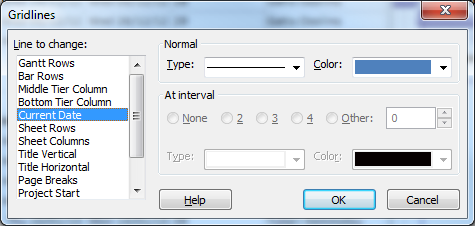
To show, for example the Current Date on your Gantt, select “Current Date” and change the line type from blank to any other line style. Change the colour if required, then click “OK”.
My example here is showing the Status Date as a red line, and the Current Date as a blue line:


Categories: CPS Cross Post, EPM, Project Server, Project Server 2010, PS2010
Comments (0)
Trackbacks (1)
Leave a comment
Trackback
-
January 10, 2013 at 09:19Showing/hiding items from the Gantt Chart « Joined Up Solutions


 SharePoint (and Project Server) Shenanigans