Archive
SharePoint 2013 on Windows Server 2012
There are quite a few articles about installing SharePoint 2013 on Windows Server 2012 around, but I thought I would share a real world experience.
Pretty much the first thing that the SharePoint 2013 Deployment Tool does during an install is try to add the Application and Web Server roles to Windows Server.
If your Windows 2012 Server has internet access then you should have no problems, but if your server does not have internet access then you will need a copy of the Windows server ISO and these instructions below as the server roles are now on demand with Windows Server 2012.
http://support.microsoft.com/kb/2765260
A couple of points to note, firstly there is a typo in the instructions for the Offline method.
This instruction
Add-WindowsFeature NET-WCF-HTTP-Activation45,NET-WCF-TCP-Activation45,NET-WCF-Pipe-Activation45-Source D:\Sources\sxs
should read
Add-WindowsFeature NET-WCF-HTTP-Activation45,NET-WCF-TCP-Activation45,NET-WCF-Pipe-Activation45 -Source D:\Sources\sxs
note the space before the –Source switch
secondly, the KB article states
Note Be aware that you can also copy the files locally or specify a UNC path where the installation files are stored.
We found that having the files copied locally or the ISO file mounted locally worked fine, but trying to run over a UNC path worked for the 1st set of features but failed for the 2nd set with a PowerShell error, as soon as we mounted the ISO locally the 2nd set worked fine.
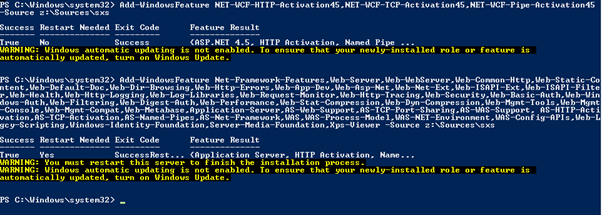
If your PowerShell works as it should, you will get a result as below.

SharePoint 2010 Workflow Issues
I was recently asked to help out a client who was having problems with standard Out Of the Box Approval workflow.

We checked the Farm and isolated the issue to one specific site collection, all other site collections were fine.
To resolve this we opened the site collection in SPD, open the All files section drilled into the _catalogs/wfpub folder, the folder for the Approval workflow was present but for some reason the wfconfig.xml file had been modified from the site definition (Shown by blue I symbol), once this file had been reset to the site definition workflows were working again.

Search in SharePoint 2013..increased functionality makes it simple!
Good article about search refiner improvement’s in SharePoint 2013

One of the search features introduced with SharePoint 2010 was the concept of search refiners and this really gave power to the users to filter and work with search results. This capability was surfaced as the Refiner Panel in the search results pages and was driven by metadata values assigned to the content. The benefit of this was that users can work with large results sets and narrow down the search results based on meaningful business criteria.
Out of the box, the standard refiners were based on metadata generated directly by SharePoint and users were not able to configure these to their liking. The types of refiners that would typically be made available include Result Type (the type of file such as a Microsoft Word or Microsoft Excel document), the Author of the piece of the document, the Modified data etc.


Whilst it was quite possible to add new refiners…
View original post 531 more words

SQL 2012 Quick pointers for SharePoint 2013 – SharePoint Community
Some good quick tips from SharePoint community site
http://sharepoint-community.net/m/blogpost?id=6614983%3ABlogPost%3A62150
Search Issues with SharePoint 2010
I was recently asked to take a look a SharePoint 2010 UAT server that was showing some very odd search behaviour. The rest of SharePoint was working fine but search results were only bringing back web pages, no other content was appearing in the search results.
We tried the normal trouble shooting steps such as clearing the config cache and resetting the search indexes but nothing seemed to help, we checked the crawl, event and ULS logs but nothing seemed to point to an problem.
We finally resorted to creating a new search application and adding to the default group. After running a full crawl we had a full set of results back as expected, the only step left was to move the existing crawl rules from the old search application to the new one.
After moving the crawl rules across from the original search application to the the new one the same result issues appeared, so it was obvious that one of the 10+ crawl rules in operation was causing the issue, we removed the rules one at time and reran a full crawl each time to check the results, we finally found the offending rule (below) with a URL exclusion of ‘http://*/forms’ , this seemed to have the effect of stopping the crawler component going into the hidden forms folder and crawling content via that route.


How to backup deployed solutions
Recently I had the need to backup all the solutions deployed to a test system before a code refresh, to achieve this I used the simple piece of PowerShell below.
$dirName = "C:\Solutions"
foreach ($solution in Get-SPSolution)
{
$filename = $Solution.SolutionFile.Name
$solution.SolutionFile.SaveAs("$dirName\$filename")
}
To run the PowerShell script simply create the folder c:\Solutions, or set another location in the script and run with Farm credentials or equivalent.
Happy SharePointing !
Fun with SharePoint CUs and Language Packs
I was recently involved with helping a client expand a 2010 farm by adding 2 more servers to an existing environment.
It should have have been a straight forward task to install the SP2010 binaries, Service Pack etc and join the new servers to the existing farm.
Checking the documentation for the existing farm I could that the following build was in use
SharePoint 2010 RTM & SP1 & Feb 2012 CU & June 2012 CU & Brazil Portuguese Language Pack & Language Pack SP1 & Office Web Apps.
I gathered all the media together and settled down for a day of watching the blue bar.
After all the installs I planned to run the Configuration Wizard up to the PassPhrase step to ensure the servers were ready to be joined at a later point.
Running the Configuration Wizard on one of the ‘New’ servers I was able to connect to the Configuration database but the Configuration Wizard was stopping at the Patch screen reporting a patch mismatch between the current farm servers and the new server.
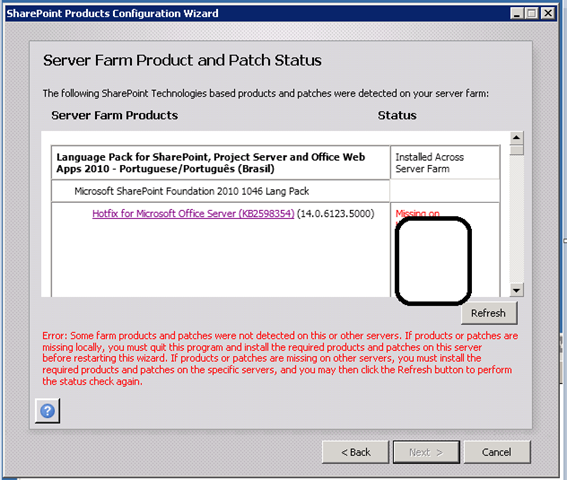
The Patch status was reporting that the June 2012 CU was not installed on any of the other servers, even thought it clearly was !.
After much head scratching and chatting to colleagues I was at bit of a loss as to what the issue could be, I was thinking about running a PsConfig b2b on one the ‘live’ servers, but decided to keep looking around and finally found a discrepancy in Control Panel –> Programs –> View Installed Updates, comparing the new server with one of the current servers I noticed a difference in the installed updates for the Language Pack, the ‘new’ server was showing 13 updates for the Language Pack compared to existing servers that were only showing 1


After another chat with one of my colleagues we established that in the current live environment the Language Pack had been installed after the June 2012 CU, where as when i built the ‘New’ servers I had installed the Language Pack before the CU, and as the CU’s are multilingual a number of extra Hotfixes had been installed.
The solution in this case was simply remove and reapply the Language Pack over the CU, now the new servers could be added to the current farm.

SP2010 Docs opening as Read-Only.
When you have been working with SharePoint for a while, you get a feeling for when an issue is with SharePoint and when its not, and you can generally tell which it is within a few minutes.
So when we started getting reports of users unable to edit documents or save edits back to SharePoint, I immediately though it’s just a single user or a faulty workstation, but when we started getting more and more reports I did begin to wonder it it was a SharePoint issue after all.
The symptoms seemed to be, a user could open a document from SharePoint, edit it and save the edits, but the all subsequent documents would open in [Read-Only] mode, without the normal “Edit Document” message bar appearing in the office client application.


To get back to normal functionality the user would have to close all browser sessions and relaunch, no amount of changing browser or office settings would return office to normal working.
Further investigations showed that almost all the workstations were running Windows 7 and Office 2010, but all had Lync 2013 installed, finally we we tried running an Office 2010 client repair from Windows Control Panel and bingo, normal document editing was resumed.
So once again not a true SharePoint issue, but as the presentation layer SharePoint normally gets the blame.
Happy SharePointing
Follow @NeilKing41
SharePoint 2010 AD update failing.
Getting the AD update feature working in SharePoint 2010 / 2013 can be a challenge as you need to ensure the the permissions you set on the synchronization account are exactly correct as per the following TechNet article.
http://technet.microsoft.com/en-us/library/hh296982#RDCchild
Even following these to the letter you can still come across problems as I recently discovered.
I was asked to take a look at client system where the AD update for the telephone number was failing, checking in SharePoint I could see that attribute was set to ‘Export’

but the Telephone number for a ‘Test User’ was not being set, checking in the FIM client tool we could see a permissions error for the object update.
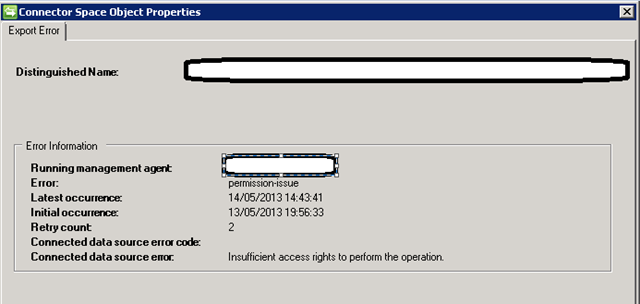
Rechecking the permissions that the AD sync account has showed that the update permission had been removed from the AD object and AD Inheritance had been removed.
After some serious investigation by a colleague ( Big Respect to Chris V ), we discovered an AD feature called “Protected Groups” whereby if you are a member of a specific AD group such as Administrators, Account Operators, Server Operators etc the following could happen.
http://support.microsoft.com/kb/817433
As soon as we tested the AD feature for a ‘normal’ user it worked as exactly as expected , so a nice little ‘feature’ to watch out for that is not documented from the SharePoint side.
Happy SharePointing
Follow @NeilKing41
Always look at the simple things first
Recently I was asked to take a look at SPD workflow on development system that was not sending emails.
Normally this works fine as it uses the standard emailing features of the SharePoint Platform, as long as the outgoing email settings are configured.
In this instance the outgoing email settings were correct for the environment in question, so a quick test I created an alert on a list, normally this would send an email straight away saying that an alert has been created but no email arrived.
If you have access to the server console the first test is to make sure you can ping your SMTP relay server, this will be the server you have referenced in your outgoing SMTP server configured in Central Administration.
If you can ping the server try using TelNet to connect on Port 25, if telnet times out and fails to connect then you probably have a firewall issue.
In this instance we were getting:

Which was an indication that the development server was not allowed to relay email via the SMTP server, as soon as we had the development server added to the allowed SMTP relay list we could connect via TelNet and send alerts and emails from SharePoint and development continued.
So always check the simple things 1st !


 SharePoint (and Project Server) Shenanigans
You must be logged in to post a comment.