Archive
Getting changed field values from SPItemEventReceiver
has written a very interesting looking helper function for getting old values out of events.


via Buzz Blog http://paulbuzzblog.wordpress.com/2012/11/26/getting-changed-field-values-from-spitemeventreceiver/
   Paul is a an expert SharePoint and Project Server developer and is responsible for designing and implementing custom solutions on client systems using the latest SharePoint and .NET technologies.
Paul has extensive experience with SharePoint systems across all sizes of implementation, ranging from small to large farms and has an excellent understanding of all the elements of SharePoint. This article has been cross posted from paulbuzzblog.wordpress.com (original article) |

Creating a Project Server 2013 App
The first in a series of posts about creating a Project Server app.
This will be interesting.

via Buzz Blog http://paulbuzzblog.wordpress.com/2012/11/26/creating-a-project-server-2013-app/
|
Paul is a an expert SharePoint and Project Server developer and is responsible for designing and implementing custom solutions on client systems using the latest SharePoint and .NET technologies.
Paul has extensive experience with SharePoint systems across all sizes of implementation, ranging from small to large farms and has an excellent understanding of all the elements of SharePoint. This article has been cross posted from paulbuzzblog.wordpress.com (original article) |
Technorati: YK3CCGWXYEC9
Service descriptions for SharePoint 2013
This post here http://modery.net/new-service-descriptions-for-office-365-wave-15/
has a list of all the services in SharePoint 2013 and what version they are available in.
The interesting one for me is that SSRS is available in the E3 and E4 Office 365 plans. Not seen anything about that and I am interested as to how it will work.

via Buzz Blog http://paulbuzzblog.wordpress.com/2012/11/26/service-descriptions-for-sharepoint-2013/
|
Paul is a an expert SharePoint and Project Server developer and is responsible for designing and implementing custom solutions on client systems using the latest SharePoint and .NET technologies.
Paul has extensive experience with SharePoint systems across all sizes of implementation, ranging from small to large farms and has an excellent understanding of all the elements of SharePoint. This article has been cross posted from paulbuzzblog.wordpress.com (original article) |
#ProjectServer 2010 #Excel Services Reports fail to Refresh #Office2013 #SP2010
 I am a Project Server and SharePoint consultant but my main focus currently is around Project Server.
I have been working with Project Server for nearly five years since 2007 for a Microsoft Gold Certified Partner in the UK, I have also been awared with the Microsoft Community Contributor Award 2011. I am also a certified Prince2 Practitioner. This article has been cross posted from pwmather.wordpress.com (original article) |
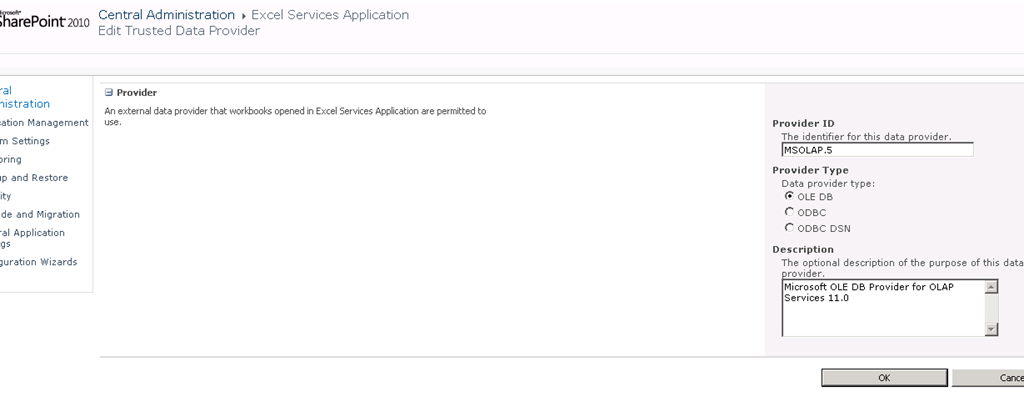
A quick post to highlight an issue you may face if you have upgraded to Office / Excel 2013. I recently created some Excel reports for Project Server 2010 using Excel 2013. These reports failed to refresh in Excel Services. After a quick check on the connection string in Excel, the provider is MSOLAP.5 rather than the usual MSOLAP.4 provider when using Excel 2010. See below
Excel 2010:

Excel 2013:

The ULS log error is:
The workbook ‘http://vm730:81/pwa/ProjectBICenter/Reports/Actual Work.xlsx’ attempted to access external data using the unsupported provider ‘Provider=MSOLAP.5
The fix is very simple, navigate to Central Admin > Manager Service Applications > Excel Services > Trusted Data Providers then add the MSOLAP.5 provider as below:


How to hide the SharePoint ribbon
Here is a quick post to show you how you can hide the SharePoint ribbon on a page using JavaScript. This was created by one of my colleagues so I am not sure of why the ribbon needed to be hidden but here is how.
function hideEditRibbon() {
           var ribbon = SP.Ribbon.PageManager.get_instance().get_ribbon();
           // Set the tab to the “Browse” tab
           SelectRibbonTab("Ribbon.Read", true);
           // Remove the “Edit” tab from a list from from the ribbon.
           ribbon.removeChild('Ribbon.ListForm.Edit');
     }

     SP.SOD.executeOrDelayUntilScriptLoaded(function() {

           var pm = SP.Ribbon.PageManager.get_instance();

           pm.add_ribbonInited(function() {
                hideEditRibbon();
           });

           var ribbon = null;
           try {
                ribbon = pm.get_ribbon();
           }
           catch (e) { }

           if (!ribbon) {
                if (typeof(_ribbonStartInit) == "function")
                      _ribbonStartInit(_ribbon.initialTabId, false, null);
           }
           else {
                hideEditRibbon();
           }
     },
     "sp.ribbon.js");
Just add this code to a page using the content editor web part and it will work.

via Buzz Blog http://paulbuzzblog.wordpress.com/2012/11/23/how-to-hide-the-sharepoint-ribbon/
|
Paul is a an expert SharePoint and Project Server developer and is responsible for designing and implementing custom solutions on client systems using the latest SharePoint and .NET technologies.
Paul has extensive experience with SharePoint systems across all sizes of implementation, ranging from small to large farms and has an excellent understanding of all the elements of SharePoint. This article has been cross posted from paulbuzzblog.wordpress.com (original article) |
Add the SharePoint Version Number to a Word Document
A client asked me today how he could insert the Version of a file stored in a Sharepoitn Library into a word 2010 document, my initial response was “use Quick Parts” but I tested and to my surprise it’s not showing in the list of QuickParts.
Nor in the column value “[Version]” can be used in a different column: the value is being saved only after the item is processed and therefore any calculated value will not take the change and display 0.
Thanks to those simple no-code steps by CodebyCody it’s a quick fix which gets you to start using Sharepoint Information Management Policy Settings. Enabling this label at a Content Type level for instance “Document” will fix all document library in one shot.

via François on Sharepoint http://sharepointfrancois.wordpress.com/2012/11/21/add-the-sharepoint-version-number-to-a-word-document/
 French native Sharepoint Consultant living in London. A crossway between a designer, developer and system architect. Prefers stretching the limit of out-of-the-box features rather than breaking them into code. When not working with Microsoft Sharepoint François is often found on Web2.0 News sites and related social networking tools.
This article has been cross posted from sharepointfrancois.wordpress.com/ (original article) |
#SharePoint Conference 2012 Opening Keynote #SP2013 #PS2013 #MSProject #ProjectServer
Just a quick email to say that the Opening Keynote from the SharePoint Conference 2012 is now available online.
SPD 2010 Workflow Form Error
While working on a migration project recently, we had reason to republish the OOTB Approval workflow to update the owner.
After this update we found that the OOTB Approval Workflow would not submit anymore.

After much head-scratching and googling I came across this social thread that covers the fault in some detail, the issue is caused by having KB2553322 installed on the PC with SPD2010 installed, as soon as we removed the patch and republished the workflow normal service was resumed.

#ProjectServer and #SharePoint 2010 October 2012 Cumulative Update #PS2010 #SP2010 #MSProject
|
I am a Project Server and SharePoint consultant but my main focus currently is around Project Server.
I have been working with Project Server for nearly five years since 2007 for a Microsoft Gold Certified Partner in the UK, I have also been awared with the Microsoft Community Contributor Award 2011. I am also a certified Prince2 Practitioner. This article has been cross posted from pwmather.wordpress.com (original article) |
The Office 2010 October 2012 Cumulative Updates are now available, please see the links below:
http://support.microsoft.com/kb/2757117
Project Server 2010 Server Roll up package October 2012 CU (Recommended) – delayed for a couple of weeks:
http://support.microsoft.com/kb/2687565
Project Server 2010 October 2012 CU (Included in the Server Roll up package):
http://support.microsoft.com/kb/2687615
Project 2010 October 2012 CU:
http://support.microsoft.com/kb/2687612
Remember SP1 is a pre-requisite for the October 2012 CUs.
For more details please see:
http://blogs.technet.com/b/projectadministration/archive/2012/11/05/microsoft-project-server-and-sharepoint-server-2007-and-2010-october-2012-cu-announcement.aspx
As always, test these updates on a test environment before deploying to production


Quick Powershell to delete all items in my Sharepoint list
A quick post with a simple script I gathered a while back that comes in handy for data cleansing before releasing a site:
– how to delete the 100s of items in my list without doing it from the web interface (limited to the maximum displayed in a view)
Use the #powershell script below.
Warning: do this at your own risk, don’t get the wrong site/list or you will regret it 
<strong>
</strong> # script starts here…</div>
<div>[System.Reflection.Assembly]::Load(“Microsoft.SharePoint, Version=12.0.0.0, Culture=neutral, PublicKeyToken=71e9bce111e9429c”) | out-null
$oContentService = [Microsoft.SharePoint.Administration.SPWebService]::ContentService;
[Microsoft.SharePoint.Administration.SPWebApplicationCollection]$waColl = $oContentService.WebApplications;
$siteUrl = “http://SharepointSite”
$webName = “”
$spSite = new-object Microsoft.SharePoint.SPSite($siteurl)
$spWeb = $spSite.OpenWeb($webName)
$spList = $spWeb.Lists["List Name"]
foreach ($item in $spList.items)
{
$deaditem=$splist.GetItemById($item.ID)
$deaditem.Delete()
}</div>
<div>

via François on Sharepoint http://sharepointfrancois.wordpress.com/2012/10/31/quick-powershell-to-delete-all-items-in-my-sharepoint-list/
|
French native Sharepoint Consultant living in London. A crossway between a designer, developer and system architect. Prefers stretching the limit of out-of-the-box features rather than breaking them into code. When not working with Microsoft Sharepoint François is often found on Web2.0 News sites and related social networking tools.
This article has been cross posted from sharepointfrancois.wordpress.com/ (original article) |


 SharePoint (and Project Server) Shenanigans
You must be logged in to post a comment.