Archive
#MSPC12 Experiences Day One and the CPS presentations #PC324 #PC301
I’m sitting in my hotel room right now totally buzzing from the day I have just experienced at the Microsoft Project Conference 2012.
A whole host of emotions and states have run through from nerves and waking up at 3am this morning to joy and more academic interest in the sessions that I have attended today.
Nerves? you may ask. Well you see today was my first ever presentation to an audience at a conference! Now I am a consultant by trade and do presentations at clients all the time.
We even run seminars, where I am backed by sales people and colleagues from my company.
But this is different. This is the Microsoft Project Conference!
It runs every three years. I have been preparing for months with dry run after dry run. Presentation tweaks left, right and centre.
So how did it go you may be wondering… Well I will come to that later…
Initially there was breakfast…
Phil, Sacha, Chris and myself sitting in the conference centre wearing our speaker shirts feeling tense about our mission ahead.
Philip Stanbury-Jones (ARM)

Giles Hamson (CPS)

The Keynote
First up was the Microsoft Project Conference key note.
DJ at the beginning of the session really brining the vibe of the conference build up to a head.
Discussions about the focus areas of SharePoint and Project Server 2010 including an excellent demo involving Project Server 2010, Portfolio Management, Windows 8 (On a Samsung slate), MS Project 2010, iPhones in one seamless demo!
Videos on successful implementations at Revlon
Further details can be found on Chris Crane’s blog post (link) and for the time being the Microsoft News Center has links to case studies, videos etc… here:

Presentations I attended
So after the keynote all 1,200 attendees of the conference filtered to their chosen sessions. My chosen sessions were:
- EPM@EPA: Accelerating Maturity in the Cloud – Richard Warren (U.S. Environmental Protection Agency)
- Practical TFS and Project Server integration in mid size enterprise – Piotr Prussak, Richard Ng (Revlon)
Both excellent presentations and case studies of real world applications of core Project Server functionality with integration of other key Microsoft technologies such as Report Services, Private Cloud Technologies with Project Hosts and Visual Studio 2010 – Team Foundation Server.
Then at 15:15
Both presentations sponsored by my company, Corporate Project Solutions started: Philip Stanbury-Jones
8 Billion Reasons Why ARM Chose Project Server 2010 (#PC301)
A good attendance and well received presentation detailing the project I have been working on for the last 2 years integrating Project Server 2010, SharePoint Server 2010 and Reporting Services 2008 R2 with other LOB applications such as SAP and other internal tools.
This presentation discussed the business benefits of the approach taken.

#PC301 feedback on Twitter
Giles Hamson
Integration SharePoint and Project Server 2010 – Deployment Approaches, Integration Options and Making the Most of the Enterprise Features (#PC324)
As for my session… attendance was excellent, audience appeared to be engaged with questions throughout the session and lots of questions at the end.
I was so excited, I had to take a picture…

#PC324 Audience
The session, related to Phil’s presentation, discusses a more high level view on deployment approaches, pros and cons, some gotchas and examples of Enterprise features to really leverage the power of the SharePoint and Project Server 2010 platform.

Many of these experiences were learnt on implementing the solution discussed in Phil’s presentation, so I urge you to seek you the details at the MS Project Conference 2010 website.
The Wrap Up
So to finish the day, we attended the ClubPC event for networking, socialising and generally calming down from the excitement of the sessions before a group of us split off to eat at the prestigious Hyatt revolving restaurant.

Excellent food, great company.

#MSPC12 Experiences–Day Zero #MSProject #ProjectServer #PC301 #PC324
So I am sitting here in the Conference on the 1st day of the event and it has been so busy that this is the first chance I have had to write about my experiences.
Now this is the first conference I have been to where Microsoft Project and Project Server is the primary subject matter and of course I am here on behalf of my company (CPS).
You may be wondering what I mean by: Day Zero.
Well as part of being a Microsoft Partner with a Gold Competency in Project and Portfolio Management and one of the leading PPM partners in the UK we get involved in the various Microsoft meetings etc… One of which is a partner appreciation pre-day to get everyone deep into Project Server together to discuss key ideas and network.
Community Recognition
Now I have been running this blog for a while now (October 2010 if I recall), but I am also a consultant by trade, so I am busy all the time and never quite know the impact of what I am putting out into the world.
Sure there are comments and I help a few peeps. I can see daily stats which look fairly healthy, but to truly know whether you are connecting to the community; coming to an event like the Microsoft Project Conference 2012 has really hit it home that I am reaching my intended audience.
Face to face:
I walk into the partner pre-day and grab a coffee before the session starts and Andrew Lewinsky (UMT) comes up to me and says “Giles, nice to meet you, I’m …”.
Now I have never met or spoken to him in my life, but I of course know who he is. Project MVP, works for UMT and most importantly the author of the white paper Reporting with Project Server 2010.
Not only am I recognised, but so is my company and other fellow blogger colleagues also: “Is Paul Mather here also, he keeps beating me to the punch on the MSDN forums, but his responses are sooooo good…”
Another highlight is being recognised by Christophe Fiessinger, including being mentioned in his presentation:

Christophe on stage discussing the importance of community

Focusing on the importance of PowerShell (post by Paul Mather)
Now I won’t go into the details of the Partner Appreciation Day but I would like to thank the Microsoft Project team including Jan Kalis and Christophe Fiessinger for all the arrangements, it was a useful day which I took a lot from.
I will create further posts with my further experiences of the conference with myself, Sacha Cohn (@sachacohn), Chris Pond (@ccpond) and my client Philip Stanbury-Jones including an update on how Phil and my presentations go today.
Presentations start at 15:15:
- Philip Stanbury-Jones – 8 Billion Reasons Why ARM Chose Project Server 2010 (#PC301)
- Giles Hamson – Integration SharePoint and Project Server 2010 – Deployment Approaches, Integration Options and Making the Most of the Enterprise Features (#PC324)
If you are reading this from the conference and see me, come and introduce yourself 
Have fun!

Why you should use a SQL Alias with SharePoint
Recently I was asked to take a look at a SharePoint 2007 system that was having a few problems after an IP readdressing project.
The 2007 Farm was stretched across 2 domain, the main farm was working fine after the readdressing, but one server in the 2nd domain was having problems connecting to SQL.
When trying to connect to a web application hosted in the 2nd domain we were getting the ever helpful “An unexpected error has occurred” message in the browser.
The ULS Logs were full of database connection errors, but we could ping the database server okay, we could TELNET to port 1433 okay. We had all the firewalls checked for dropped packets but could not see an faults.
After many hours of checking and rechecking we decided to re-run the SharePoint Config Wizard, which timed out and failed but left these entries in the PCDiagnostic log file.
03/13/2012 12:11:44 1 INF Found a v3 confidb in the registry. configdb SharePoint_Config, server xx.xx.xx.xx
…
03/13/2012 12:12:14 1 INF Calling SPFarm.Local and SPServer.Local to get the local farm objects
03/13/2012 12:23:24 1 INF SPFarm.Local returned null. This usually means that the server is not joined. But, you can delete a server from the configdb without unjoining, which would mean that this machine still thinks it is joined.
…
03/13/2012 12:23:24 1 ERR Discovered a v3 connection string and SPFarm.Local indicates that this machine is not joined. Therefore we failed to determine if we were joined to a server farm.
This finally shed some light onto the problem, the IP highlighted above was the previous address of the SQL server, not its new address, or its name, so we checked the registry and found that the dsn for the SharePoint SQL server has the SQL servers previous IP address, as soon as we updated this to the SQL servers name SharePoint sprang into life.
[HKEY_LOCAL_MACHINE\SOFTWARE\Microsoft\Shared Tools\Web Server Extensions\12.0\Secure\ConfigDB]
"dsn"="Data Source=xx.xx.xx.xx;Initial Catalog=SharePoint_Config;Integrated Security=True;Enlist=False;Connect Timeout=300"
"Id"="4990697d-8893-43f4-8422-206622797eaa"

#SP2010 and #PS2010 versions and the associated KB articles #SharePoint #ProjectServer #in
Following on from my colleagues post on finding the SharePoint Build Version via PowerShell (Link), I would just like to draw your attention to a list of SharePoint / Project Server versions that I maintain.
Links to the KB articles are also available along with the build version and the Cumulative Update / Service Pack that they are associated with.
How to access:
In the top menu of the site:

Screenshot:

I know that other people maintain similar lists, this is just my way of keeping on top of the versions for SharePoint and in particular Project Server.
Hopefully this is useful for others also.
Enjoy!

Project Conference 2012 Sessions List in Excel! #MSPC12 #PC324 #PC301 #in #MSProject #ProjectServer
So I am sitting here this evening announcing my new Windows Phone 7 app and starting to look at the sessions in the Project Conference myself, my colleagues (Chris Pond @ccpond, Sacha Cohn (webcast session) and my client (Philip Stanbury-Jones – ARM #PC301) are going to in just over a weeks time.
I have ended up collating this spread sheet with links to all the twitter feeds for use during the conference.
Hopefully others will find it useful also, You can download the spread sheet here:

Or you can view it online here:

Enjoy!

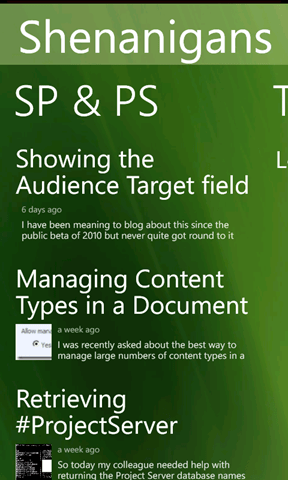
Announcing the Shenanigans #WP7 app #SharePoint #SP2010 #PS2010 #ProjectServer #PS2010 #in
It has been about 6 months since I created the first mobile application for this website and now finally an app is available for the most suitable platform for the subject matter of this blog.
Announcing: Shenanigans for Windows Phone 7
|
|
|


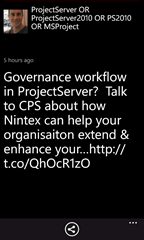
All the key features from the previous applications are available for WP7 including:
- SharePoint (and Project Server) Shenanigan feeds
- Twitter feeds for SharePoint and Project Server
- You Tube Videos
- Podcasts
- and more…
- I hope you enjoy and stay tuned for updates

Screenshots:
 |
  |
 |
  |

Finding a SharePoint Farm build version
At some point you will need to know the build version of your SharePoint 2010 system, this might be for patching, feature checking or even raising a ticket with Microsoft.
In the world of SharePoint 2007 you could get the build number from any site collection administration page, (not really, that’s the content database schema build number, if you have a 2007 farm and the build number changes between site collections then some of your content db’s have not been updated and you need to rerun the config wizard)
In the world of 2010, build versions are now displayed in Central Administration under Upgrade and Patch Management > Check Product and Patch Installation Status.

You are then presented with a list of the installed components in your farm and their installed version and install status, from this list you will look for the highest install version number, and that will be your build, Service Pack or CU number depending on your patch status.
There is also a neat little link at the top of the page that will take you to the SharePoint 2010 updates page.

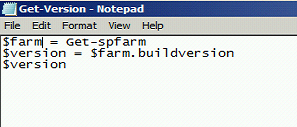
but there is also a neat way to get the same information from Power Shell with 3 simple lines
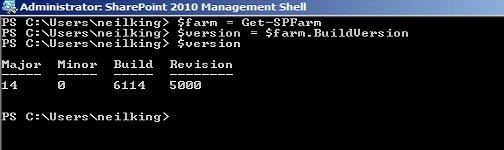
Simply open the SharePoint 2010 Management Shell and type the 3 lines as above, to simplify matters even further you can put the 3 lines into a notepad file, save this with a .ps1 extension in your documents folder and you call it directly from within Power Shell.
In this example I called the script Get-Version.ps1, then I can call it directly from PowerShell
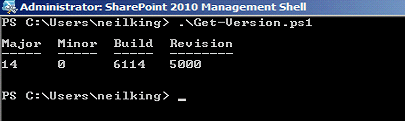
Simple.

Showing the Audience Target field in an EditModePanel #SharePoint #SP2010 #in #ProjectServer #PS2010
I have been meaning to blog about this since the public beta of 2010 but never quite got round to it until now!
I was reminded of the functionality we implemented for a client recently that allowed the Audience Target field to appear in the Edit Mode Panel of a Publishing page layout.
You would think that it would be easier, but after lots of digging around we finally found a solution.
Firstly in the Page Layout we need to register a new reference at the top of the page:
<%@ Register
   TagPrefix="OfficeWebControls"
   Namespace="Microsoft.Office.Server.WebControls.FieldTypes"
   Assembly="Microsoft.Office.Server.UserProfiles, Version=14.0.0.0, Culture=neutral, PublicKeyToken=71e9bce111e9429c"
%>
With this new reference in place we can now implement the field in a standard EditModePanel way like so:
<PublishingWebControls:EditModePanel runat="server" PageDisplayMode="Edit">
   <table>
      <tr>
         <td>
            <span>
               Use if you wish to ‘push’ this content to a particular
               audience select here. Leaving it blank will make it
               available to all site users.
            </span>
            <br />
            <OfficeWebControls:SPFieldTargetToControl
               ID="Audience"
               runat="server"
               FieldName="Audience"
            />
         </td>
      </tr>
   </table>
</PublishingWebControls:EditModePanel>
Have fun!
Retrieving #ProjectServer database names from the URL #in #PS2010
So today my colleague needed help with returning the Project Server database names from PowerShell.
The usual process occurs here within CPS in this scenario, email to the whole team asking the question and this results in a variety of response from the sensible to the ridiculous to achieve the end goal.
The sensible suggestions is as follows:
PowerShell:
Get-SPProjectWebInstance
Example Output:


Documenting a SharePoint Farm
Anyone involved with the building / running / supporting of a SharePoint system will know how important documenting the original build configuration is.
If you build farms using the excellent AutoSPIntaller, then most of your work is already done as you have to plan things like your service accounts and database names for the inputs.xml file.
But what if you are called into look at a system that you know nothing about ?. in this case the equally excellent SPSFarmReport will come to your help.
The download zip file has versions for both WSS 3.0 / MOSS (32 & 64 bit) and SharePoint Foundation / SP2010 / Project Server 2010.
Once downloaded onto one of your servers with the binaries installed, simply run the appropriate executable under Farm account credentials, once ran you can delete the executable if needed.
The report output file is a nicely formatted HTML document that covers just about every single aspect of your farm configuration, this can be used to create your documentation guide, and as a timed snapshot of your configuration for future comparison.


 SharePoint (and Project Server) Shenanigans
You must be logged in to post a comment.