The moral of this story is…

A nice and quick post on one of my experiences at a client.
This client was having problems with their SharePoint & Project Server 2010 environment. All resources in Project Server where not able to click on Timesheets without the following error coming up:

Now the environment itself was not up to date with updates only running SharePoint 2010 SP1 with the August 2010 CU. Before I could troubleshoot the problem I wanted to get the environment to a decent service level. I chose the December CU of 2012 as it mentioned an issue solved that is very similar to the issue my client is experiencing.
Now I wanted to install the CU and got the following error:

I had troubles understanding why this happens until I came across a statement that said the entire environment needs to have at least SP1. Since my last visit the client had installed a language pack which I didn’t know off and the client did not update the languague pack to SP1. To solve my issues I downloaded and installed service pack 1 for the language pack. Then I was able to run the SharePoint & Project Server 2010 December 2012 CU.
Luckily for me the SharePoint & Project Server 2010 December 2012 CU solved the issue of the view of the timesheet not being able to load. Getting the environment updated and solving the issue is like killing two birds with one stone yeah me!
So the moral of this story is: When installing new components to your SharePoint & Project Server farm always make sure you’ve installed the correct version with the correct updates this also includes language packs!
The next time I am getting the error “The expected version of the product was not found on the system” I will know where to look first.
That is it for me see you next time.


via SpeakingSilent » Robin Kruithof http://speakingsilent.wordpress.com/2013/01/14/the-moral-of-this-story-is/
   I am Robin Kruithof. I am working at CXS in the Netherlands as a Microsoft Project Consultant. My passion lies in Project Management and everything in the Project Management domain.
This article has been cross posted from speakingsilent.wordpress.com/ (original article) |

Showing/hiding items from the Gantt Chart
A useful little nugget about Microsoft Project that came in handy the other day is showing or hiding items from your Gantt chart. It’s as simple as this:
In Microsoft Project right-click in the Gantt Chart and select “Gridlines”:
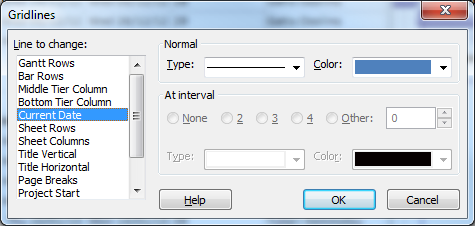
To show, for example the Current Date on your Gantt, select “Current Date” and change the line type from blank to any other line style. Change the colour if required, then click “OK”.
My example here is showing the Status Date as a red line, and the Current Date as a blue line:


#SharePoint Integration Mode and no Data Driven Subscriptions #SP2013 #SP2010 #SSRS
Just come back after the New Year and was posed with an interesting problem.
SharePoint 2010, SSRS in integration mode but under the manage subscriptions link within a report, the Add Data Driven Subscription button was missing from the screen.
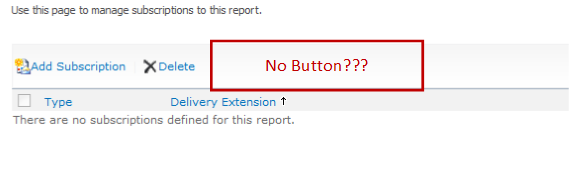
So after some googling / binging around, I found that the answer was because we were using SQL Server 2008 Standard and Data Driver Subscriptions require the Enterprise version of SQL Server.
Anyway, just a quick post in case I forget in future. Useful links below:
- SSRS Feature Support – Integration Mode: http://msdn.microsoft.com/en-us/library/bb326290(v=sql.100).aspx
- How to use Data Driven Subscriptions within SharePoint: http://blogs.devhorizon.com/reza/2008/10/26/ssrsdata-driven-subscriptions-in-integrated-mode-part-1/
- Required versions for Data Driven Subscription support: http://msdn.microsoft.com/en-us/library/ms159150(v=sql.100).aspx
Although in this scenario I am talking about SQL Server 2008, the same is true of SQL Server 2008 R2. In SQL Server 2012, Enterprise or Business Intelligence editions are required:

The365project

Just a small announcement.
Not so long ago the blog the365project launched. This blog has been created to provide tips around SharePoint, Project and Project Server. These tips are provided by MVP’s and all kind of members of the community including me.
Every few days a new tip will be posted. There is already a lot of useful tips on there that you can take advantage of. So go take a look if you are interested http://the365project.net/


via SpeakingSilent » Robin Kruithof http://speakingsilent.wordpress.com/2013/01/03/the365project/
|
I am Robin Kruithof. I am working at CXS in the Netherlands as a Microsoft Project Consultant. My passion lies in Project Management and everything in the Project Management domain.
This article has been cross posted from speakingsilent.wordpress.com/ (original article) |

Preconfigured #ProjectServer solution – Project Server Plus from CPS #PS2010 #PS2013 #SP2013 #Office2013
 I am a Project Server and SharePoint consultant but my main focus currently is around Project Server.
I have been working with Project Server for nearly five years since 2007 for a Microsoft Gold Certified Partner in the UK, I have also been awared with the Microsoft Community Contributor Award 2011. I am also a certified Prince2 Practitioner. This article has been cross posted from pwmather.wordpress.com (original article) |
Just a quick post to highlight a product from CPS, Project Server Plus. This is a quick start preconfigured Project Server solution includes best practice fields and lookup tables, Views, RAG calculations and indicators, many great dashboards / reports and an enhanced Project Site template – all out of the box.
For details see:
http://www.cps.co.uk/What-We-Do/Pages/Project-Server-Plus.aspx


Traffic light indicators for schedule
One query that we receive a lot from our clients is about setting up automatic traffic light (or RAG) indicators for their project schedule. This is a very well documented request, but a recent client wanted a slight variation – the project schedule indicator to have its tolerance based on a percentage, instead of a hard-coded value. The following formula solves this issue:
IIf([Baseline Duration]=0,"No Baseline",
Switch([Baseline Start]=ProjDateValue(‘NA’) Or [Baseline Finish]=ProjDateValue(‘NA’),"No baseline",
[Duration Variance]<=0,"On schedule",
[Duration]/[Minutes per day]>([Tolerance for schedule in percent]/100)+([Baseline Duration]/[Minutes Per Day]),"Outside tolerance",
[Duration]/[Minutes per day]<=([Tolerance for schedule in percent]/100)+([Baseline Duration]/[Minutes Per Day]),"Within tolerance"
))
This is for the task schedule RAG, and will return values based on a number field called “Tolerance for schedule in Percent” to indicate whether the task duration has increased beyond its allowed tolerance.
You will also need to set up RAG graphical indicators for this field as well, with the following values, as per the screenshot below:
No baseline = Question Mark
On schedule = Green
Within tolerance = Amber
Outside tolerance = Red

Of course, your indicators could be different to those that I have chosen, as well as the text. Just make sure to update the formula if you want to change the returned text.
Hopefully this will shorten your chin-scratching time when attempting to do something similar!
Lester

SharePoint Timer Job Servers
Recently, while helping out a client, they asked a question about timer jobs running on their Farm.
The client in question has a large farm with multiple servers, web applications and content databases and was concerned about multiple servers appearing to run the same timer jobs on the same web application at different times.
If you have a web application with multiple content databases, or a farm with multiple servers it will be completely normal to see the servers running timer jobs changing, you can try to override this behaviour by setting a preferred timer server in Central Administration for a content database even thought this setting doesn’t even seem to be mentioned in TechNet.
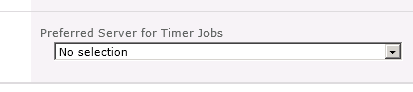
As each content database can have a different server assigned to run its timer jobs on of the ways to determine this is to have a look in SQL at contentDB in the TimerLock table
In SharePoint 2007 the actual timer server name was in the contentDB, but in 2010 this was changed to a GUID that represented the object, so you have to join the contentDB to the ConfigDB, the following SQL allows you tell which server currently has the timer lock for a contentDB.
select a.lockedby, b.name
from <contentdb_Name>.dbo.TimerLock a inner join SharePoint_Config.dbo.Objects b
on a.lockedby = b.Id
Happy SharePointing in 2013
Follow @NeilKing41
2012 in review
Well it is the end of the year and whilst I am on holiday at Surfside, Texas (near Houston), I have been reflecting on the past year for the blog. During this time, WordPress kindly shared the annual report for the blog and we have had a very successful year. You can see all the glorious details below…
I would personally also like to take the time to thank you all for taking interest in the site, happy holidays to all new and existing authors and I can assure you that in the companies we work at, 2013 based projects for clients and internally are well under way, so expect lots more posts from all the authors as we find more interesting tidbits on SharePoint, Project Server, Office 365 and Project Online + anything else of relevance.
We are also starting to look at more thought piece posts in the coming year on project management as well as other relevant subjects, so stay tuned and we will bring you lots more content.
As always, if you have suggestions, questions or comments, get in contact and we actively encourage new authors to come on board either as the occasional guest author or something more that can add value to the community.
I hope everyone has had a wonderful Christmas and I look forward to interacting with you all in the new year.
So… Without further ado…
The WordPress.com stats helper monkeys prepared a 2012 annual report for this blog.

Here’s an excerpt:
19,000 people fit into the new Barclays Center to see Jay-Z perform. This blog was viewed about 130,000 times in 2012. If it were a concert at the Barclays Center, it would take about 7 sold-out performances for that many people to see it.

England, Project Server 2013 and learning

Before I begin I hope everyone had a great Christmas and I wish you all a great 2013!
A lot of great things will happen in 2013. SharePoint & Project Server 2013 are out and I will be playing around with that and off course Project Online the cloud version of Project Server is on the horizon. Happy times I would say.
Now in December I had the pleasure of going to England to our Partner/Colleagues Corporate Project Solutions. The purpose of this visit to play and learn everything I could within three weeks of Project Server 2013. I want to take this opportunity to thank everyone at CPS for this great experience. It was a honor to work with such a talented bunch of people.
So what did I learn?
I tried to learn as much as I can on some of the below topics:
- Installing Project Server 2013.
- Configuring new Exchange features (Task aggregation and Out of Office Sync)
- ADFS and Office365 integration (Interesting topic with the coming of Project Online)
- The new Project Server SharePoint Permission Model
- The Transition from SharePoint Task List to Enterprise Projects
- New Timesheet enhancements
Off course I did a lot more but these are the highlights. I’ll will blog about all these subjects as soon as I get around to it to give some more insight in the installation and new features.
In this post Ill talk a little about my experience when installing Project Server 2013.
One of the first things I started with at CPS was the installation of Project Server 2013. If you are familiar with the installation of SharePoint and Project Server 2010 you quickly realize that the core installation process of SharePoint 2013 and Project Server 2013 is almost identical.
So I won’t bore you with that except one note. I was building my environment on Windows Server 2012 and SQL Server 2012. Strangely you still need to install the SQL Server Native Client 2008 and SQL Server 2008 ASAMO10 for the cube to build successfully.
So what else?
Well there are some small changes like when you provision a Project Web App by default it will have the SharePoint Security Model. (I’ll talk about this model in a different post.) It can be turned back to the Project Server classic mode but only via PowerShell.
Project Server Mode (Classic)
Set-SPProjectPermissionMode –URL http://servername/pwa -AdministratorAccount domain\accountname -Mode ProjectServer
And if you wish back to SharePoint Mode. Note: Switching between SharePoint permission mode and Project Server permission mode deletes all security related settings.
SharePoint Mode
Set-SPProjectPermissionMode –URL htt://servername/pwa –AdministratorAccount domain\accountname –Mode SharePoint
With the coming of Project Online Microsoft has chosen to move some of the web functionality from the server setting to SharePoint Central Administration.

General Queue Settings also have been moved from PWA Server settings to the Project Server Service Application.

Is this it?
Well from what I learned these are the most notable. Off course there are some other additions but those are more SharePoint related then Project Server.
This is it for now in my next post I’ll talk about the new SharePoint permission model.
As for now I am done, again I wish you a good 2013 see you next year!


via SpeakingSilent » Robin Kruithof http://speakingsilent.wordpress.com/2012/12/31/england-project-server-2013-and-learning/
|
I am Robin Kruithof. I am working at CXS in the Netherlands as a Microsoft Project Consultant. My passion lies in Project Management and everything in the Project Management domain.
This article has been cross posted from speakingsilent.wordpress.com/ (original article) |

#ProjectServer and #SharePoint 2010 December 2012 Cumulative Update #PS2010 #SP2010 #MSProject
|
I am a Project Server and SharePoint consultant but my main focus currently is around Project Server.
I have been working with Project Server for nearly five years since 2007 for a Microsoft Gold Certified Partner in the UK, I have also been awared with the Microsoft Community Contributor Award 2011. I am also a certified Prince2 Practitioner. This article has been cross posted from pwmather.wordpress.com (original article) |
The Office 2010 December 2012 Cumulative Updates are now available, please see the links below:
http://support.microsoft.com/kb/2789671
Project Server 2010 Server Roll up package December 2012 CU (Recommended) – delayed:
http://support.microsoft.com/kb/2596956
Project Server 2010 December 2012 CU (Included in the Server Roll up package):
http://support.microsoft.com/kb/2553504
Project 2010 December 2012 CU:
http://support.microsoft.com/kb/2553188
Remember SP1 is a pre-requisite for the December 2012 CUs.
For more details please see:
http://blogs.technet.com/b/projectsupport/archive/2012/12/19/microsoft-project-server-and-sharepoint-server-2007-and-2010-december-2012-cu-announcement.aspx
As always, test these updates on a replica test environment before deploying to production


 SharePoint (and Project Server) Shenanigans
You must be logged in to post a comment.