Windows 7 Feature Comparisons
I know this post is a bit off topic, but on a personal note we had a laptop die and we were deciding whether to go with a fully fledged laptop or a netbook, since my partners needs are simply email, Facebook and Microsoft Office functionality.
Battery life was also a key consideration, as well as being small and light.
So a netbook seemed like the obvious choice, but the nerd in me just has a niggley feeling that they are just too underpowered for that occasional YouTube visit etc…
So on to the web for some research and came across this useful table about Windows 7 editions and some of the key differences.
| Windows 7 Starter (limited distribution) | Windows 7 Home Basic (emerging market only) | Windows 7 Home Premium | Windows 7 Professional | Windows 7 Enterprise and Ultimate | |
| Broad application and device compatibility with up to three concurrent applications. | Yes | Yes | Yes | Yes | Yes |
| Safe, reliable, and supported. | Yes | Yes | Yes | Yes | Yes |
| Home Group makes it easy to share media, documents and printers across multiple PCs in offices without a domain. | Yes | Yes | Yes | Yes | Yes |
| Improved taskbar and JumpLists | Yes | Yes | Yes | Yes | Yes |
| Live thumbnail previews and enhanced visual experience. | Yes | Yes | Yes | Yes | |
| Advanced networking support (ad-hoc wireless networks and Internet connection sharing). | Yes | Yes | Yes | Yes | |
| Mobility Center is included. | Yes | Yes | Yes | Yes | |
| Aero Glass and advanced windows navigation. | Yes | Yes | Yes | ||
| Easy networking and sharing across all your PCs and devices. | Yes | Yes | Yes | ||
| Windows Media Center | Yes | Yes | Yes | ||
| Improved media format support, enhancements to Windows Media Center and media streaming, including Play To. | Yes | Yes | Yes | ||
| Multi-touch and improved handwriting recognition. | Yes | Yes | Yes | ||
| Domain Join enables simple and secure server networking. | Yes | Yes | |||
| Encrypting File System protects data with advanced network backup. | Yes | Yes | |||
| Location Aware Printing helps find the right printer when moving between the office and home. | Yes | Yes | |||
| Remote Desktop Host | Yes | Yes | |||
| BitLocker prevent loss or theft of data. | Yes | ||||
| BitLocker To Go protects data on removable devices. | Yes | ||||
| DirectAccess links users to corporate resources from the road without a virtual private network (VPN). | Yes | ||||
| BranchCache makes if faster to open files and Web pages from a branch office. | Yes | ||||
| AppLocker easily restricts unauthorized software and enables greater security. | Yes | ||||
| MUI multiple languages support. | Yes | ||||
| Boot from VHD disk image. | Yes | ||||
| Maximum running applications | Unlimited | Unlimited | Unlimited | Unlimited |
Original Source: http://www.mydigitallife.info/windows-7-editions-features-comparison/
Microsoft Windows 7 Edition Comparison (Click the feature comparison tab): http://windows.microsoft.com/en-US/windows7/products/compare
In the end we decided to go with a middle ground laptop (Acer Aspire One) with Windows 7 Home Premium pre-installed, but it was certainly interesting to know what the different Windows products offer.
I think working for a Gold Partner we get a little spoilt by the latest and greatest, therefore these things can often get overlooked.
Anyway, off to start the day… till the next time.

Check all #SharePoint lists and libraries for specified column type in a site collection #SP2010 #PS2010 #ProjectServer #PowerShell
   I am a Project Server and SharePoint consultant but my main focus currently is around Project Server.
I have been working with Project Server for nearly five years since 2007 for a Microsoft Gold Certified Partner in the UK, I have also been awared with the Microsoft Community Contributor Award 2011. I am also a certified Prince2 Practitioner. This article has been cross posted from pwmather.wordpress.com (original article) |
Recently we were carrying out an internal review of our SharePoint 2010 intranet system at CPS and needed to see where the BCS applications were used in the site collection on all sites. Rather than clicking on the list or library settings for each list / library to check for the External Data type on the column settings, I wrote a simple PowerShell script to check this.
The script is available from the Microsoft Script Center below:
http://gallery.technet.microsoft.com/scriptcenter/Check-all-lists-for-8689d3a9
To run the script, update the $siteCollection variable with the correct site collection URL and specify the column type, in our case this was External Data.
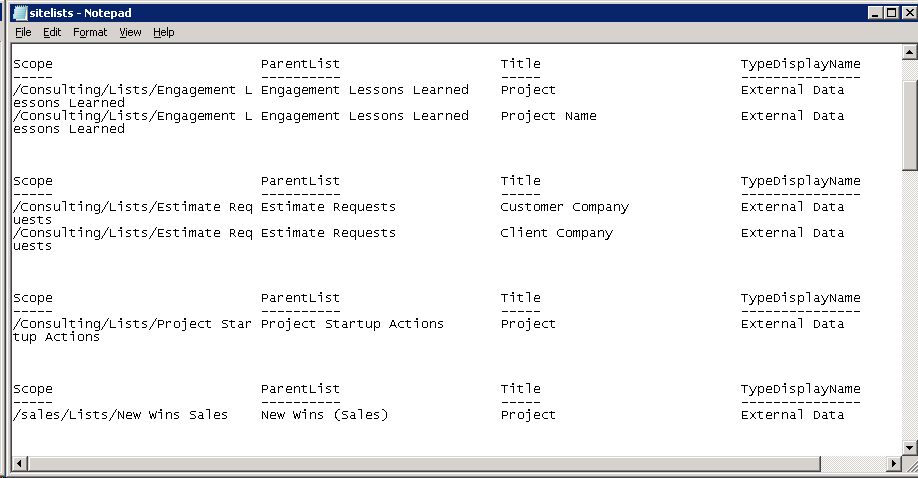
Once executed, the script will output the data to a text file called sitelists.txt. An example output can be seen below:


Hardware Load Balancing #AAM’s and a few other bits of fun.
On a recent client site we installed a 4 server SharePoint 2010 farm using normal HTTP and Kerberos authentication, the client wanted to use SSL as well.
For this particular install we had the opportunity to use a CISCO ACE (Application Control Engine) appliance to perform the Load balancing http://www.cisco.com/en/US/prod/collateral/contnetw/ps5719/ps7027/Data_Sheet_Cisco_ACE_4710.html
A couple of the features we used on the ACE were Hardware SSL Termination and Acceleration and HTTP to HTTPS translation. This allow us to run HTTPS traffic to and from the Load Balancer and HTTP from the load balancer to the farm.
This worked out really well we didn’t need to worry about SSL certificates or Ports on the SharePoint servers, the ACE takes care of all that.
The only extra item we needed to configure in SharePoint were the AAM’s for the Web Apps we had created.
Our testing showed the some of the normal SharePoint functions coming from Core.js stopped working, things like the ECB menu for a document stopped appearing on a client over SSL but worked okay on the servers behind the ACE, to resolve this we added some AAMs for the default zone for http to https and https to https.

A good CICSO article is here
As we were wrapping up this project a couple of other little jobs were taken care of
Open PDF’s in the Browser.
By default in SP2010 PDF’s no longer open in the browser, the user is prompted to download the file before opening. To resolve this we added the PDF Application type to the AllowedInlineDownloadMimeType list with a small piece of PowerShell
$webApp = Get-SPWebApplication("http://webappurl")
$webApp.AllowedInlineDownloadedMimeTypes.Add("application/pdf")
$webApp.Update()
As this setting is per webapp you may have to run more than once
An excellent article explaining why you use the method above is here.
The local farm is not accessible. Cmdlets with FeatureDependencyId are not registered
The error above really bugs me!, even if you are a Farm and Server Admin, the SharePoint management shell still wont play nicely due to you not having the SharePoint_Shell_Access role on the config database.

Some folk would have you go and change the permissions directly on the db via SQL Management Studio, but personally I think the best way is to use the Add-SPShellAdmin Cmdlet, you will have to logon as the Farm Account then delegate the permission to yourself or who ever the chosen admin is.
Darrin Bishop has an excellent write up of the steps needed here
Happy SharePointing.
Follow @NeilKing41
Testing a new #ProjectServer project site template #PS2010 #MSProject #EPM #SP2010 #SharePoint
|
I am a Project Server and SharePoint consultant but my main focus currently is around Project Server.
I have been working with Project Server for nearly five years since 2007 for a Microsoft Gold Certified Partner in the UK, I have also been awared with the Microsoft Community Contributor Award 2011. I am also a certified Prince2 Practitioner. This article has been cross posted from pwmather.wordpress.com (original article) |
If you are not aware already, deleting or modifying the default lists and fields in Project Server 2007 and Project Server 2010 can break some default functionality on Project Server. For example updating the Issue and Risk Status field choices, particular the “(1) Active” value will prevent the active Issues and Risks displaying in the Reminders web part on the PWA homepage. Other changes can cause the Reporting WSS sync job to fail in the Project Server queue which causes the WSS Project Sites data not to be current in the Reporting database and OLAP Cube. If you do have any of these issues I did write about a fix around a year ago now, this can be found here: http://pwmather.wordpress.com/2011/06/20/project-server-2010-project-site-default-fields/
Below is a useful set of tests that can be used to test a new Project Server 2010 project site to confirm the default functionality with Project Server still works:
· Create a test project with a few tasks and a project site
· Check you can create a new Issue, set the status to Active and assign to a Project Manager account that has access to the Project Site
· Return to PWA homepage using the Project Manager account and ensure you see 1 active issue assigned
· Click on the new Issue and make sure all links function correctly and you can see the Issue on the Project Site
· Check you can create a new Risk, set the status to Active and assign to a Project Manager account that has access to the Project Site
· Return to PWA homepage using the Project Manager account and ensure you see 1 active risk assigned
· Click on the new Risk and make sure all links function correctly and you can see the Risk on the Project Site
· Edit an Issue and link it to a Project task
· Return to PWA Project Centre, does the Issue indicator appear
· View the Project Details page, does the Issue indicator appear next to the task
· Edit a Risk and link it to a Project task
· Return to PWA Project Centre, does the Risk indicator appear
· View the Project Details page, does the Risk indicator appear next to the task
· Can you upload a document
· Edit a Project Document and link it to a Project task
· Return to PWA Project Centre, does the Document indicator appear
· View the Project Details page, does the Document indicator appear next to the task
· Publish the Project Plan
· Check Reporting job is successful in the Project Server queue
· Build the Project Server OLAP Cube, create a report based on the OlapProjectSharePoint template and confirm the issues and risks appear
· Open the IssuesandRisks sample report and confirm the issues and risks appear
· Check you can delete workspace for the test project
· Check can create a new workspace for the test Project
· Publish the Project Plan
· Check the workspace synchronisation is successful – no errors in the queue
To test other functions in Project Server 2010, take a look at this TechNet link:
http://technet.microsoft.com/en-us/library/gg502592.aspx


TechEd Europe 2012 Day Two #TEE12
I know TechEd Europe 2012 is over now and unfortunately it is only now that I have had a chance to recount my adventures of day two.
Day two for me was unfortunately my last day due to work commitments. It was however the day of my presentation on Integrating SharePoint and Project Server 2010.
 |
 |
 |
First of all, the sessions:
Keynote
The focus of the keynote on day two was around Windows 8. Now I know that Windows 8 has been available in its preview form for a long time now and we have seen it on tablets with the Samsung Series 7 Slate:

However, I have installed it in a VM and tried it out and felt the desktop experience was somewhat lacking. This is only based on initial trials and I hadn’t done any research into shortcuts etc. So it was just my initial impression.
I have to say though, after watching the keynote, I was pleasantly surprised. The ease of use for touch and mouse / keyboard interfaces is actually very good but is somewhat hidden from initial impressions and I can totally see that I will be using Windows 8 with ease in future.
As part of the keynote, they demonstrated Tablet use, Mouse / Keyboard use and even multi-touch aware touch pads on laptops. It is clear that a lot of thought has been put into this interface and more importantly every demonstration in this keynote was live, using the release preview of the software.
Then they demonstrated Windows To Go, which is a new feature of Windows 8 allowing you to run the OS and anything installed from a USB drive.
Once again a live demo which worked first time without issues and then whilst running the OS and demonstrating the solution he pulled the USB stick out:
And within 60 seconds, if you put the USB stick back in, the OS and the applications just keep running, totally amazing!!!
Can you imagine using your new Microsoft Surface tablet with all your sales demos and POC machines booting from the USB (perhaps a bit aspirational, but still… it sounds possible)
Anyway… on to the sessions… I only really had time for one session:
BI Semantic Models: Multi-dimensional vs. Tabular
Now I am have been using the BI tool part of the SharePoint for a very long time and recently my projects has started to become more involved in the backend infrastructure of the data and the way it is stored and accessed.
This is particularly useful when you consider the newer BI technologies such as PerformancePoint (not that new I know), PowerPivot (a bit newer) and PowerView (cutting edge) which rely upon either Analysis Service cubes and PowerPivot cubes.
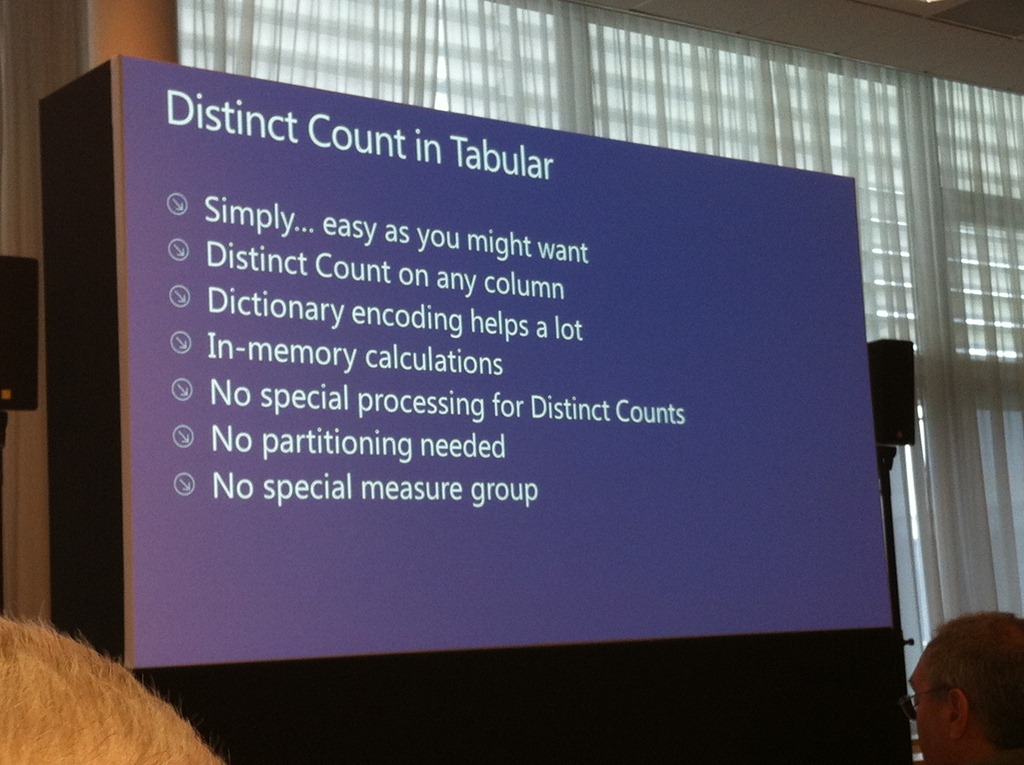
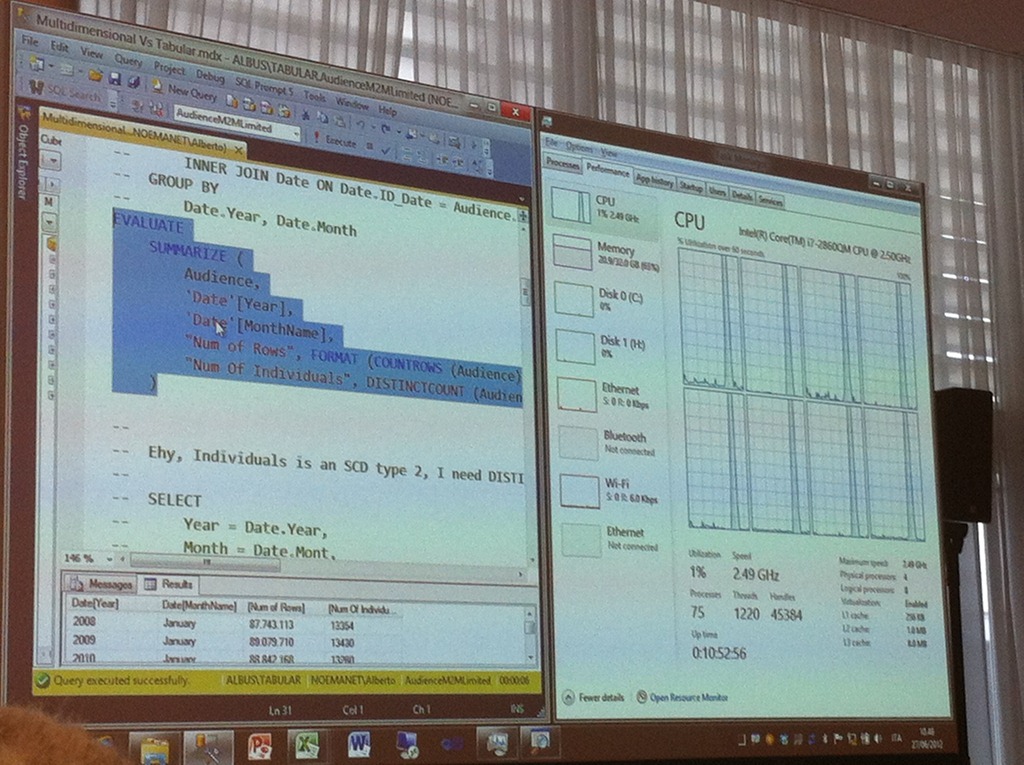
The tabular approach is new by comparison and uses DACS rather than MDX to query and process the data.
The session discussed the differences and which is more performed better under different scenarios.
The presenters were excellent and clearly knew this stuff inside out!
 |
 |
 |
The session can be viewed here:
http://channel9.msdn.com/Events/TechEd/Europe/2012/DBI319
After the session, I caught up on emails and work and then straight into my session:
Integrating SharePoint and Project Server 2010
Essentially a slightly cut down version of my original presentation at the Microsoft Project Conference 2012 (which is available here: http://www.microsoft.com/en-us/showcase/details.aspx?uuid=06fff348-8836-497b-a5eb-b5ed63a3b6c9)
The presentation went well and I even had my groupies in the form of Robin Kruithof (CXS – who has just started his blog here) and Barbara Henhapl (Project MVP – Austria).

 |
 |
 |
I was also honoured to have Christophe Fiessinger in the audience too.
And that was it for me, I said my goodbyes to all the colleagues and people I networked with and headed back to the airport for the flight home (and work the next day…)

#ProjectServer and #SharePoint 2010 June 2012 Cumulative Update #PS2010 #SP2010 #MSProject
|
I am a Project Server and SharePoint consultant but my main focus currently is around Project Server.
I have been working with Project Server for nearly five years since 2007 for a Microsoft Gold Certified Partner in the UK, I have also been awared with the Microsoft Community Contributor Award 2011. I am also a certified Prince2 Practitioner. This article has been cross posted from pwmather.wordpress.com (original article) |
The Office 2010 June 2012 Cumulative Updates are now available, please see the links below:
http://support.microsoft.com/kb/2712235
Project Server 2010 Server Roll up package June 2012 CU (Recommended):
http://support.microsoft.com/kb/2598355
Project Server 2010 June 2012 CU (Included in the Server Roll up package):
http://support.microsoft.com/kb/2598375
Project 2010 June 2012 CU:
http://support.microsoft.com/kb/2598351
For more details please see: http://blogs.technet.com/b/projectadministration/archive/2012/06/29/microsoft-project-server-and-sharepoint-server-2007-and-2010-june-2012-cu-announcement.aspx
As always, test these updates on a test environment before deploying to production


SharePoint never say “It won’t take long”
SharePoint – why is nothing ever quick ?
Recently I had to help out a client who was trying to restore a single piece of content from a backup. We had a backup copy of the content-db and the client also had a recovery farm we could use, so this shouldn’t have taken long.
The backup was over 200 GB, so the 1st problem was to find enough space on the DR farm to recover the content db, once we had enough space the backup was restored to SQL and we attached the content db to the recovery farm, but the Current Number of Sites, was 0, very odd…
I ran a couple of SQL queries on the content db to get some information about its content,
http://devdotnotes.wordpress.com/2012/01/27/common-sql-queries-for-sharepoint-content-database/
but SharePoint refused to show me any content, so we detached and reattached, moved to another Web-app and reattached but nothing appeared, and no errors were reported from the UI.
I took a look a the ULS logs, which was showing nothing, just the headings. An IIS reset and restart of the Tracing service kicked the ULS logs into action and we tried the reattach again, now we were getting errors in the ULS log.
The site named <Site Collection Name> and with id bc229270-86b6-4606-832e-a38c0e71058d was found in the content database <database name> in the database server <SQL Server Name>. However, the following error was reported while adding a mapping to this site to the configuration database. Operation is not valid due to the current state of the object.
Followed by
System.Data.SqlClient.SqlException: Violation of PRIMARY KEY constraint ‘PK_SiteMap’. Cannot insert duplicate key in object ‘dbo.SiteMap’. The statement has been terminated
This DR farm had all sorts of other Web Apps and content db’s attached, but I finally worked that another copy of the same db with a different name as attached to one of the other Web Apps, once that was detached we could attach our db, find the site, get the content out and make the client and end user happy 
Another day in the wonderful world of SharePoint !
Follow @NeilKing41
Deleting the #SharePoint Training Kit site
So you have had your SharePoint environment installed for a while and you installed the SharePoint Training Kit as a site for end users to get used to the idea of lists, libraries, check in / out etc… but you are a couple of years into your implementation now and you want to clean up sites that aren’t being used anymore.

The SharePoint Training Kit site hasn’t had usage for a while (you can see this from your analytic stats) and you make the decision to get rid of it.
You attempt to delete and you get the following message:
Cannot delete the training web site becasue you are not authorized or other training site depends on this site. at
Microsoft.SharePoint.Library.SPRequestInternalClass.DeleteWeb(String bstrUrl)
at Microsoft.SharePoint.Library.SPRequest.DeleteWeb(String bstrUrl)
Well thanks to this blog post, there is a nice step by step guide:
http://blogs.msdn.com/b/ekraus/archive/2008/05/22/sharepoint-training-kit-cannot-delete-site.aspx
Just for my own reference, I will place the steps to resolve here:
The deactivate event in the feature receiver is restricting the DeleteWeb call. To get past this, remove the two assemblies that are installed in the GAC when you ran the install:
- Micrososft.SharePointTrainingKit.dll
- Microsoft.SharePointTraining.Features.dll
1. Browse to %WINDIR%\assembly
2. Find the assembly, Right click > Uninstall
- Run IISRESET
- You should now be able to delete the three subwebs, and finally the top level web.
Note: To add the DLLs back into the GAC:
1. Browse to the install location of the Training Kit (typically C:\Program Files\Microsoft Office SharePoint Server 2007 Training)
2. Copy the MossTraining.wsp file and past in the same folder (name is not important)
3. Change the copied *.wsp file’s extension to *.cab
4. Double click on the *.cab file to open it up in an explorer window
5. Find the two assemblies mentioned above, right click > Copy
6. Browse back up one level and paste them into your install folder
7. Open a new explorer window and browse to %WINDIR%\assembly
8. DRAG the assemblies into the assembly folder (copy & paste will not work)
- Run IISRESET
Thanks Eric Kraus, this could have been a nightmare to debug without your blog 

Move a #SharePoint 2010 sub site to a different location on the same farm #SP2010 #PS2010 #PowerShell
|
I am a Project Server and SharePoint consultant but my main focus currently is around Project Server.
I have been working with Project Server for nearly five years since 2007 for a Microsoft Gold Certified Partner in the UK, I have also been awared with the Microsoft Community Contributor Award 2011. I am also a certified Prince2 Practitioner. This article has been cross posted from pwmather.wordpress.com (original article) |
Recently a query came up on the Project Server forums asking how to move a SharePoint site from the PWA site collection to another site collection. Please note this was not a Project Site. For this question I created a simple PowerShell script that will export the site and import it into the specified location. Even though this example is for a site in the PWA site collection, it will work for a site in any SharePoint 2010 site collection providing the same site templates, features etc. are available.
The script is available to download from the Microsoft Script Center:
http://gallery.technet.microsoft.com/scriptcenter/Move-a-SharePoint-2010-sub-f7774baa
Below is a walkthrough on using and executing the script.
Firstly download the script and set the variables:
# set variables
$exportfolder = "C:\Site exports" – Specify the folder to be created, this is where the export files will be created
$exportfile = "\site_export.cmp" – Specify the export file name
$exportsite = "http://vm353/PWA/PAULMATHERTESTSITE" – Specify the URL of the site that you want to move
$exportlocation = $exportfolder+$exportfile – This does not need to be updated
$importlocation = "http://vm353/PAULMATHERTESTSITE" – Specify the location where you want the site to be imported
The next part of the script gets the exported site’s template as this is needed to create the placeholder site later on:
#get export site’s template
$web = Get-SPWeb $exportsite
$webTemp = $web.WebTemplate
$webTempID = $web.Configuration
$webTemplate = "$webTemp#$webTempID"
$web.Dispose()
Worthing noting is that you need to use the Configuration property as the template ID rather than the WebTemplateID property as the WebTemplateID will always contain the original ID for the first template Microsoft created. For example a Team Site template ID is STS#0, but the WebTemplateID property for a Team Site will contain a 1, the Configuration property will contain the correct ID, in this case a 0.
The final part of the script is does the export and import, the comments above each line advise what that part of the script is doing.
#create export folder
$null = New-Item $exportfolder -type directory
#export site
Export-SPWeb $exportsite –Path $exportlocation -IncludeUserSecurity -IncludeVersions 4
Write-host "$exportsite has been exported to $exportlocation"
#create new site ready for import
$null = New-SPWeb $importlocation -Template "$webTemplate"
Write-host "$importlocation created ready for import"
#import site
Import-SPWeb $importlocation –Path $exportlocation -IncludeUserSecurity –UpdateVersions 2
Write-host "$exportsite has been imported to $importlocation" -foregroundcolor "Green"
Now lets have a walkthrough and move a site, in the example I have a Team site called “PAULMATHERTESTSITE” that is below the PWA site collection, I want to move this to the top level root site collection. For this example the variables above are correct. Open PowerShell on the Application server and navigate to the location of the ps1 file, in this case it is on my desktop:

Press Enter to execute the script:

A copy of the site should now exist in the new location.
As always, this script is provided as is with no warranties etc. use at your own risk and test on a test environment before using on a production environment.


#ProjectServer save from Project Professional failed #PS2010 #SP2010 #MSProject
|
I am a Project Server and SharePoint consultant but my main focus currently is around Project Server.
I have been working with Project Server for nearly five years since 2007 for a Microsoft Gold Certified Partner in the UK, I have also been awared with the Microsoft Community Contributor Award 2011. I am also a certified Prince2 Practitioner. This article has been cross posted from pwmather.wordpress.com (original article) |
Just a quick post as a reminder, I was recently at a client where projects failed to save to Project Server. The key error shown in Project Professional and in the Project Server queue was:
error id =”12005”
error= System.Data.SqlClient.SqlException: Execution of user code in the .Net Framework is disabled. Enable “clr enabled” configuration option
The error states the exact issue, CLR needed to be enabled on the SQL Server. The steps to enable CLR are documented here:
http://technet.microsoft.com/en-us/library/ee662108.aspx#section3


 SharePoint (and Project Server) Shenanigans
You must be logged in to post a comment.