Archive
Missing options in Central Admin #SharePoint 2013 #SP2013 #PS2013
   I am a Project Server and SharePoint consultant but my main focus currently is around Project Server.
I have been working with Project Server for nearly five years since 2007 for a Microsoft Gold Certified Partner in the UK, I have also been awared with the Microsoft Community Contributor Award 2011. I am also a certified Prince2 Practitioner. This article has been cross posted from pwmather.wordpress.com (original article) |
A quick post to highlight an issue that you might run into. Mange Services on Server link missing in Central Admin when running Internet Explorer on the App / Web Server? New Service Application button disabled?
Missing Manage Services on Server link:

New Service Application button disabled:

Run Central Admin as an Administrator and these options will be available. 


Getting changed field values from SPItemEventReceiver
has written a very interesting looking helper function for getting old values out of events.

via Buzz Blog http://paulbuzzblog.wordpress.com/2012/11/26/getting-changed-field-values-from-spitemeventreceiver/
 Paul is a an expert SharePoint and Project Server developer and is responsible for designing and implementing custom solutions on client systems using the latest SharePoint and .NET technologies.
Paul has extensive experience with SharePoint systems across all sizes of implementation, ranging from small to large farms and has an excellent understanding of all the elements of SharePoint. This article has been cross posted from paulbuzzblog.wordpress.com (original article) |

Creating a Project Server 2013 App
The first in a series of posts about creating a Project Server app.
This will be interesting.

via Buzz Blog http://paulbuzzblog.wordpress.com/2012/11/26/creating-a-project-server-2013-app/
|
Paul is a an expert SharePoint and Project Server developer and is responsible for designing and implementing custom solutions on client systems using the latest SharePoint and .NET technologies.
Paul has extensive experience with SharePoint systems across all sizes of implementation, ranging from small to large farms and has an excellent understanding of all the elements of SharePoint. This article has been cross posted from paulbuzzblog.wordpress.com (original article) |
Technorati: YK3CCGWXYEC9
Service descriptions for SharePoint 2013
This post here http://modery.net/new-service-descriptions-for-office-365-wave-15/
has a list of all the services in SharePoint 2013 and what version they are available in.
The interesting one for me is that SSRS is available in the E3 and E4 Office 365 plans. Not seen anything about that and I am interested as to how it will work.

via Buzz Blog http://paulbuzzblog.wordpress.com/2012/11/26/service-descriptions-for-sharepoint-2013/
|
Paul is a an expert SharePoint and Project Server developer and is responsible for designing and implementing custom solutions on client systems using the latest SharePoint and .NET technologies.
Paul has extensive experience with SharePoint systems across all sizes of implementation, ranging from small to large farms and has an excellent understanding of all the elements of SharePoint. This article has been cross posted from paulbuzzblog.wordpress.com (original article) |
#ProjectServer 2010 #Excel Services Reports fail to Refresh #Office2013 #SP2010
|
I am a Project Server and SharePoint consultant but my main focus currently is around Project Server.
I have been working with Project Server for nearly five years since 2007 for a Microsoft Gold Certified Partner in the UK, I have also been awared with the Microsoft Community Contributor Award 2011. I am also a certified Prince2 Practitioner. This article has been cross posted from pwmather.wordpress.com (original article) |
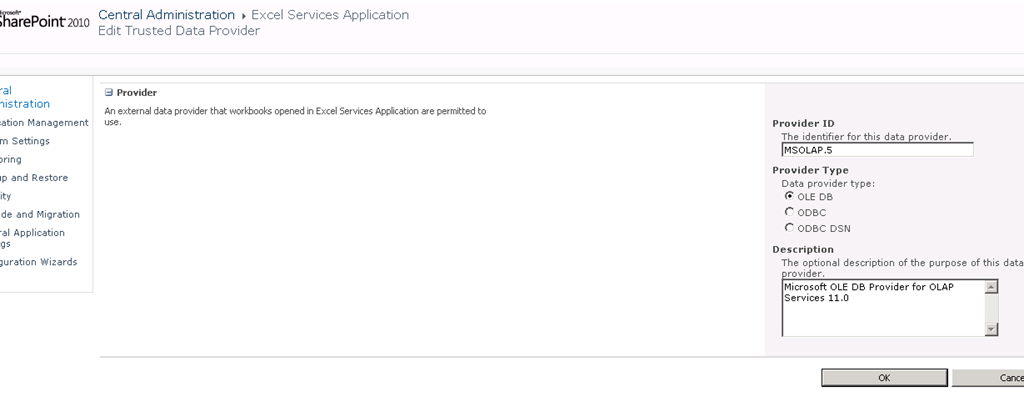
A quick post to highlight an issue you may face if you have upgraded to Office / Excel 2013. I recently created some Excel reports for Project Server 2010 using Excel 2013. These reports failed to refresh in Excel Services. After a quick check on the connection string in Excel, the provider is MSOLAP.5 rather than the usual MSOLAP.4 provider when using Excel 2010. See below
Excel 2010:

Excel 2013:

The ULS log error is:
The workbook ‘http://vm730:81/pwa/ProjectBICenter/Reports/Actual Work.xlsx’ attempted to access external data using the unsupported provider ‘Provider=MSOLAP.5
The fix is very simple, navigate to Central Admin > Manager Service Applications > Excel Services > Trusted Data Providers then add the MSOLAP.5 provider as below:


How to hide the SharePoint ribbon
Here is a quick post to show you how you can hide the SharePoint ribbon on a page using JavaScript. This was created by one of my colleagues so I am not sure of why the ribbon needed to be hidden but here is how.
function hideEditRibbon() {
           var ribbon = SP.Ribbon.PageManager.get_instance().get_ribbon();
           // Set the tab to the “Browse” tab
           SelectRibbonTab("Ribbon.Read", true);
           // Remove the “Edit” tab from a list from from the ribbon.
           ribbon.removeChild('Ribbon.ListForm.Edit');
     }

     SP.SOD.executeOrDelayUntilScriptLoaded(function() {

           var pm = SP.Ribbon.PageManager.get_instance();

           pm.add_ribbonInited(function() {
                hideEditRibbon();
           });

           var ribbon = null;
           try {
                ribbon = pm.get_ribbon();
           }
           catch (e) { }

           if (!ribbon) {
                if (typeof(_ribbonStartInit) == "function")
                      _ribbonStartInit(_ribbon.initialTabId, false, null);
           }
           else {
                hideEditRibbon();
           }
     },
     "sp.ribbon.js");
Just add this code to a page using the content editor web part and it will work.

via Buzz Blog http://paulbuzzblog.wordpress.com/2012/11/23/how-to-hide-the-sharepoint-ribbon/
|
Paul is a an expert SharePoint and Project Server developer and is responsible for designing and implementing custom solutions on client systems using the latest SharePoint and .NET technologies.
Paul has extensive experience with SharePoint systems across all sizes of implementation, ranging from small to large farms and has an excellent understanding of all the elements of SharePoint. This article has been cross posted from paulbuzzblog.wordpress.com (original article) |
#ProjectServer and #SharePoint 2010 October 2012 Cumulative Update #PS2010 #SP2010 #MSProject
|
I am a Project Server and SharePoint consultant but my main focus currently is around Project Server.
I have been working with Project Server for nearly five years since 2007 for a Microsoft Gold Certified Partner in the UK, I have also been awared with the Microsoft Community Contributor Award 2011. I am also a certified Prince2 Practitioner. This article has been cross posted from pwmather.wordpress.com (original article) |
The Office 2010 October 2012 Cumulative Updates are now available, please see the links below:
http://support.microsoft.com/kb/2757117
Project Server 2010 Server Roll up package October 2012 CU (Recommended) – delayed for a couple of weeks:
http://support.microsoft.com/kb/2687565
Project Server 2010 October 2012 CU (Included in the Server Roll up package):
http://support.microsoft.com/kb/2687615
Project 2010 October 2012 CU:
http://support.microsoft.com/kb/2687612
Remember SP1 is a pre-requisite for the October 2012 CUs.
For more details please see:
http://blogs.technet.com/b/projectadministration/archive/2012/11/05/microsoft-project-server-and-sharepoint-server-2007-and-2010-october-2012-cu-announcement.aspx
As always, test these updates on a test environment before deploying to production


Practice makes Perfect Part 8 – Customizing the Ribbon
 I have been working with Microsoft Project for a decent amount of time now and I go to a lot of clients during my Project Server implementations. One thing I noticed with the average Project Manager that they never use the feature to customize their ribbon. For the people that do not know what the ribbon is, it is the action bar where all the buttons reside in Office products.

While most buttons you use in Project are already present in the ribbon, they sometimes are not in the place you like them to be. It is my experience that when working on your project plan you mostly use the “Task” tab in your ribbon. What I like to do, is to add a few buttons I use on regular basis in the other tabs to have them in available in the “Task” tab.
Because I work with Project Server a lot I always like to have the “Publish” button in my ribbon, the same goes for the “Set Baseline”, “Entire Project” and “Team planner” buttons.
So how do you do this?
That is the easy part. Go to “File” and select “Options”. In the options menu you can find “Customize Ribbon” and “Quick Access Toolbar”. For this post I will only customize my ribbon.

When you selected the “Customize Ribbon” option you are able to add button to all tabs. Here we will customize the “Task” tab.

Expand the “Task” tab. Now I advise you to make a custom tab for the buttons you want to add. To do this click on “New Group”.


So that is the group. Now that we have our group lets populate it with the extra buttons we want shall we.

Select the button you want to add in my case that is “Publish” and press add. Now select other buttons you want and press ok. Go back to the tab you customized to see the result.

It is that easy. Above the result. Having these buttons all in the “Task” tab saves me the hassle to go the other tabs for them. Everything you need one click away.

via SpeakingSilent » Robin Kruithof http://speakingsilent.wordpress.com/2012/11/01/practice-makes-perfect-part-8-customizing-the-ribbon/
 I am Robin Kruithof. I am working at CXS in the Netherlands as a Microsoft Project Consultant. My passion lies in Project Management and everything in the Project Management domain.
This article has been cross posted from speakingsilent.wordpress.com/ (original article) |

Publish specified Projects in #ProjectServer using #PowerShell #MSProject #PS2010 #SP2010
|
I am a Project Server and SharePoint consultant but my main focus currently is around Project Server.
I have been working with Project Server for nearly five years since 2007 for a Microsoft Gold Certified Partner in the UK, I have also been awared with the Microsoft Community Contributor Award 2011. I am also a certified Prince2 Practitioner. This article has been cross posted from pwmather.wordpress.com (original article) |
There have been several requests for publishing projects listed in a text file, this follows on from my post / publish all projects script found below:
http://gallery.technet.microsoft.com/scriptcenter/Server-2010-Publish-all-45ba385b
This script allows you to specify a list of projects in a text, then only those projects will be sent for publishing. For the purpose of this post I have a text file called projectstobepub.txt that contains a list of my test projects to be published:

The PowerShell script will need to be updated to reference the text file containing the list of projects that you wish to publish and also update the Project Server PWA URL. Comments have been added in the screen shot below to show what lines need to to be updated:

The script has my test PWA instance URL as highlighted below:
New-WebServiceProxy -uri “http://vm353/pwatest/_vti_bin/PSI/Project.asmx?wsdl” –useDefaultCredential
The strikethrough text will need to be updated with the correct URL for your environment.
The script can be downloaded from the Script Center following the link below:
http://gallery.technet.microsoft.com/scriptcenter/Server-2010-Publish-537857d8
Once the script has been executed, the projects listed in the text file will be sent for publishing.
The script can either be executed on demand or set on a schedule using Windows Tasks Scheduler. Execute the script with an account that has access to the projects listed in the text file.


Second session new release of Microsoft Project
 After a vacation of both authors we are back and recharged and ready for whatever the last two months of 2012 can throw at us. Blogs will start popping up again in a sort of regular fashion. To start this of, I would like to announce that I am again giving a Dutch presentation at Microsoft in the Netherlands about the new release of Microsoft Project on the 1ste of November.
I am really pleased that I can do this again. I will be giving a overview on what is new in Project Professional 2013 and show you the cloud based version of Microsoft Project Server “Project Online” This session will give you a good overview of the new enhancements and features in the new release that will help anyone that works with Microsoft Project.
It is a free session so if you are interested you can sign up at the link below. Please keep in mind this session is in the Netherlands and will be given in Dutch.
First Look new release of Microsoft Project

Hope to see you there

via SpeakingSilent » Robin Kruithof http://speakingsilent.wordpress.com/2012/10/22/second-session-new-release-of-microsoft-project/
|
I am Robin Kruithof. I am working at CXS in the Netherlands as a Microsoft Project Consultant. My passion lies in Project Management and everything in the Project Management domain.
This article has been cross posted from speakingsilent.wordpress.com/ (original article) |


 SharePoint (and Project Server) Shenanigans
You must be logged in to post a comment.