Archive
#SharePoint Web Front-End HTTP 404 Response but no errors in the log #SP2010 #PS2010 #MSProject #ProjectServer #in
Recently we had to restore a content database from back up at a client. We were working on APP1 of a 2 WFE + Database configuration.
We followed the usual steps:
- Restore database into SQL Server from backup as a different name (<ServerName>_ContentDB_20111028)
- Log into Central Administration
- Go to Manage Content Databases
- Remove the existing Content Database
- Add the newly restored database (<ServerName>_ContentDB_20111028)
- Restart IIS (not required but just for good measure)
After doing this, APP1 worked find, but APP2 however kept giving the HTTP Response Error: 404.
We checked the usual places:
- ULS Logs
- Windows Event Logs
- IIS Logs
No other errors apart from the 404 Not Found error.
To try and force an error we went to some the standard SharePoint pages on the file system such as:
- /_layouts/settings.aspx
- /_layouts/create.aspx
This forced the following error to appear in the ULS logs:
- Unexpected System.NullReferenceException: Object reference not set to an instance of an object
A quick Google and the following came up:
The steps below are slightly modified from the one mentioned in the post but it ultimately resolved the issue:
- Stop the OWSTIMER service on the problem SharePoint WFE server in the farm.
- On the problem server, navigate to:
Server 2003 location: Drive:\Documents and Settings\All Users\Application Data\Microsoft\SharePoint\Config\GUID and delete all the XML files from the directory.
Server 2008 location: Drive:\ProgramData\Microsoft\SharePoint\Config\GUID and delete all the XML files from the directory. - Delete all the XML file in the directory. NOTE: ONLY THE XML FILES, NOT THE .INI FILE.
- Open the cache.ini with Notepad and reset the number to 1. Save and close the file.
- Start the OWSTIMER service on the server and wait for XML files to begin to reappear in the directory.
- IIS Reset (just for good measure)
Took us a good couple of hours to resolve this one, so hopefully it can help you too.
Full Log Example:
10/28/2011 09:30:41.30 w3wp.exe (0x1508) 0x1204 SharePoint Foundation Runtime tkau Unexpected System.NullReferenceException: Object reference not set to an instance of an object. at Microsoft.SharePoint.SPSite.PreinitializeServer(SPRequest request) at Microsoft.SharePoint.SPWeb.InitializeSPRequest() at Microsoft.SharePoint.WebControls.SPControl.EnsureSPWebRequest(SPWeb web) at Microsoft.SharePoint.WebControls.SPControl.SPWebEnsureSPControl(HttpContext context) at Microsoft.SharePoint.ApplicationRuntime.SPRequestModule.GetContextWeb(HttpContext context) at Microsoft.SharePoint.ApplicationRuntime.SPRequestModule.PostResolveRequestCacheHandler(Object oSender, EventArgs ea) at System.Web.HttpApplication.SyncEventExecutionStep.System.Web.HttpApplication.IExecutionStep.Execute() at System.Web.HttpApplication.ExecuteStep(IExecutionStep step, Boolean& complet… 97bd5397-9665-4f46-82ed-c5e702f8ccd0
10/28/2011 09:30:41.30* w3wp.exe (0x1508) 0x1204 SharePoint Foundation Runtime tkau Unexpected …edSynchronously) 97bd5397-9665-4f46-82ed-c5e702f8ccd0

#SharePoint You Tube web part now up on #codeplex #SP2010 #ps2010 #projectserver #MSProject
Although I don’t get to develop as much as I would like, I do occasionally spot a need and create a web part or two.
In this case my marketing department wants to put videos that are on our company You Tube channel on to our website.
Now to the techies of the world you may be thinking. This is easy, Content Editor Web Part, copy and paste the embed code and done. However, if the web site is being maintained by non-technical people, things can get into a muddle pretty quickly.
As a result of this I started to look at the You Tube iFrame Embed API and found all sorts of interesting options. So this web part provides access to most of the features found in the API. The most interesting of which is the playlist option with a comma separated list of Video ID’s.
Take a look at the video below:
Hopefully other people will find it useful also.
Details:
Title: SharePoint You Tube Web Part
Versions Supported: SharePoint Foundation 2010, SharePoint Server 2010, Project Server 2010
Type: Farm Solution (Hoping to make it a sandbox solution, but was having issues…)
URL: http://spyoutube.codeplex.com
Have fun!
Community #SharePoint and #ProjectServer application is fully compatible with #iOS5 on #iPhone and #iPad #SP2010 #PS2010 #MSProject
Just a quick post to say that the mobile app SharePoint (and Project Server) Shenanigans is fully compatible with iOS 5 on the iPad and iPhone.
As far as I am aware, it was not responsible for this: http://thenextweb.com/apple/2011/10/13/demand-for-ios-5-and-icloud-was-so-high-apple-almost-broke-the-internet/
 Have fun!

#SharePoint 2010 Media Web Part–Options, FAQ’s and other useful information #SP2010 #PS2010 #MSProject #ProjectServer #SUGUK
As part of the standard Corporate Project Solutions project management process there always comes a time when you start to communicate the project to a wider audience than the project team, stakeholders and other key users / focus groups.
Typically this will be the time between completion of development / client testing and the go live date of your project.
Now the stakeholders, project members and focus groups will already be up to speed with how the solution works and training will be in place for key individuals as well. But what do you do when the training budget cannot extend to the whole organisation? Especially when that organisation could have over a hundred thousand users.
So to ensure that you have appropriate training material in place, you create videos, presentations, documentation and FAQ’s to help aid the user. This plus an effective search solution can bring down the cost of training and ensure that your users are appropriately informed.
One of the key aspects of this would be to ensure that video material can be played within the web page. This will allow the user to view the videos inline with the solution and can even be linked directly from the solution. This is where the SharePoint 2010 Media Web Part comes into play:

Through my consulting travels I have found that clients have issues with knowing what is and isn’t supported by this web part. So this blog post will hopefully shed some light and provide links to useful information.
So lets go through the web part options:

Change Media
The media web part supports Audio and Video formats.
Format support:
- Video: WMV (including VC-1), MP4 (H.264), 3GP
- Audio: WMA (Standard and Professional), MP3
- Supported sources are from within SharePoint or from an external web address:
- From Computer: The user will be asked to upload the file to a location within SharePoint such as a document library or a site asset library.
- From SharePoint: The file already exists in SharePoint and you can select the file from a document / site asset library
- From Address: Allows the user to specify an external web address for example:

Change Image
This option allows you to add some presentation to the media web part by showing a picture before the user clicks on the play button.
Format Support:
- Image: jpg, png, gif, bmp (most common image formats are supported)
- NB: Please note that the picture will not be shown if “Start media automatically” is checked

Properties
Title: The summary description for the web part and the video.
Whilst the video is stopped you will see this Title at the top within the web part as well as on the web part chrome. When you change the title within the Media Web Part the chrome title will be synchronised when the page is saved.
For example:

Start media automatically: When this is checked, as soon as the page loads, the video / audio will start.
Loop until stopped: When checked, the media will continue to play until the user stops it via the in-built controls.

Player Styles
Styles: Two options are available out of the box, light & dark.
NB: After various bits of research, these styles appear to be part of the Silverlight control and cannot be customised.


Size Options
Horizontal Size: Changing the width of the media player
Vertical Size: Changing the height of the media player
Lock Aspect Ratio: When checked the horizontal and vertical measurements will be kept in accordance with each other. So as you adjust the height, the width will change in keeping to maintain the aspect ratio.
NB: Please not that this also updates the width and height properties on the web part
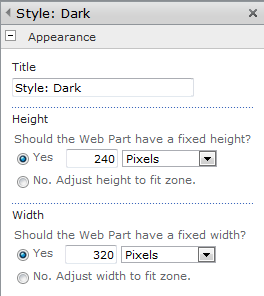
So there we go, all the options covered for the Media Web Part. I know that a number of people have had issues with some of the styling options on the TechNet forums so hopefully this provides a concise view of the options available.
Useful Links:
Media Web Part FAQ: http://blogs.msdn.com/b/sanjaynarang/archive/2010/05/20/media-web-part-in-sharepoint-2010-faq.aspx
Supported Media Formats: http://msdn.microsoft.com/en-us/library/cc189080(VS.95).aspx

TechNet Web Cast Slides: Deploying #ProjectServer on #VMWare with Shared Infrastructure #PS2010 #SharePoint #SP2010 #in
Just a quick post to say that the slides are now available for the Deploy Project Server on VMWare with Shared Infrastrucutre webcast that ran last week.
I have placed them on Office 365 so that you can look at them online here:
 |
Successfully deploy Project Server on VMware with shared infrastructure (PowerPoint Web App – Office 365: ghamson.sharepoint.com) |
You can also download the On-Demand Web Cast from Microsoft here:
TechNet Webcast
Successfully Deploy Project Server on VMware with Shared Infrastructure (Level 200)
Virtualizing Microsoft Project Server 2010 provides many benefits, but there are a number of decisions that you must carefully consider. This webcast highlights the key decision points around architecting a Project Server 2010 deployment utilizing VMware on shared infrastructure.
- Audience: IT Decision Maker and IT Generalist
- Running Time: 1 hour 15 minutes
- Host: Sacha Cohn, CTO – Corporate Project Solutions
- Registration: https://msevents.microsoft.com/CUI/EventDetail.aspx?culture=en-US&EventID=1032493923
- Short Link: http://goo.gl/CTaiJ
About the presenter:
Sacha Cohn is Chief Technology Officer of Corporate Project Solutions. A Microsoft Project Server and Microsoft SharePoint architect for over 10 years, Sacha has architected global-scale Project Server and SharePoint solutions. As a Microsoft Certified Scalability tester for the past 5 years, Sacha has focused on pioneering load and performance testing of Project Server and SharePoint solutions, to achieve the best value from VMware, Hyper-V, and physical infrastructure.

Successfully Deploy #ProjectServer on #VMWare with Shared Infrastructure web cast tomorrow–1600 GMT #SP2010 #PS2010 #MSProject #SharePoint
Update: Original post suggested that the time was 15:30 GMT. It is actually 16:00 GMT
Just a quick post to say that my colleague (Sacha Cohn – CTO – Corporate Project Solutions) is running a webcast tomorrow about how to successfully deploy Project Server 2010 on virtualised hardware.
In particular this web cast focuses on VMWare, however many of the same principals work on Hyper-V infrastructure too.
I’ll be trying to dial in also and there will be plenty of chances to ask questions at the end so I encourage you to join in. I suspect you will be surprised by some of our findings.
Details:
TechNet Webcast
Successfully Deploy Project Server on VMware with Shared Infrastructure (Level 200)
Virtualizing Microsoft Project Server 2010 provides many benefits, but there are a number of decisions that you must carefully consider. This webcast highlights the key decision points around architecting a Project Server 2010 deployment utilizing VMware on shared infrastructure.
- Audience: IT Decision Maker and IT Generalist
- Date: 29th September 2011
- Time: 16:00 GMT
- Running Time: 1 hour 15 minutes
- Host: Sacha Cohn, CTO – Corporate Project Solutions
- Registration: https://msevents.microsoft.com/CUI/EventDetail.aspx?culture=en-US&EventID=1032493923
- Short Link: http://goo.gl/CTaiJ
About the presenter:
Sacha Cohn is Chief Technology Officer of Corporate Project Solutions. A Microsoft Project Server and Microsoft SharePoint architect for over 10 years, Sacha has architected global-scale Project Server and SharePoint solutions. As a Microsoft Certified Scalability tester for the past 5 years, Sacha has focused on pioneering load and performance testing of Project Server and SharePoint solutions, to achieve the best value from VMware, Hyper-V, and physical infrastructure.
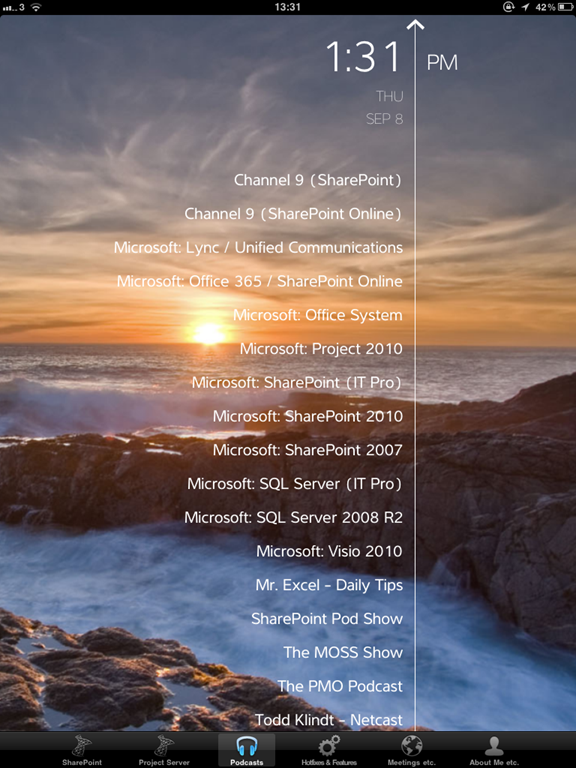
Introducing the iPad version of the #SharePoint and #ProjectServer community app #MSProject #SP2010 #PS2010 #SUGUK #in
Features are exactly the same as the iPhone version of the application (but now it is pretty!!!) and all future updates to the app will be kept in sync with the iPhone and Android versions.
 Application features:
- Blog articles from this site
- Blog categories by author
- SharePoint blog community RSS feeds
- Project Server blog community RSS feeds
- SharePoint Conference locations and dates
- SharePoint Saturday locations and dates
- User Group locations and dates
Application Name: SharePoint (and Project Server) Shenanigans HD
Application Categories: Social
Search Keywords: SharePoint, Project Server, Giles Hamson, Shenanigans, Social
Screenshots:



Integrating #SP2010 and #PS2010–slides from the SharePoint User Group meeting #ProjectServer #MSProject #SharePoint #SUGUK #SUGUKEA #in
Last Tuesday (20th September 2011), I was at the SharePoint User Group in Cambridge.
It was an excellent meeting with presentations from Symon Garfield (CTO – ICS Solutions – @symon_garfield) and myself.
As at the end of the meeting I mentioned that I would share my slides which gives me a perfect excuse to use Office 365 and the PowerPoint Office Web App.
As ever, if you have any questions you can use the contact form on this site to get hold of me.
|
Integrating SharePoint and Project Server 2010 PowerPoint – Office Web Apps – http://ghamson.sharepoint.com |

Current Year, Month and Quarter in JavaScript #SP2010 #SharePoint #PS2010 #MSProject #ProjectServer #in
Just a quick post to show some useful JavaScript I have been using this week.
In particular a one liner to work out the current quarter.
1 var currentYear = (new Date).getFullYear();
2 var currentMonth = (new Date).getMonth();
3 var currentQuarter = Math.floor(((currentMonth + 11) / 3) % 4) + 1;
I’ll be speaking at the Cambridge #SharePoint User Group 20th September 2011 #SP2010 #PS2010 #ProjectServer #MSProject
Another quick post to say that I will be speaking at the next SharePoint User Group meeting in Cambridge (where I tend to spend my life these days).

Integration of Project Server and SharePoint 2010
Not just another Managed Service within SharePoint
Now that Project Server is part of the SharePoint Server 2010 Enterprise (as opposed to the “special” version of WSS 3.0 in Project Server 2007) suite there are a number of things about Project Server that just do not conform to the standard SharePoint techniques.
I’ll be covering major differences and gotcha’s around the two products including customisation, business intelligence, permissions and more…
I will of course be around afterwards for a pint or two as well 
Further Details
About
The next Meeting for the East Anglia user group will be held on the 20th September in Cambridge.
Agenda
- 6.30pm – Registration
- 6.45pm – Symon Garfield
- 7.45pm – Break
- 8.15pm – Giles Hamson
- 9.15pm – Close and Sharepint
Speakers
-
Symon Garfield (Chief Technology Officer, ICS Solutions) (@symon_garfield)
-
Giles Hamson (Senior SharePoint Consultant, Coporate Project Solutions) (@ghamson)
Location
Holiday Inn Express Cambridge
15-17 Coldhams Park
Norman Way
Cambridge
CB1 3LH
United Kingdom
Map Location (open in new window)
Registration
To register please go to http://sugukea006.eventbrite.com/
Forum Thread
http://suguk.org/forums/thread/27260.aspx
Let us know you are coming on the forum for further discussion and the latest details.


 SharePoint (and Project Server) Shenanigans
You must be logged in to post a comment.