Archive
Rename a workflow in SPD2010
Consider the following situation, you have a column in a list or library with a name such as “Workflow” , someone come along and creates a workflow called “Workflow” and associates it with your list, in isolation that is no problem. However you do now have 2 columns in your list / library view called “workflow” one is your column and the other is the status of your workflow.

In your list description you still only have one column called “Workflow”

But your end users are saying that when they are creating views there are 2 columns called “Workflow” and don’t know which to choose.
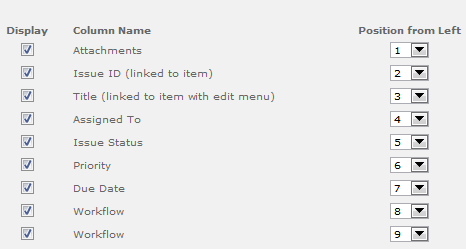
The most simple thing to do would be rename the Workflow, the only effect this should have is to change the name of your status column (personally I have not seen other side effects of doing this)
So in SPD we change the Workflow name, hit Save then Publish and nothing happens !, so we do it again and nothing happens, no changes in SharePoint, so we change the Workflow name then hit Rename then hit Save & Publish and finally it works, how odd !


SharePoint Security Bulletin – Critical
Microsoft Security Bulletin MS13-024 – Critical
Vulnerabilities in SharePoint Could Allow Elevation of Privilege (2780176)
Published: Tuesday, March 12, 2013
Executive Summary
This security update resolves four privately reported vulnerabilities in Microsoft SharePoint and Microsoft SharePoint Foundation. The most severe vulnerabilities could allow elevation of privilege if a user clicks a specially crafted URL that takes the user to a targeted SharePoint site.
This security update is rated Critical for all supported editions of Microsoft SharePoint Server 2010 and rated Important for all supported editions of Microsoft SharePoint Foundation 2010. For more information, see the subsection, Affected and Non-Affected Software, in this section.
The security update addresses the vulnerabilities correcting the way that Microsoft SharePoint Server validates URLs and user input. For more information about the vulnerabilities, see the Frequently Asked Questions (FAQ) subsection for the specific vulnerability entry under the next section, Vulnerability Information.
http://technet.microsoft.com/en-us/security/bulletin/ms13-024

SP2010, #PerformancePoint and Kerberos
I was recently involved in getting PerfomancePoint and the “Per User Identity” configuration working for a client running SharePoint 2010. The same configuration still holds true for SharePoint 2013, but for 2013 both PerformancePoint and Excel Services now introduce the new “EffectiveUserName” feature, which should make life a load easier.
In the world of SharePoint /PerformancePoint 2010 if you want to build an MI dashboard that shows user specific information in the reports the only way to do this effectively is to use the “Per-User Identity” option in the Data Source Connection setting, which in turn involves setting up Kerberos and specifically constrained delegation, in this article I will cover the broad steps needed.
Kerberos on Web App.
Firstly make sure that Kerberos is running on the Web App that will be hosting your PerformancePoint content, the best way to check this is in the Windows Security log, filter on 4624 events and find a logon event, make sure its a type 3 (Network) and the Process is Kerberos.

Kerberos on Target.
Make sure you have the correct SPNs registered against your target, typically with PerformancePoint this will be an SSAS cube, use SetSPN –S MSOLAPSvc.3/ServerName DomainName\SSASDomainAccount to create the SPNs, these will be key, so take your time and make sure you get them right.
Claims to Windows Token Service
PerformancePoint (along with Excel and Visio Services) relies on the C2WTS for Protocol Transition, so this must be running and configured correctly.
I would recommend running the C2WTS as a separate managed account, this account needs some specific requirements (local administrator, Logon as a service, Act as part of the operating system and Impersonate a client after authentication, set the last 3 in local security policy.)
If the C2WTS is not happy you will probably see something like the error below logged in the Windows Application log when trying to connect.

You also need to register a manual SPN for the C2TWS, something like SetSPN –S SP/C2WTS DomainName\C2WTSDomainAccount, this will allow the “delegation” tab on the user account domain object to become available.
Constrained Delegation.
This is the tricky part to get working, basically we are saying that “object A” is allowed to delegate to “service A” only in, our case it will be “object A & object B and object C”, are allowed to delegate to “Service A” in fact all the objects in the delegation chain, so to allow delegation we open our user object in AD, go to the “Delegation” tab, select “Trust this user for delegation to the specified services only” (This is setting constrained delegation)–> “Use any authentication protocol” (This is allowing protocol transition).
Use the Add… button to find the service account for the SSAS Domain account mentioned above and select the Service Type you setup earlier.
You will probably have to perform this for your Web Application account, C2WTS account, PerformancePoint account and any other managed service account that is involved, once finished each account should have a setting like this
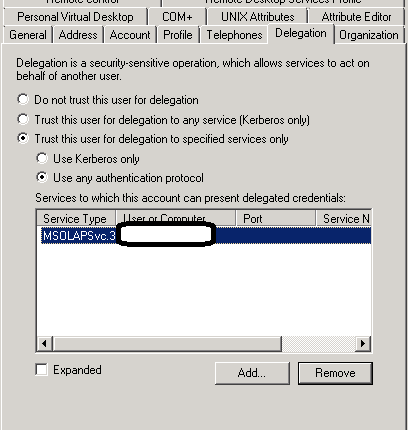
Remember that if the Delegation tab is not available on the user object you have to create a manual SPN.
If your data connection still refuses to connect with the “Per-User Identity setting”, have another look at the eventlog again and look for this error.

This probably means you still have an SPN missing or not configured correctly, the best way to deal with this is to install Network Monitor then run a trace while trying to connect and filter on the ‘KerberosV5’ events, and you are looking for any Kerberos error codes most likely you will see some kind of PRINCIPLE_UNKNOWN error being reported, normally associated with a user name or service account that has been missed in the constrained delegation settings.
Good luck and Happy SharePointing
Follow @NeilKing41
SP2010 Corrupt BlobCache
Just a quick entry.
While running a client health check I spotted an error in the Event log that I have never seen before.
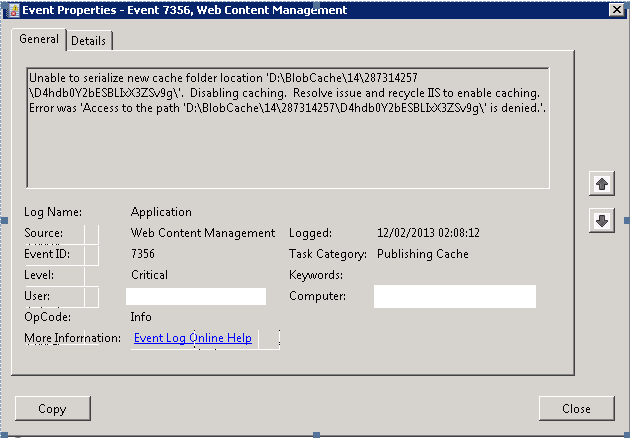
Googling the Event ID and text didn’t help as I couldn’t find anything online about this.
Clearly the BlobCache on this server had become corrupted somehow, upon closer inspection the folder \287314257 was missing from the location D:\BlobCache\14, hence the error.
The fix was to disable the BlobCache from the web.config, do an IIS Reset and delete the folder D:\BlobCache then re-enable the Blobcache.

Disable social features in SharePoint 2010
For most deployments clients want to use all the social features that SharePoint 2010 offers, but on a recent project I was working on, the client wanted all the social features disabled including.
– MySite Creation
– Use of My Profile link
– Page Personalization
– The use of ‘I Like It’ and ‘Tags & Notes’

As I have never had to do this it took a bit of googling to find all the correct settings.
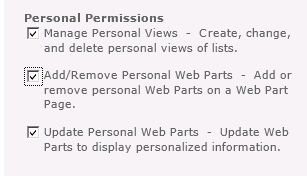
Page Personalization
From CA – > Pick the Web app in question –> User Permissions

Unticking the last 2 items and the ‘Personalize this Page’ menu item is removed, but the users still have the ability to create personal views on lists and libraries, removing ‘Manage Personal Views’ will remove this option as well.
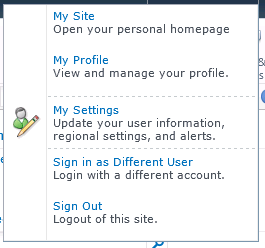
Another option to look at is ‘Edit Personal User Information’
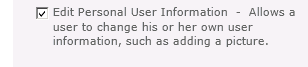
This removes the, Edit Item and My Regional Settings from the ‘My Settings’ link, via the ‘My’ Drop down menu.

My Site & My Profile
To Remove the My Site and My Profile links go to CA –> Manage service Applications –> User Profile Service Application –> Manage User Permissions
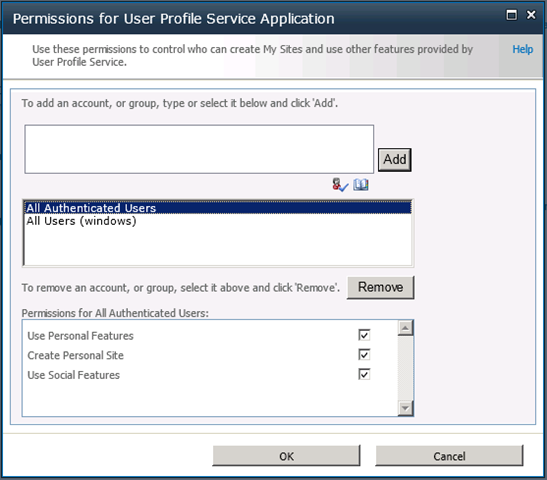
By default all authenticated users have access to all the ‘Personal’ features, see the link below for details on the specific feature sets.
http://technet.microsoft.com/en-us/library/ee721063(v=office.14).aspx.
Personally I quite like this feature as you can decide who has access to which feature set, for example you might not want external users or partners to be able to use these features.
A point to note here is that if you disable “Use Social Features”, any of the features that you might have deployed such as the Note Board or list ratings will disappear !
Finally, to remove the SocialRibbonControl (‘I Like It’ and ‘Tags & Notes’) it can be disabled at Farm Level as it is a Farm Scoped feature
http://technet.microsoft.com/en-us/library/ee721062(v=office.14).aspx
Now we have a very short ‘My’ menu.

Happy SharePointing !

SharePoint 2010 Site relocation
A project I have recently worked on involved moving an Internet facing hosted SharePoint 2010 site from one hosting provider to another.
The actual moving of the site was quite straight forward but did involve quite a lot prep work, the broad steps are covered below.
The site was made up of custom components deployed as WSP’s, a content-db backup and some farm configuration tasks.
To build the new platform we started with a vanilla SharePoint 2010 build, created an empty web application, restored the supplied content-db to the SQL server and ran a test upgrade check against the database
Test-SPContentDatabase –Name SP_Test_Content –WebApplication http://TestApp
http://technet.microsoft.com/en-us/library/ff607941(v=office.14).aspx
We used the output of this to cross check which features the content database was expecting to find in the farm, these were added with powershell cmdlet
Add-SPSolution <wsp name>
The Test-SPContentDatabase cmdlet was run again to ensure nothing had been missed.
Once the site was running extensive testing was performed to identify any missing components or settings, most were identified as missing at the Farm level, such as content sources and search scopes
One of the issued noticed was accessing the site via an iPhone browser was redirecting to the mobile version, this was easily resolved by updating the browser definition file compat.browser file in the location
C:\inetpub\wwwroot\wss\VirtualDirectories\<site folder>\App_Browsers
http://technet.microsoft.com/en-us/library/ff393836(v=office.14).aspx
The section
<!– iPhone Safari Browser –>
has the value
<capability name="isMobileDevice" value="false" /> set to
<capability name="isMobileDevice" value="true" />
This has to be replicated on all web-servers in the farm
Once testing has finished the Internet facing site was set to anonymous authentication and the site was extended to another zone with Windows authentication to allow authoring to take place.
I hope these broad steps help someone else faced with this task.
SharePoint Timer Job Servers
Recently, while helping out a client, they asked a question about timer jobs running on their Farm.
The client in question has a large farm with multiple servers, web applications and content databases and was concerned about multiple servers appearing to run the same timer jobs on the same web application at different times.
If you have a web application with multiple content databases, or a farm with multiple servers it will be completely normal to see the servers running timer jobs changing, you can try to override this behaviour by setting a preferred timer server in Central Administration for a content database even thought this setting doesn’t even seem to be mentioned in TechNet.
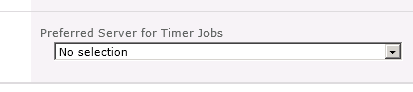
As each content database can have a different server assigned to run its timer jobs on of the ways to determine this is to have a look in SQL at contentDB in the TimerLock table
In SharePoint 2007 the actual timer server name was in the contentDB, but in 2010 this was changed to a GUID that represented the object, so you have to join the contentDB to the ConfigDB, the following SQL allows you tell which server currently has the timer lock for a contentDB.
select a.lockedby, b.name
from <contentdb_Name>.dbo.TimerLock a inner join SharePoint_Config.dbo.Objects b
on a.lockedby = b.Id
Happy SharePointing in 2013
Follow @NeilKing41
SPD 2010 Workflow Form Error
While working on a migration project recently, we had reason to republish the OOTB Approval workflow to update the owner.
After this update we found that the OOTB Approval Workflow would not submit anymore.

After much head-scratching and googling I came across this social thread that covers the fault in some detail, the issue is caused by having KB2553322 installed on the PC with SPD2010 installed, as soon as we removed the patch and republished the workflow normal service was resumed.

SharePoint Designer 2013 #SPD2013
I have seen a lot recently about the changes to SPD 2013 and especially the removal of the Design View from page editing and the impact that would have on peoples normal daily SharePoint work. The rational for the change is here on the SharePoint team blog, some of the responses on End User SharePoint are worth a read, and non of them are very positive. So I thought I would take a look a couple of typical End User style visual solution and see it can see be used in the brave new world of SPD2013.
Using calculated columns to add colour coding to your SharePoint lists
This excellent solution comes from Sarah Haase. I won’t cover the steps for 2010, but will go straight into 2013.
The 1st step is to grab a copy of SPD2013 preview from the MS download site and get this running in your SP2013 world, then setup your list and calculated column and open your site in SPD2013, at first glance a site in SPD2013 looks exactly the same as an SPD2010, but when you open the list-view you have the option of code view or code view, nice !
So how do we make appropriate change now that we have no visual representation of the page ?
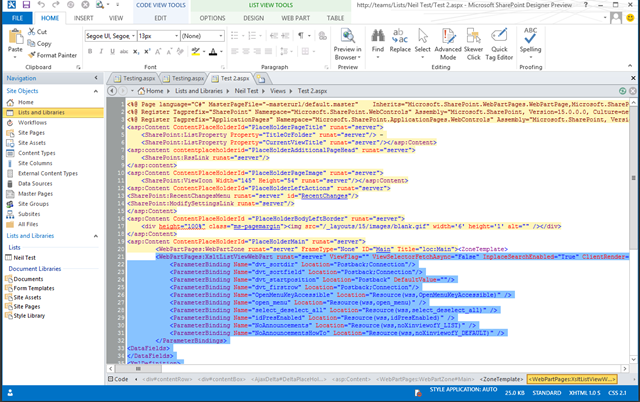
If we go to the List View Tools tab section and select the Design tab, we have the option to Customize the XLST for the entire view (this is available in SPD2010 as well)

Now its a case of searching for the tag
<xsl:value-of select="$thisNode/@*[name()=current()/@Name]"/>
and updating it to read
<xsl:value-of select="$thisNode/@*[name()=current()/@Name]" disable-output-escaping="yes"/>
Save the page view, preview in a browser and voila, a colour coded column in SharePoint 2013.
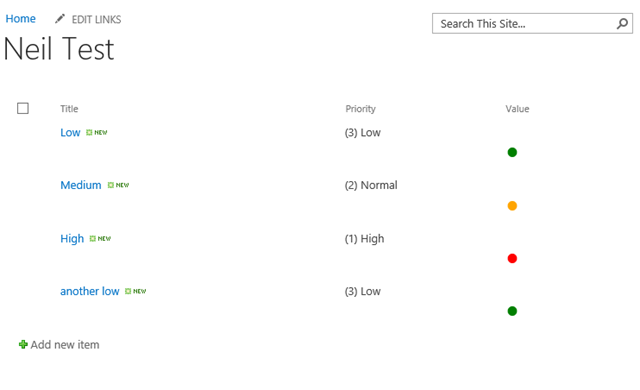
So was this more difficult then 2010 ?, The answer is Yes and No, without the visual representation of the page it would have been much more difficult to figure out which tag to update, but once you know that, the actual change is no more difficult, but I think that is the crux of the issue, features like conditional formatting are now going to be much much more difficult to apply in SPD2013 when we are going to have to work through the entire list view code.

I didn’t know it would do that #sp2010 #docversion
Its always interesting when you see something that you never expected to happen or had forgotten about, this happened to me the other week while working with an internal colleague.
We were looking at the process surrounding internal process forms and templates, in this process the version of the form or template may not necessarily be the version number stored in the SharePoint document history, so as a way to display the version I added a simple version number column called Doc Version to the library and to my surprise the column populated with data !


A quick look in the document properties showed a custom property with the same name as the library column that I just created.

A nice little feature of Office and SharePoint integration that I had forgotten about


 SharePoint (and Project Server) Shenanigans
You must be logged in to post a comment.