Archive
#SharePoint 2010 Media Web Part–Options, FAQ’s and other useful information #SP2010 #PS2010 #MSProject #ProjectServer #SUGUK
As part of the standard Corporate Project Solutions project management process there always comes a time when you start to communicate the project to a wider audience than the project team, stakeholders and other key users / focus groups.
Typically this will be the time between completion of development / client testing and the go live date of your project.
Now the stakeholders, project members and focus groups will already be up to speed with how the solution works and training will be in place for key individuals as well. But what do you do when the training budget cannot extend to the whole organisation? Especially when that organisation could have over a hundred thousand users.
So to ensure that you have appropriate training material in place, you create videos, presentations, documentation and FAQ’s to help aid the user. This plus an effective search solution can bring down the cost of training and ensure that your users are appropriately informed.
One of the key aspects of this would be to ensure that video material can be played within the web page. This will allow the user to view the videos inline with the solution and can even be linked directly from the solution. This is where the SharePoint 2010 Media Web Part comes into play:

Through my consulting travels I have found that clients have issues with knowing what is and isn’t supported by this web part. So this blog post will hopefully shed some light and provide links to useful information.
So lets go through the web part options:

Change Media
The media web part supports Audio and Video formats.
Format support:
- Video: WMV (including VC-1), MP4 (H.264), 3GP
- Audio: WMA (Standard and Professional), MP3
- Supported sources are from within SharePoint or from an external web address:
- From Computer: The user will be asked to upload the file to a location within SharePoint such as a document library or a site asset library.
- From SharePoint: The file already exists in SharePoint and you can select the file from a document / site asset library
- From Address: Allows the user to specify an external web address for example:

Change Image
This option allows you to add some presentation to the media web part by showing a picture before the user clicks on the play button.
Format Support:
- Image: jpg, png, gif, bmp (most common image formats are supported)
- NB: Please note that the picture will not be shown if “Start media automatically” is checked
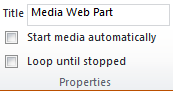
Properties
Title: The summary description for the web part and the video.
Whilst the video is stopped you will see this Title at the top within the web part as well as on the web part chrome. When you change the title within the Media Web Part the chrome title will be synchronised when the page is saved.
For example:

Start media automatically: When this is checked, as soon as the page loads, the video / audio will start.
Loop until stopped: When checked, the media will continue to play until the user stops it via the in-built controls.

Player Styles
Styles: Two options are available out of the box, light & dark.
NB: After various bits of research, these styles appear to be part of the Silverlight control and cannot be customised.


Size Options
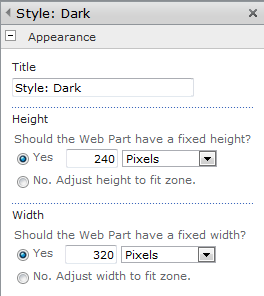
Horizontal Size: Changing the width of the media player
Vertical Size: Changing the height of the media player
Lock Aspect Ratio: When checked the horizontal and vertical measurements will be kept in accordance with each other. So as you adjust the height, the width will change in keeping to maintain the aspect ratio.
NB: Please not that this also updates the width and height properties on the web part
So there we go, all the options covered for the Media Web Part. I know that a number of people have had issues with some of the styling options on the TechNet forums so hopefully this provides a concise view of the options available.
Useful Links:
Media Web Part FAQ: http://blogs.msdn.com/b/sanjaynarang/archive/2010/05/20/media-web-part-in-sharepoint-2010-faq.aspx
Supported Media Formats: http://msdn.microsoft.com/en-us/library/cc189080(VS.95).aspx

TechNet Web Cast Slides: Deploying #ProjectServer on #VMWare with Shared Infrastructure #PS2010 #SharePoint #SP2010 #in
Just a quick post to say that the slides are now available for the Deploy Project Server on VMWare with Shared Infrastrucutre webcast that ran last week.
I have placed them on Office 365 so that you can look at them online here:
 |
Successfully deploy Project Server on VMware with shared infrastructure (PowerPoint Web App – Office 365: ghamson.sharepoint.com) |
You can also download the On-Demand Web Cast from Microsoft here:
TechNet Webcast
Successfully Deploy Project Server on VMware with Shared Infrastructure (Level 200)
Virtualizing Microsoft Project Server 2010 provides many benefits, but there are a number of decisions that you must carefully consider. This webcast highlights the key decision points around architecting a Project Server 2010 deployment utilizing VMware on shared infrastructure.
- Audience: IT Decision Maker and IT Generalist
- Running Time: 1 hour 15 minutes
- Host: Sacha Cohn, CTO – Corporate Project Solutions
- Registration: https://msevents.microsoft.com/CUI/EventDetail.aspx?culture=en-US&EventID=1032493923
- Short Link: http://goo.gl/CTaiJ
About the presenter:
Sacha Cohn is Chief Technology Officer of Corporate Project Solutions. A Microsoft Project Server and Microsoft SharePoint architect for over 10 years, Sacha has architected global-scale Project Server and SharePoint solutions. As a Microsoft Certified Scalability tester for the past 5 years, Sacha has focused on pioneering load and performance testing of Project Server and SharePoint solutions, to achieve the best value from VMware, Hyper-V, and physical infrastructure.

Successfully Deploy #ProjectServer on #VMWare with Shared Infrastructure web cast tomorrow–1600 GMT #SP2010 #PS2010 #MSProject #SharePoint
Update: Original post suggested that the time was 15:30 GMT. It is actually 16:00 GMT
Just a quick post to say that my colleague (Sacha Cohn – CTO – Corporate Project Solutions) is running a webcast tomorrow about how to successfully deploy Project Server 2010 on virtualised hardware.
In particular this web cast focuses on VMWare, however many of the same principals work on Hyper-V infrastructure too.
I’ll be trying to dial in also and there will be plenty of chances to ask questions at the end so I encourage you to join in. I suspect you will be surprised by some of our findings.
Details:
TechNet Webcast
Successfully Deploy Project Server on VMware with Shared Infrastructure (Level 200)
Virtualizing Microsoft Project Server 2010 provides many benefits, but there are a number of decisions that you must carefully consider. This webcast highlights the key decision points around architecting a Project Server 2010 deployment utilizing VMware on shared infrastructure.
- Audience: IT Decision Maker and IT Generalist
- Date: 29th September 2011
- Time: 16:00 GMT
- Running Time: 1 hour 15 minutes
- Host: Sacha Cohn, CTO – Corporate Project Solutions
- Registration: https://msevents.microsoft.com/CUI/EventDetail.aspx?culture=en-US&EventID=1032493923
- Short Link: http://goo.gl/CTaiJ
About the presenter:
Sacha Cohn is Chief Technology Officer of Corporate Project Solutions. A Microsoft Project Server and Microsoft SharePoint architect for over 10 years, Sacha has architected global-scale Project Server and SharePoint solutions. As a Microsoft Certified Scalability tester for the past 5 years, Sacha has focused on pioneering load and performance testing of Project Server and SharePoint solutions, to achieve the best value from VMware, Hyper-V, and physical infrastructure.

Introducing the iPad version of the #SharePoint and #ProjectServer community app #MSProject #SP2010 #PS2010 #SUGUK #in
Features are exactly the same as the iPhone version of the application (but now it is pretty!!!) and all future updates to the app will be kept in sync with the iPhone and Android versions.
 Application features:
- Blog articles from this site
- Blog categories by author
- SharePoint blog community RSS feeds
- Project Server blog community RSS feeds
- SharePoint Conference locations and dates
- SharePoint Saturday locations and dates
- User Group locations and dates
Application Name: SharePoint (and Project Server) Shenanigans HD
Application Categories: Social
Search Keywords: SharePoint, Project Server, Giles Hamson, Shenanigans, Social
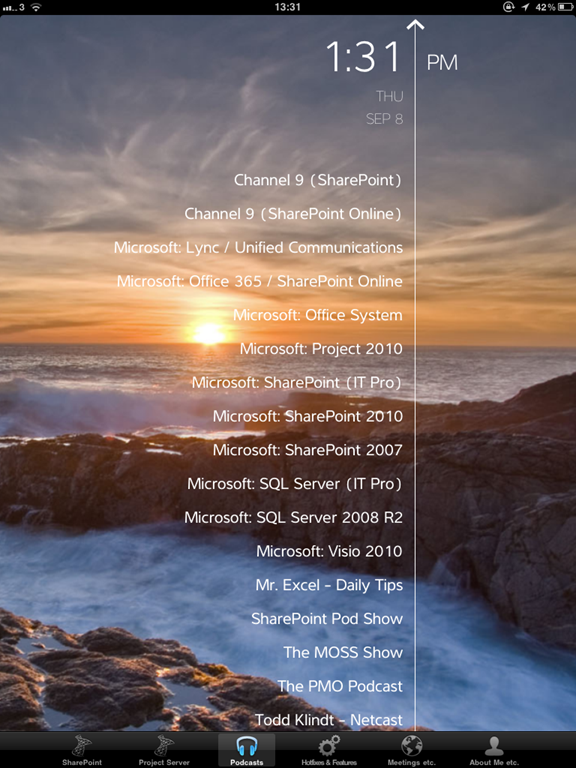
Screenshots:



Integrating #SP2010 and #PS2010–slides from the SharePoint User Group meeting #ProjectServer #MSProject #SharePoint #SUGUK #SUGUKEA #in
Last Tuesday (20th September 2011), I was at the SharePoint User Group in Cambridge.
It was an excellent meeting with presentations from Symon Garfield (CTO – ICS Solutions – @symon_garfield) and myself.
As at the end of the meeting I mentioned that I would share my slides which gives me a perfect excuse to use Office 365 and the PowerPoint Office Web App.
As ever, if you have any questions you can use the contact form on this site to get hold of me.
|
Integrating SharePoint and Project Server 2010 PowerPoint – Office Web Apps – http://ghamson.sharepoint.com |

Current Year, Month and Quarter in JavaScript #SP2010 #SharePoint #PS2010 #MSProject #ProjectServer #in
Just a quick post to show some useful JavaScript I have been using this week.
In particular a one liner to work out the current quarter.
1 var currentYear = (new Date).getFullYear();
2 var currentMonth = (new Date).getMonth();
3 var currentQuarter = Math.floor(((currentMonth + 11) / 3) % 4) + 1;
Office 2010 / #MSProject 2010 SP1 + June 2011 Cumulative Update links #ProjectServer #SharePoint #SP2010 #PS2010
As ever, now that my server environment is starting to stabilise after installing SP1 + June 2011 CU (Security Validation issues aside of course), we are now looking at updating the clients to reflect the update.
This is especially important in a Project Server / Microsoft Project 2010 environment.
As a result, here are some useful links that took me a while to dig out for the Office / Project 2010 client updates:
Project 2010
Project 2010 Service Pack 1 x86:
http://www.microsoft.com/downloads/details.aspx?FamilyId=C72141FE-D264-4F6E-AE09-D0FBD32DE5D5
Project 2010 Service Pack 1 x64:
http://www.microsoft.com/downloads/details.aspx?FamilyId=CE1FD136-A1F4-4FF5-909B-50808D6F39CB
Project 2010 – June Cumulative Update 2011 x86 & x64:
http://support.microsoft.com/hotfix/KBHotfix.aspx?kbnum=2536590&kbln=en-us
NB: only update binary available for Project 2010 in the June 2011 CU
Office 2010
Office 2010 Service Pack 1 x86:
http://www.microsoft.com/downloads/details.aspx?FamilyId=9D2E1282-8B69-418B-AFA0-9F61239EC8BE
Office 2010 Service Pack 1 x64:
http://www.microsoft.com/downloads/details.aspx?FamilyId=E9F3C2D0-C321-4910-A4CE-B2F294B42D65
Office 2010 – June Cumulative Update 2011 x86 & x64:
http://support.microsoft.com/kb/2553023
NB: no single update binary available, update client applications as required.
Other Useful Links:
On my travels I also found this other link which lists all the updates for the SharePoint and Office Systems:
Podcasts now available on the #SharePoint / #ProjectServer community app #Android #iOS #SP2010 #PS2010 #MSProject
Another week and another update to the SharePoint and Project Server community mobile app.
This time, wrap your audio visual senses around these podcasts that stream directly from the application (watch out for your mobile data caps!!!)

I shall add more as I find them and as ever, if you have any suggestions for the application… get in contact.
The application is currently available for iOS (iPad / iPhone) and Android.


Slipstream #Project Professional 2010 updates #MSProject #PS2010 #PS2007 #ProjectServer #MSOffice
Following on from my previous post Customising the Project Professional install, this post looks at slipstreaming the Project Professional 2010 updates into the Project install media. This simplifies the install as there is just one install file to run. This post will look at slipstreaming Service Pack 1 and the June 2011 Cumulative update into the Project 2010 install media. The same process applies for Project Professional 2007 but use the 2007 updates. This process also applies for other Microsoft Office applications with the relevant updates.
Firstly download the following updates:
- Project 2010 Service pack 1 – KB 2460052
- Project 2010 June 2011 Cumulative Update – KB 2536590
For the purpose of this post, I have both of the updates on the root of the C:\ drive, if you have the updates in a different location please update the commands to reflect the file location.
Create an Updates folder on the root of the C:\ drive
Open Command Prompt, navigate to the root of the C:\ drive and type the following command to extract Project 2010 SP1 to the new Updates folder:
project2010sp1-kb2460052-x86-fullfile-en-us.exe /extract:C:\Updates

Press Enter and accept the license agreement in the pop up box, you will then see the files extracting dialog box
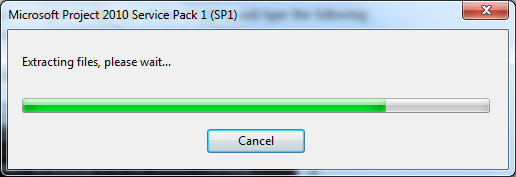
Once complete you will then see installation complete message:

Click OK then you will see the extracted files in the C:\Updates folder:

Copy the contents of the C:\Updates folder and paste the contents into the Updates folder in the install media.
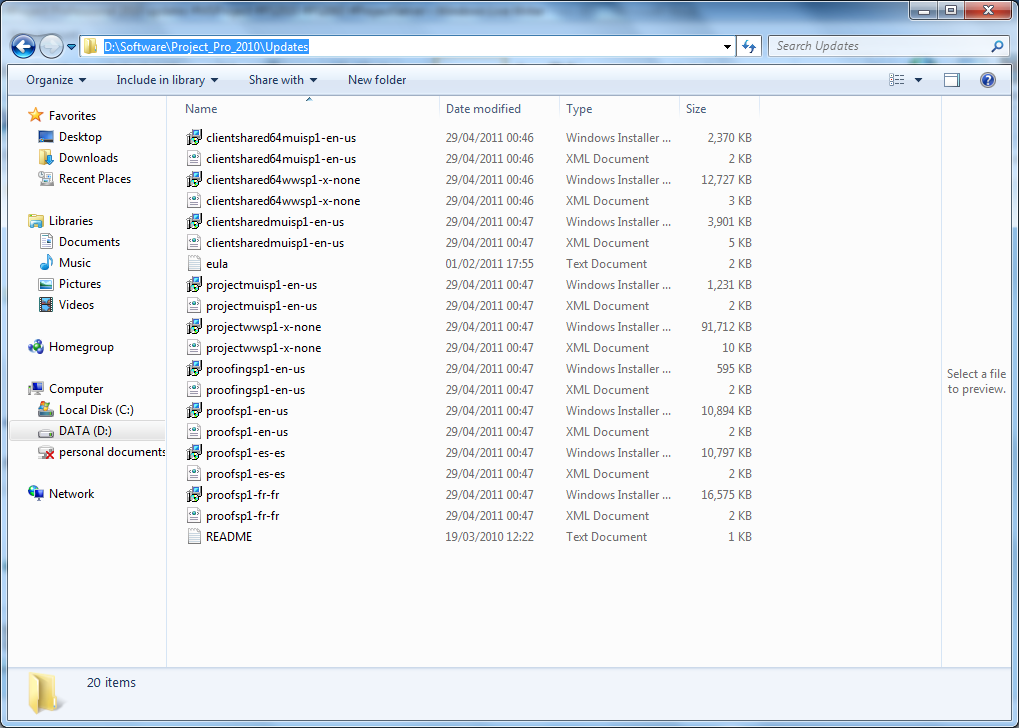
Once the files have been copied to the Updates folder in the install media for Project Professional 2010, delete all of the files from the C:\Updates folder so that you are ready to extract the Project 2010 June 2011 CU.
Open Command Prompt again and navigate to the root of the C:\ drive then type the following command to extract the Project 2010 June 2011 Cumulative Update to the Updates folder:
project2010-kb2536590-fullfile-x86-glb.exe /extract:C:\Updates
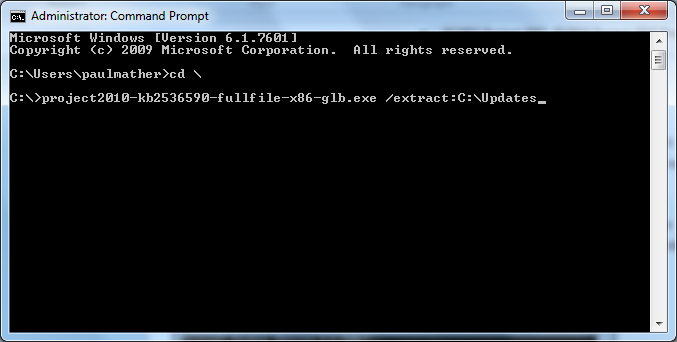
Press Enter and accept the license agreement in the pop up box, you will then see the files extracting dialog box appear followed by the installation complete message:

Click OK then you will see the extracted files in the C:\Updates folder:

Copy the contents of the C:\Updates folder and paste the contents into the Updates folder in the install media.
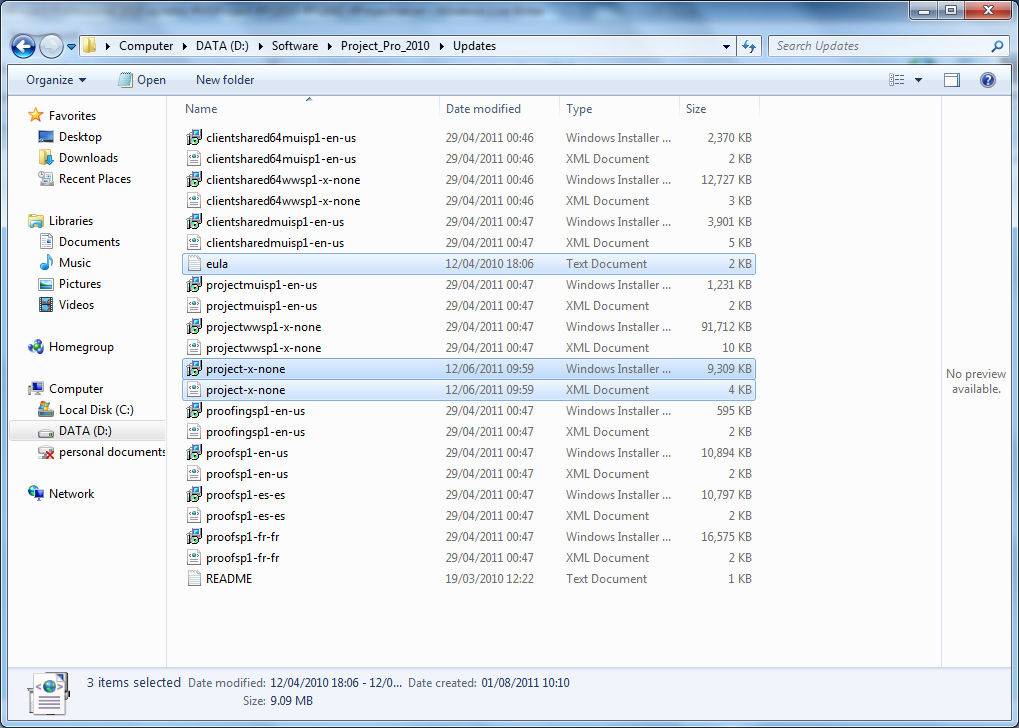
Now the updates have been extracted to the Updates folder in the installation media for Project Professional 2010, the updates will be applied when Project Professional 2010 is installed.

Further mobile app updates #iOS #Android #iPhone #SP2010 #SharePoint #PS2010 #ProjectServer #MSProject
Now that the Android release is out of the way, the application content can be updated.
New features in this content update:
- Location and date updates for Conferences, SharePoint Saturday’s and User Groups (UK)
- CodePlex Project video updates
- Minor link updates to SharePoint and Project Server RSS feeds including adding one of the site authors RSS feed for his new blog (Paul Mather: http://pwmather.wordpress.com)
If you have a blog, user group meeting or anything else you would like to add to the app, please get in contact.


 SharePoint (and Project Server) Shenanigans
You must be logged in to post a comment.