Archive
Introducing a new #iPhone / #iPad application for the #SharePoint and #ProjectServer community #SP2010 #MSProject #in
  |
Application features:
|


As the community has been so kind to me, this is my way of giving something back and I welcome new feature suggestions and blogs to be added to the RSS feeds.

The user group meeting locations is currently only for the UK, but if anyone would like to add any further user group locations / dates, anywhere in the world. I will happily add them and they will be available on the application the following day.
|
Although the application is currently only available for the iOS platform, it will soon also be available for Android and potentially Windows Mobile 7 Please send feedback / suggestions via the contact form. |
 |
Application Name: SharePoint (and Project Server) Shenanigans
Application Categories: Social Media, News
Search Keywords: SharePoint, Project Server, Giles Hamson, Shenanigans, RSS, Blog
Screenshots:


Recreating the SharePoint 2010 State Service #SP2010 #SharePoint #PS2010 #MSProject #ProjectServer
My client was so eager to get SP1 and the June 2011 Cumulative Updates up and running on the Development and Test environments that on day one I was installing and testing the updates on my project.
What on earth was my clients requirement I hear ask? couldn’t they wait?
Well the end users are heavy Linux users and the requirement for Timesheet data entry within Firefox is v.strong. As a result, testing SP1 outside of the beta that we had already tested was top priority.
Of course, a few days later the June 2011 Cumulative Update was re-released and it is widely known that the State Service among other things can go wrong.
Looking into it further and the State Service cannot be created in the usual method (clicking the new button in the Managed Service section of Central Administration).
So PowerShell to the rescue:
$StateServiceDB = "SP2010_StateService"
$GetSPStateServiceApplication = Get-SPStateServiceApplication

If ($GetSPStateServiceApplication -eq $Null)
{
   Write-Host -ForegroundColor White "- Creating State Service Application..."
   New-SPStateServiceDatabase -Name $StateServiceDB | Out-Null
   New-SPStateServiceApplication -Name "State Service Application"
 -Database $StateServiceDB | Out-Null
   Get-SPStateServiceDatabase | Initialize-SPStateServiceDatabase | Out-Null
   Write-Host -ForegroundColor White " - Creating State Service
 Application Proxy..."
   Get-SPStateServiceApplication | New-SPStateServiceApplicationProxy
 -Name "State Service Application Proxy" -DefaultProxyGroup | Out-Null
   Write-Host -ForegroundColor White "- Done creating State Service
 Application."
}
Else
{
   Write-Host -ForegroundColor White "- State Service Application
 already exists."
}

Security Validation Issue – Form Services issue with SP1+June 2011 CU (Release 2) #in #SP2010 #SharePoint #MSProject #ProjectServer
We are testing Service Pack 1 heavily in my project that I have talked about on this blog many times.
One of the features of our implementation is a number of developed InfoPath forms. We found one issue previously that required a hotfix and it looks like SP1 and June 2011 CU (Release 2) has introduced another.
My colleague Paul Busby has mentioned it here:
and another user has also confirmed the issue.
I shall be sending the details below to Microsoft through our partner support and hopefully we can get a resolution.
Scenario:
- Form Services
- Administrator Approved Form
- Server Version: 14.0.6106.5002 (Office 2010 SP1 + June 2011 CU – Release 2)
- Client Version: 14.0.6023.1000 (Office 2010 SP1)
- NB: June 2011 Cumulative Update does not include updates for InfoPath 2010
- Microsoft June 2011 Cumulative Update for Office 2010 Client Applications – KB2259686: http://support.microsoft.com/kb/2259686/en-us
The form has two views:
- View one has a people picker
- View two is blank
The form is uploaded via Central Administration and activated to a site collection
A form library is created and the associated content type is attached
Upon creating a new form, the form loads

When the user switches views in the form, a Security Validation Error occurs:

Further Details:
- We have discovered that it appears to happen when switching to or from a view that contains a people picker field.
- Turning off security validation, allows the form to continue to work, but this is not something we want to go live with
- This issue has been found on a client DEV and TEST environment as well as a newly installed RTM machine upgraded to SP1 + June 2011 CU Release 2
SharePoint 2010 Log Details (specific details in red):
07/20/2011 13:54:03.85 w3wp.exe (0x10CC) 0x11BC SharePoint Foundation Monitoring nasq Medium Entering monitored scope (Request (POST:http://vm482:80/_layouts/FormServer.aspx?XsnLocation=http://vm482/FormServerTemplates/SP1SecurityValidationTest_Published.xsn
&SaveLocation=http%3A%2F%2Fvm482%2FSP1SecurityValidationTest&ClientInstalled=true&Source=http%3A%2F%2Fvm482%2FSP1SecurityValidationTest%2FForms%2FAllItems%2Easpx&DefaultItemOpen=1))
07/20/2011 13:54:03.85 w3wp.exe (0x10CC) 0x11BC SharePoint Foundation Logging Correlation Data xmnv Medium Name=Request (POST:http://vm482:80/_layouts/FormServer.aspx?XsnLocation=http://vm482/FormServerTemplates/SP1SecurityValidationTest_Published.xsn
&SaveLocation=http%3A%2F%2Fvm482%2FSP1SecurityValidationTest&ClientInstalled=true&Source=http%3A%2F%2Fvm482%2FSP1SecurityValidationTest%2FForms%2FAllItems%2Easpx&DefaultItemOpen=1) 5c0ca3e0-a782-4691-9a79-b2e163e3f0e9
07/20/2011 13:54:03.85 w3wp.exe (0x10CC) 0x11BC SharePoint Foundation Logging Correlation Data xmnv Medium Site=/ 5c0ca3e0-a782-4691-9a79-b2e163e3f0e9
07/20/2011 13:54:03.91 w3wp.exe (0x10CC) 0x11BC SharePoint Foundation Web Controls cm8z Medium Failed to get SPGroupName from GroupID. Error Message: Group cannot be found. Callstack: at Microsoft.SharePoint.SPGroupCollection.GetByID(Int32 id) at Microsoft.SharePoint.WebControls.PeopleEditor.set_SharePointGroupID(Int32 value). 5c0ca3e0-a782-4691-9a79-b2e163e3f0e9
07/20/2011 13:54:03.91 w3wp.exe (0x10CC) 0x11BC SharePoint Foundation General 8kh7 High The security validation for this page is invalid. Click Back in your Web browser, refresh the page, and try your operation again. 5c0ca3e0-a782-4691-9a79-b2e163e3f0e9
07/20/2011 13:54:03.91 w3wp.exe (0x10CC) 0x11BC SharePoint Foundation Runtime tkau Unexpected System.Runtime.InteropServices.COMException: The security validation for this page is invalid. Click Back in your Web browser, refresh the page, and try your operation again. at Microsoft.SharePoint.Library.SPRequestInternalClass.ValidateFormDigest(String bstrUrl, String bstrListName) at Microsoft.SharePoint.Library.SPRequest.ValidateFormDigest(String bstrUrl, String bstrListName) 5c0ca3e0-a782-4691-9a79-b2e163e3f0e9
07/20/2011 13:54:03.91 w3wp.exe (0x10CC) 0x11BC SharePoint Foundation Monitoring b4ly Medium Leaving Monitored Scope (Request (POST:http://vm482:80/_layouts/FormServer.aspx?XsnLocation=http://vm482/FormServerTemplates/SP1SecurityValidationTest_Published.xsn
&SaveLocation=http%3A%2F%2Fvm482%2FSP1SecurityValidationTest&ClientInstalled=true&Source=http%3A%2F%2Fvm482%2FSP1SecurityValidationTest%2FForms%2FAllItems%2Easpx&DefaultItemOpen=1)). Execution Time=66.2620528586734 5c0ca3e0-a782-4691-9a79-b2e163e3f0e9

How to check the SharePoint 2010 and Project Server 2010 service pack / patch level #PS2010 #ProjectServer #SharePoint #SP2010
This article will show how to check the farm version for SharePoint Foundation 2010, SharePoint Server 2010 and Project Server 2010.
The farm patch level can be check in the Central Administration site, click “Upgrade and Migration” then “Check Product and Patch Installation Status”

The patch level of all farm components will be detailed here, as you can see below, Project Server is listed at the bottom:

The farm configuration database version can also be checked on the “Manage Servers in this farm” page:
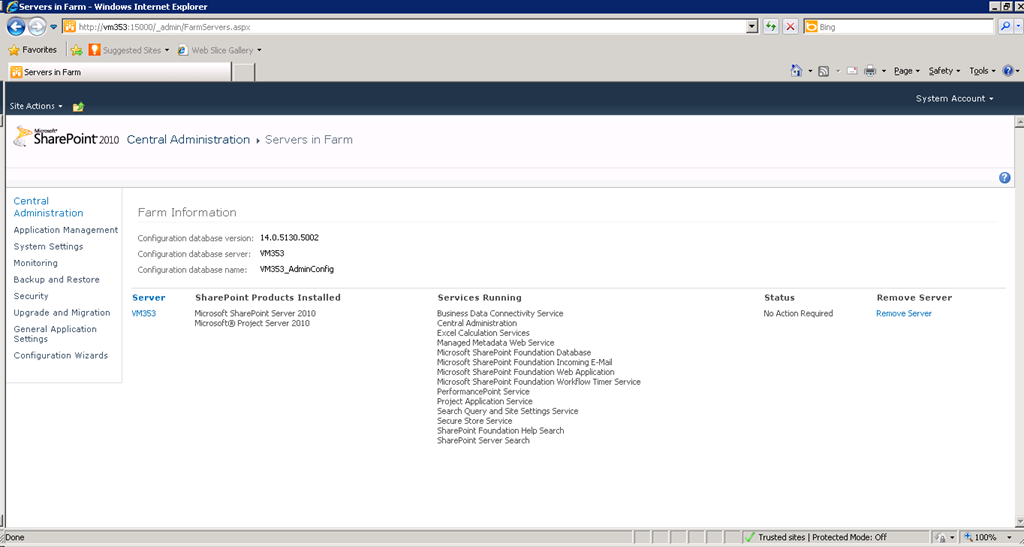
You can also check the SQL databases directly just running the query below:
select version
, ID
, UserName
, TimeStamp
from versions
Or if you want to see everything:
Select * from versions
This query can be executed against most of the SharePoint 2010 databases and all of the Project Server 2010 PWA databases. Worth noting is that not all SharePoint databases have a versions table, also not all of the versions tables get updated with every update, it usually depends if there is a schema update.

Some links to capacity planning tools and advice #in #SP2010 #PS2010 #ProjectServer #SharePoint #MSProject
Microsoft Guides:
Capacity management and sizing for SharePoint & Project Server 2010
http://technet.microsoft.com/en-us/library/cc261700(office.14).aspx
Software Boundaries and Limitations for SharePoint & Project Server 2010:
http://technet.microsoft.com/en-us/library/cc262787.aspx
Storage and SQL Server capacity planning and configuration (SharePoint & Project Server 2010):
http://technet.microsoft.com/en-us/library/cc298801(office.14).aspx
Further Resources & Links – SharePoint 2010:
http://technet.microsoft.com/en-us/sharepoint/ff601870
Further Resources & Links – Project Server 2010:
http://technet.microsoft.com/en-us/projectserver/ee263909
HP Tools
http://h20338.www2.hp.com/activeanswers/Secure/548230-0-0-0-121.html
Tihomir Ignatov Blog
Custom Excel spread sheet for sizing High Availability environments:
http://tihomirignatov.blogspot.com/2010/12/sharepoint-2010-capacity-planning-and.html
Choirul Amri Blog
Further storage considerations:
Microsoft Project Server 2010–Service Pack 1 released #in #SP2010 #SharePoint #MSProject #ProjectServer
And here is the SharePoint and Project Server 2010 Download and Detail Links.
Details:http://support.microsoft.com/kb/2460047
Download: http://www.microsoft.com/download/en/details.aspx?id=26636
FireFox compatibility for Tasks and Timesheet entry – woo hoo!
I have a client desperate for this, so shall be testing tomorrow.
Microsoft SharePoint 2010–Service Pack 1 released #in #SP2010 #SharePoint
Finally!!!
Details Here (Live soon I expect): http://support.microsoft.com/kb/2460045
Download Here: http://www.microsoft.com/download/en/details.aspx?id=26623
Happy downloading.
Microsoft Office 2010 Service Pack 1 released #in #SharePoint #SP2010 #MSProject #MSOffice #ProjectServer #PS2010
Quite a day for Microsoft today. Office 365 has been released!!! (This blog may be moving to Office 365 soon – you can see a preview here: http://ghamson.sharepoint.com)
It is expected that the SharePoint and Project Server 2010 updates will be released in a matter of minutes / hours.
And of course the Microsoft Office 2010 client suite service pack has just been released!
Download Links:
32-bit: http://www.microsoft.com/download/en/details.aspx?id=26622
64-bit: http://www.microsoft.com/download/en/details.aspx?id=26617
I will post again with SharePoint 2010 / Project Server 2010 Service Pack details as soon as possible.
Content Query Web Part–Debug XSLT Template #in #SP2010 #SharePoint
Something I always forget and scramble around to find:
<xsl:template name="Debug" match="Row[@Style=’Debug’]" mode="itemstyle">
<xsl:for-each select="@*">
Property Name: <xsl:value-of select="name()"/>
Value: <xsl:value-of select="." /> <br/>
</xsl:for-each>
</xsl:template>
Original blog post is here:
http://kharlesp.blogspot.com/2008/07/getting-all-values-to-debug-xsl-in.html
I will be posting more stuff on the blog soon. Things are a bit manic at the moment 

Auto height plain text box issue fixed in InfoPath / Form Services 2010 #in #SharePoint #SP2010
A quick post to say that the InfoPath / Form Service 2010 issue I was having at one of my clients has now been fixed and is included as part of the SharePoint 2010 – April 2011 Cumulative Update.
My description of the issue can be found here: https://ghamson.wordpress.com/2010/10/17/form-services-infopath-2010-bug-found-in-multi-line-plain-text-boxes/
Microsoft KB Articles
- InfoPath Hotfix: http://support.microsoft.com/kb/2516485
- Project Server 2010 – April 2011 CU: http://support.microsoft.com/kb/2512801
- SharePoint Server 2010 – April 2011 CU: http://support.microsoft.com/kb/2516485
- SharePoint Foundation 2010 – April 2011 CU: http://support.microsoft.com/kb/2512804
I would also like to take this opportunity to thank the Microsoft support and product teams in working with us to detail the issue and come to a resolution. We are testing the go live environment with April CU 2011 as I write this and the fix will dramatically improve the UI for the custom forms that we have developed.


 SharePoint (and Project Server) Shenanigans
You must be logged in to post a comment.