SharePoint its 1 step forward 2 steps backwards..
I was looking at a SharePoint 2010 farm recently to check out the Web-analytics reports and was quite shocked to not be able load the CA site I was simply getting a “Cannot connect to configuration database” error in the browser, and masses of Critical and Error warning messages in the WFE event logs, like the one below
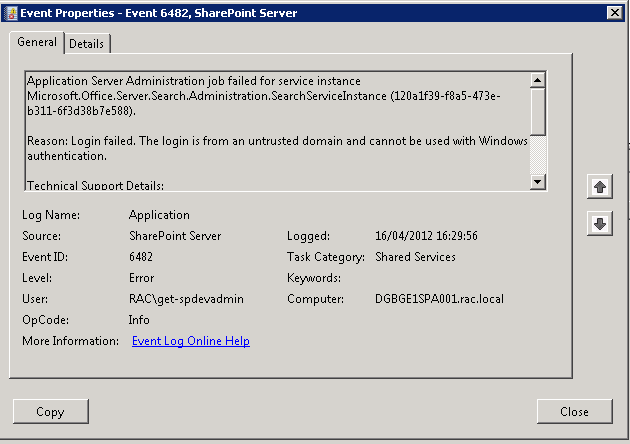
and mass of 17806 & 18452 SQL server errors in the application log on the SQL Server all for “untrusted domain” errors
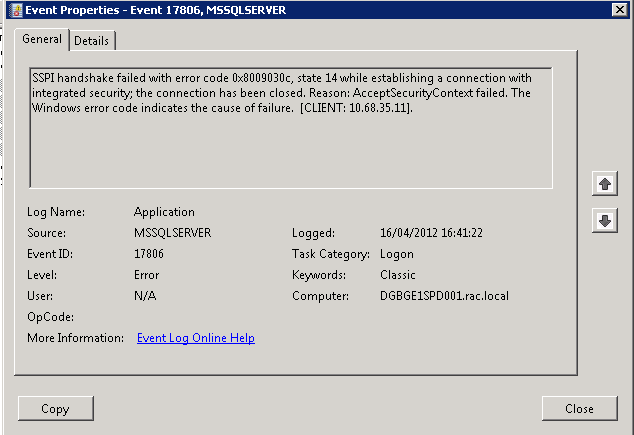
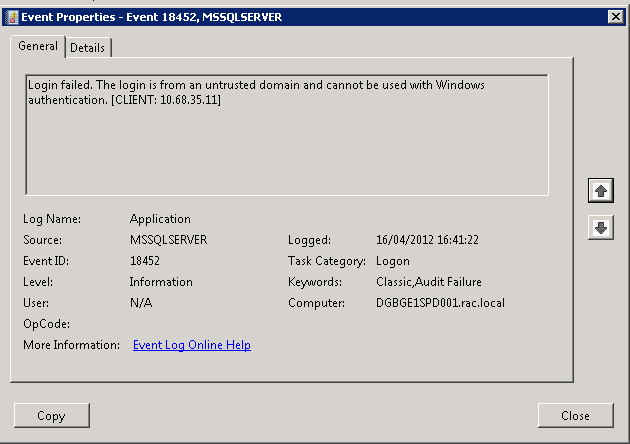
But strangely enough the Portal site on this farm was still running so the users were unaware.
After much head scratching and several hours later we realised that the password for the account running the CA web app, the Farm account , had expired.. ( one of my colleagues logged on to one of the WFE’s as the farm account was prompted to change its password).
Once we had resolved that issue (changed the password back to its previous value and set it to non expiring ), I could get on and look at Web-Analytics..

SharePoint and PDFs
Everyone knows that the Adobe PDF iFilter can be used to index PDF files, so I was quite surprised to look at an SP2010 farm last week that was only sometimes showing the PDF icon, and sometimes a blank icon.
Of course the solution to this was obvious, this farm had 2 WFE servers and the icon file and DOCICON.XML file had only been updated on one server, so a couple a minutes later everything was working once I had updated the 2nd server.
Here are the Microsoft instructions on how to install the PDF iFilter http://support.microsoft.com/kb/2293357
but personally I prefer the Nick Grattan instructions.
http://nickgrattan.wordpress.com/2010/06/14/adobe-pdf-ifilter-indexing-with-sharepoint%C2%A02010/

SPD 2010 Cannot insert this action #SP2010 #SharePoint #PS2010 #MSProject #ProjectServer #in
Just a quick blog to go over which features should be enabled for Approval tasks in SharePoint Designer 2010 Workflows.
Scenario:
Project Server – PWA. Workflow being created within a Project Site.
Features enabled at the site collection (PWA):
- Standard
- Enterprise
- Publishing
Features enabled at the site (PWA):
- Standard
- Enterprise
- Publishing
- Features enabled at the site (Project Site):
- Standard
- Enterprise
However, we were getting the following error appear when trying to use the “Start Approval Workflow” action:
Cannot insert this action. To use task process actions, the Office SharePoint Server Standard Site features must be enabled for this site by an administrator.
Interesting error message given that the Standard features were enabled at both the Site Collection and Site level.
On further inspection, it turns out (rather obviously) that the Workflow feature needs to be enabled at the Site Collection level.
It caught us out for a little while, but a quick Google and thanks to this MSDN Forum post, we got the result we needed:
Hopefully, this post helps somebody out.
SharePoint Patching and “Action Required”
The last 2 SharePoint 2010 systems I have looked at have displayed the “Action Required” status for one or more servers in the farm in the “Manage Servers in this Farm” page, which is normally caused by incorrect server patching.
When you apply a Service Pack or CU to your SP2010 farm, you are normally looking at performing a quite straight forward 3 stage process.
Stage 1: Obtain patch:
Download the latest Service Pack or CU from here:
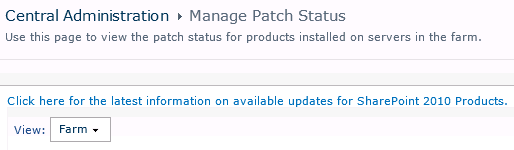
http://technet.microsoft.com/en-us/sharepoint/ff800847#LatestUpdates or use the “Use this page to view the latest patch status for products installed on servers in the farm” link on the CA site in Central Administration > Manage Patch Status
Stage 2: Install Patch
Once you have your Service Pack or CU, you will need to run it on each of the servers in your SharePoint Farm that has the SharePoint binaries installed, there is no special order to do this, but personally I like to run the patch on each WFE in turn, then on the application servers.
Once the patch has installed you will normally be prompted to run the Config wizard, if you are working on a single server farm, run the Config Wizard at this point, if you are working with a multi server farm cancel the Config Wizard and run the patch on each server on your farm.
Stage 3: Config Wizard
If you are running a single server system and have followed the instructions in stage 2, you should be finished. If you are running a multi-server farm you now need to run the Config Wizard to finalize the patch install. I like to run the wizard on the 1st server I patched and let it run to completion, then run the wizard on the rest of the servers in the farm, again there is no particular order to this but personally I like to run the wizard in the same order as I patched the servers, Once finished a quick reboot all round and we are done, and your status should be “No Action Required”


SQL Server 2012 beta exams are up #SharePoint #SP2010 #ProjectServer #PS2010
Here are CPS we are looking at our objectives for the next year and as part of this process we are looking at upcoming exams and certifications.
It would appear that 3 days ago the SQL Server 2012 exams have gone into Beta and you can try them out and provide feedback between now and April 13th.
Full details are on the link below:
Exam Overview:
|
Exam number |
|
Exam 70-461: Querying Microsoft SQL Server 2012 |
|
Exam 70-462: Administering Microsoft SQL Server 2012 Databases |
|
Exam 70-463: Implementing a Data Warehouse with Microsoft SQL Server 2012 |
|
Exam 70-464: Developing Microsoft SQL Server 2012 Databases |
|
Exam 70-465: Designing Database Solutions for Microsoft SQL Server 2012 |
|
Exam 70-466: Implementing Data Models and Reports with Microsoft SQL Server 2012 |
|
Exam 70-467: Designing Business Intelligence Solutions with Microsoft SQL Server 2012 |
Have fun and let me know how you get on!
** UPDATE **
We have now managed to get two exams booked, 70-466 and 70-467. Be quick though, spaces are limited and are going quickly.
** UPDATE 2 **
This post covers the specialisms in more detail:
http://www.jamesserra.com/archive/2012/03/sql-server-2012-new-certification-info/
In particular, the following details are key (Quoted from the above blog):
The seven exams for SQL Server 2012 are:
- Querying Microsoft SQL Server 2012 (70-461) [BI and DP] (info) (course)
- Administering Microsoft SQL Server 2012 Databases (70-462) [BI and DP] (info) (course)
- Implementing a Data Warehouse with Microsoft SQL Server 2012 (70-463) [BI and DP] (info) (course)
- Developing Microsoft SQL Server 2012 Databases (70-464) [DP] (info) (course)
- Designing Database Solutions for Microsoft SQL Server 2012 (70-465) [DP] (info)
- Implementing Data Models and Reports with Microsoft SQL Server 2012 (70-466) [BI] (info) (course)
- Designing Business Intelligence Solutions with Microsoft SQL Server 2012 (70-467) [BI] (info)
I have indicated which certification (“Business Intelligence” [BI] or “Data Platform” [DP]) each exam fits into).
So if you have the three MCITP certifications (Business Intelligence Developer, Database Administrator 2008, and Database Developer 2008) and want to get both the Business Intelligence certification and the Data Platform certification, you will need to take five of the seven exams (all but 70-461 and 70-462).
#MSPC12 Day Two and Three Further Sessions, Networking and Outer Space! #MSProject #ProjectServer
So on to the last two days of the conference…
Keynote Day Two
Initially Chris Crane discussed further how important partners are to the Microsoft Project eco-system.
Then Ludovic Hauduc, General Manager of the Project Business at Microsoft (Who has been involved with Project since 1994) discussed how he has moved from developer to his current role and how Microsoft themselves use Project, Project Server and its Portfolio Management capabilities to manage the future development of the product.
As part of his speech, he highlighted that Portfolio Management within EPM solutions was once seen as a technique for those with high project and portfolio maturity, causing an ivory tower affect. Now, however with Project Server 2010, Microsoft has successfully brought this functionality to the masses in an easy to use interface improving the maturity, focus and success of project run on the SharePoint and Project Server 2010 platform.
Other parts of the presentation discussed the ease of use connecting Microsoft Project 2010 to the cloud with Office 365. This was demonstrated to the audience…

Keynote Day 2 – Office 365 integration with Project 2010
(featuring Christophe Fiessinger as the “Geek”)
Sessions Attended
Wednesday
- Beyond the Basics: Business Intelligence Reports
- Take Your Project Reporting To The Next Level: Dashboards And Other Tools
- Cloud Bursting Techniques with SharePoint Online
Thursday
- UMT Project Essentials Pro – Effectively deploy a best practice Financial Governance framework for Project Server 2010
- Building advanced Project Server workflows with Nintex Workflow for Project Server
- Extending and Customizing the Project Server 2010 Timesheet to Drive Adoption and Achieve Business Results
A big thank you to all the presenters, the sessions were excellent. I will definitely be downloading them for future reference.
Evening Events
On the Wednesday evening of the conference, Microsoft and Shark Pro software fired out the Arizona Space Center for the evening 

My colleagues and I enjoyed the even very much, playing with all the experiments throughout the place including going into the planetarium
Overall the Project Conference was a massive success and I hope to be attending the next one!

Why a picture is worth 1000 words
I have recently been working with a colleague on a new client implementation, putting together some options for a farm design. We came up with three different options, all with differing server layouts and SQL configurations. Trying to articulate these designs to a non technical audience can be almost as challenging as building the final solution, if you are with the client you can always sketch out your ideas on a whiteboard or flipchart, but documenting your design for a distributed audience is always a problem.
This is when Visio comes to your aid, Microsoft have some specific Visio shapes available for SharePoint and Project Server.
You can download the shapes from here http://www.microsoft.com/download/en/details.aspx?id=21480
These allow you to create your own TechNet style diagrams for SharePoint, below is an example I made earlier…


Key takeaways and useful links from the #PC324 #MSPC12 integrating #SP2010 and #PS2010 presentation
For those who attended my presentation yesterday and of course anyone else who is interested, here are the key takeaways and further reading links from the session:

Further Reading:
Project Server Capacity Planning:
Plan Browser Compatibility:
Reporting with Project Server 2010:
- And if you attended my session and haven’t done so already, please fill out the Session Evaluation via the MyPC portal. All feedback is welcome.

#MSPC12 Experiences Day One and the CPS presentations #PC324 #PC301
I’m sitting in my hotel room right now totally buzzing from the day I have just experienced at the Microsoft Project Conference 2012.
A whole host of emotions and states have run through from nerves and waking up at 3am this morning to joy and more academic interest in the sessions that I have attended today.
Nerves? you may ask. Well you see today was my first ever presentation to an audience at a conference! Now I am a consultant by trade and do presentations at clients all the time.
We even run seminars, where I am backed by sales people and colleagues from my company.
But this is different. This is the Microsoft Project Conference!
It runs every three years. I have been preparing for months with dry run after dry run. Presentation tweaks left, right and centre.
So how did it go you may be wondering… Well I will come to that later…
Initially there was breakfast…
Phil, Sacha, Chris and myself sitting in the conference centre wearing our speaker shirts feeling tense about our mission ahead.
Philip Stanbury-Jones (ARM)

Giles Hamson (CPS)

The Keynote
First up was the Microsoft Project Conference key note.
DJ at the beginning of the session really brining the vibe of the conference build up to a head.
Discussions about the focus areas of SharePoint and Project Server 2010 including an excellent demo involving Project Server 2010, Portfolio Management, Windows 8 (On a Samsung slate), MS Project 2010, iPhones in one seamless demo!
Videos on successful implementations at Revlon
Further details can be found on Chris Crane’s blog post (link) and for the time being the Microsoft News Center has links to case studies, videos etc… here:

Presentations I attended
So after the keynote all 1,200 attendees of the conference filtered to their chosen sessions. My chosen sessions were:
- EPM@EPA: Accelerating Maturity in the Cloud – Richard Warren (U.S. Environmental Protection Agency)
- Practical TFS and Project Server integration in mid size enterprise – Piotr Prussak, Richard Ng (Revlon)
Both excellent presentations and case studies of real world applications of core Project Server functionality with integration of other key Microsoft technologies such as Report Services, Private Cloud Technologies with Project Hosts and Visual Studio 2010 – Team Foundation Server.
Then at 15:15
Both presentations sponsored by my company, Corporate Project Solutions started: Philip Stanbury-Jones
8 Billion Reasons Why ARM Chose Project Server 2010 (#PC301)
A good attendance and well received presentation detailing the project I have been working on for the last 2 years integrating Project Server 2010, SharePoint Server 2010 and Reporting Services 2008 R2 with other LOB applications such as SAP and other internal tools.
This presentation discussed the business benefits of the approach taken.

#PC301 feedback on Twitter
Giles Hamson
Integration SharePoint and Project Server 2010 – Deployment Approaches, Integration Options and Making the Most of the Enterprise Features (#PC324)
As for my session… attendance was excellent, audience appeared to be engaged with questions throughout the session and lots of questions at the end.
I was so excited, I had to take a picture…

#PC324 Audience
The session, related to Phil’s presentation, discusses a more high level view on deployment approaches, pros and cons, some gotchas and examples of Enterprise features to really leverage the power of the SharePoint and Project Server 2010 platform.

Many of these experiences were learnt on implementing the solution discussed in Phil’s presentation, so I urge you to seek you the details at the MS Project Conference 2010 website.
The Wrap Up
So to finish the day, we attended the ClubPC event for networking, socialising and generally calming down from the excitement of the sessions before a group of us split off to eat at the prestigious Hyatt revolving restaurant.

Excellent food, great company.

#MSPC12 Experiences–Day Zero #MSProject #ProjectServer #PC301 #PC324
So I am sitting here in the Conference on the 1st day of the event and it has been so busy that this is the first chance I have had to write about my experiences.
Now this is the first conference I have been to where Microsoft Project and Project Server is the primary subject matter and of course I am here on behalf of my company (CPS).
You may be wondering what I mean by: Day Zero.
Well as part of being a Microsoft Partner with a Gold Competency in Project and Portfolio Management and one of the leading PPM partners in the UK we get involved in the various Microsoft meetings etc… One of which is a partner appreciation pre-day to get everyone deep into Project Server together to discuss key ideas and network.
Community Recognition
Now I have been running this blog for a while now (October 2010 if I recall), but I am also a consultant by trade, so I am busy all the time and never quite know the impact of what I am putting out into the world.
Sure there are comments and I help a few peeps. I can see daily stats which look fairly healthy, but to truly know whether you are connecting to the community; coming to an event like the Microsoft Project Conference 2012 has really hit it home that I am reaching my intended audience.
Face to face:
I walk into the partner pre-day and grab a coffee before the session starts and Andrew Lewinsky (UMT) comes up to me and says “Giles, nice to meet you, I’m …”.
Now I have never met or spoken to him in my life, but I of course know who he is. Project MVP, works for UMT and most importantly the author of the white paper Reporting with Project Server 2010.
Not only am I recognised, but so is my company and other fellow blogger colleagues also: “Is Paul Mather here also, he keeps beating me to the punch on the MSDN forums, but his responses are sooooo good…”
Another highlight is being recognised by Christophe Fiessinger, including being mentioned in his presentation:

Christophe on stage discussing the importance of community

Focusing on the importance of PowerShell (post by Paul Mather)
Now I won’t go into the details of the Partner Appreciation Day but I would like to thank the Microsoft Project team including Jan Kalis and Christophe Fiessinger for all the arrangements, it was a useful day which I took a lot from.
I will create further posts with my further experiences of the conference with myself, Sacha Cohn (@sachacohn), Chris Pond (@ccpond) and my client Philip Stanbury-Jones including an update on how Phil and my presentations go today.
Presentations start at 15:15:
- Philip Stanbury-Jones – 8 Billion Reasons Why ARM Chose Project Server 2010 (#PC301)
- Giles Hamson – Integration SharePoint and Project Server 2010 – Deployment Approaches, Integration Options and Making the Most of the Enterprise Features (#PC324)
If you are reading this from the conference and see me, come and introduce yourself 
Have fun!


 SharePoint (and Project Server) Shenanigans
You must be logged in to post a comment.