Archive
InfoPath 2010 People picker control
New with InfoPath 2010 is a People Picker control, this acts like the People Picker in SharePoint and allows you to choose contacts from AD.


I was using this control recently and wanted to promote the chosen person value to a list when the form is submitted, to my surprise I found that the submitted value was just a text value, not a presence aware name, so had none of the rich integration that OCS or Lync offers.

To get around this drawback I had to write a small workflow that fired when the form was submitted.

The workflow read the list value into a variable and then wrote it back to another column in the same list, but was key was to make the return field data type an Email Address.

Now we have a presence aware Name value.

Writing History events from a SharePoint designer Workflow
Most SharePoint 2010 solutions will have some form of workflow associated with them.
Workflows written in SharePoint designer can be powerful, but tricky to troubleshoot if they do not work correctly.
Some workflows will complete but not perform as expected, and some will simply fail with the ever helpful An error has occurred in <Workflow Name> written to the history list.
To help us out with this is the Log to History List core action in our workflow designer Action List.

This allows us to write a message to the workflow history, and as such we could write back the value of a workflow parameter or variable that we can check on.
To illustrate this I have written a one step workflow with one Variable and one Parameter, the workflow has an Initiation Form that allows a user to select a colour.

We set the variable varColour to be the value of the colour the user selected which is stored in the parameter ParamColour , on the second line we use the Log to History List to output the value of varColour to the workflow history.

This is what it looks like, firstly we choose a colour from the Initiation Form

The workflow processes and completes, when we check the History list we can see that our message and the value of varColour have been recorded in the Workflow History list

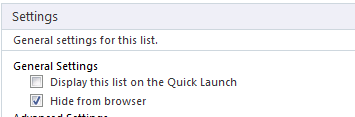
Normally the Workflow History list is hidden from the browser, but you can change this setting in SharePoint Designer.

Excel Services Problem. “An unexpected error has occurred”
I was recently asked to look at an Excel Services problem, where rather then a spreadsheet opening in the browser we were getting the ever helpful “An unexpected error has occurred” screen.
Checking in CA the Excel Services service application seemed to be provisioned, the settings seemed okay and the service was running, a quick check in Windows event log soon found the problem
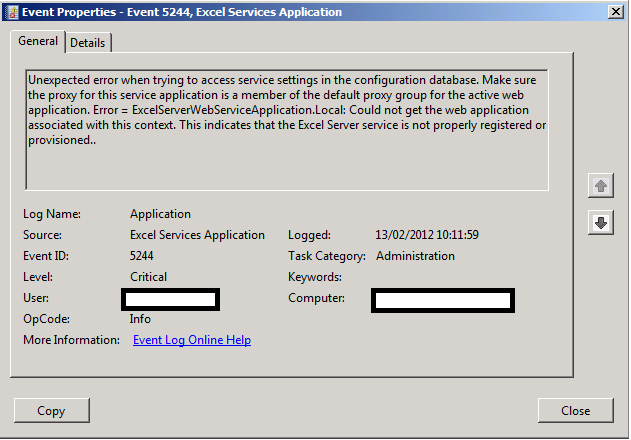
The service application was not registered with the default web application.

As soon as we set the association, Excel Services sprang into life

Missing Server Side Dependencies–Useful links for diagnosis and removal #SP2010 #PS2010 #SharePoint #ProjectServer #in
Some quick links to help diagnose the “Missing server side dependencies” errors from the health check analyzer in SharePoint 2010.
Helps remove features via a GUI interface (be careful with this tool!)
- MissingFeature Codeplex Solution: http://featureadmin.codeplex.com/
Removes feature dependencies from the database via PowerShell (be care with this script!)
- MissingFeature Removal PowerShell: http://get-spscripts.com/2011/06/removing-features-from-content-database.html
Once you have removed the dependencies, re-run the health check analyzer for the “Missing server side dependencies” rule and you may have some residual files to clean up in the content database.
Use the following PowerShell scripts to analyse the location of the files and then you can clear them up appropriately:
- Missing WebPart Diagnose: http://get-spscripts.com/2011/08/diagnose-missingwebpart-and.html
- Missing Assembly Diagnose: http://get-spscripts.com/2011/08/diagnose-missingwebpart-and.html
- MissingSetupFile Diagnose: http://get-spscripts.com/2011/06/diagnosing-missingsetupfile-issues-from.html

I’m speaking at Project Conference 2012 – Integrating #SP2010 and #PS2010 #PC12 #SharePoint #ProjectServer #in
Apologies for the lack of updates on the blog, the Christmas / New Year holidays have been really busy. Anyway, just a quick blog post to announce that I will be presenting at this years Microsoft Project Conference in Phoenix, Arizona in March this year.
 |
|
| My Company: Corporate Project Solutions |

If you are attending the conference and you would like to meet up, just let me know. You can contact me here.
Further Details:
Session Title: Integrating SharePoint and Project Server 2010 – Deployment Approaches, Integration Options and making the most of the SharePoint Enterprise Features.
Track: Deployment, Administration & Developer
Level: 300
Audience: IT Professionals, Developers & Consultants
Products: Project Server 2010 & SharePoint 2010
Now that Project Server 2010 is built on top of SharePoint 2010 Enterprise, a new series of options are available with various choices around implementation.
Although integration was possible between Microsoft Office SharePoint Server 2007 Enterprise and Project Server 2007, this was not seen as a standard implementation for many companies and those implementing this approach were defining the rules.
Corporate Project Solutions is one such company who have been taking advantage of these SharePoint Enterprise Features for companies such as ID Business Solutions and ARM to deliver tight integration along with Business Intelligence (self-service dashboards), Document Management and Collaboration.
Solutions created with this approach provide a level of visibility and collaboration previously unseen by these clients and genuinely provide business value for all stakeholders and management / reporting lines.
As a Senior SharePoint Architect who has moved into the Project Server arena in the last 3 years, I initially made many assumptions in the way Project Server works based on the fact it was built on top of SharePoint. This presentation discusses the deployment approaches / configurations of programme and project sites. It outlines 4 options, how they support business intelligence and the pros / cons of each implementation in relation to the project management maturity of the client.
However, during trialling of various implementation approaches, CPS has found a number of pitfalls that do not conform to what is encountered in a SharePoint-only implementation. This demonstration discusses some key difficulties and how to provide a solution that is in accordance with Microsoft best practice and supportable.
Section One – Implementation approach definitions:
Option 1 – Out of the box Project Web Access and Project Sites
Option 2 – Project Web Access as installed with Project Sites customised outside of the standard Project Server 2010 configuration
- Allow custom styles to be applied
- Full use of Search capabilities
- Site Content Types can be utilised to centrally control key lists such as Risks, Issues, Actions and Deliverables
- Workflows can be attached and rolled out by Content Type
- Lists can be updated whilst projects are in-flight centrally as project management maturity evolves.
Option 3 – Project Web Access as installed with centralised lists for all projects / programmes
- Allows all dashboards to be kept in sync as project maturity evolves
- Project and programme roll up dashboards can be implemented using standard out of the box list views and filter web parts (Enterprise Feature)
- Business intelligence reporting becomes easier due to all lists being in sync for all projects / programmes o Reporting is always comparing apples with apples.
However, depending on the approach taken various pitfalls need to be taken into account such as loss of client / server integration features between the Project client and Project Server, cross project security etc.…
A demonstration of each option will show the power and pitfalls of each approach as they are discussed during the presentation.
Section Two: Maintaining consistency and integrity between SharePoint and Project Server
The focus here will move to customisation options using Enterprise Features, taking account of Microsoft best practice.
Examples include:
PSI Web Service integration
- Resource Synchronisation between ERP and Project Server solutions
Project Server Event Handlers
- Linking tasks to SharePoint data and keeping them in sync via Project Server Event Handler
Business Intelligence
- Reporting Services in SharePoint Integration mode and SharePoint Enterprise filters for parameters.
- Complementing the standard BI options of Excel Services & PerformancePoint provided as part of the out of the box Business Intelligence Center site template.
Look and Feel customisation
- Customising the look and feel and adding jQuery to Project Web Access whilst maintaining best practice and supportability. (I.E. Without modifying the Master Page, Page Layouts or using SharePoint Designer)
Section Three: Breaking the rules – discussing key differences between Project Server and SharePoint and how they can be overcome.
For the final section of the presentation, we shall discuss how Project Server doesn’t conform to the techniques that SharePoint consultants use during implementations:
- User Profile Service versus the Resource Pool
- Permission Model
- Project Server vs. SharePoint – Browser compatibility comparisons
- List content types vs. Site Content Types
- Attaching workflows to Risks and Issues
Conclusions
In finish off we shall tie the three separate sections together to discuss end-to-end implementations utilising the most appropriate features of SharePoint and Project Server allowing clients to achieve the best possible solution with the options available.

Feedback from the few sessions I attended at Sharepoint Saturday UK, 12th Nov 2011
As Giles Hamson mentioned I too went to the “Sharepoint Saturday” meet-up in Nottingham for the first time. Since I was on a course this week and driving 3 hours every day I didn’t get much chance to give my feedback, so with a lot of delay here are my personal notes I jotted down in mymemory.
To my surprise, or just because I didn’t actually read the Sharepoint Saturday website much when I registered, I was amazed by the venue, the quality of the speakers (a lot US citizens Sharepoint faces coming just for the occasion) and the attendance. I thought not many professionals would sacrifice a Saturday to come and “think Sharepoint” since I know I was in that case last year but indeed it was quite a success, not a full room in the opening keynote but still a good number, a few bloggers have already reported about the event and a lot of noise on Twitter too, so this one is extra.
To my experience for having attended 2 Sharepoint Best-Practice conferences in London, once as a guest and once as a vendor, Sharepoint Saturday is very similar except that it’s free !
The quantity of knowledge session after session is very intense and if we had a way of attending 2 rooms at the same time it would be quite useful, like a download of information into our brain. Actually there kind of is a way to attend 2 sessions in 1… if you read the Twitter post of next room while listening to your room, but it is quite tiring.
The other point of such event is purely to take the opportunity of networking with the Sharepoint community in the UK and internationally, it’s rare to have people involved into Sharepoint, the ones who blog and write books under the same roof.
The reality is that meeting this close-knit Sharepoint community in real life in just one day does not give much time but it helps to put a face and personality behind a name or nickname when engaging each other on twitter and reading blogs.
Right, so now for the content and what I gathered from that day:
9:15. Silverlight vs. html5: Becky Isserman
This session was a demo of how to create a very basic project in Silverlight and the same in HTML5, but it was really a discussion with Becky and the attendees about the feeling around chosing either platform for development. The conclusion was a BIG “no idea”, “we don’t know” “Microsoft didn’t tell us anything”. So not very useful except to confirm our feeling of uncertainty.
Note to self :
- HTML5 = still no Microsoft tool so use Adobe Edge (alpha),
- Silverlight = Microsoft Expression Blend as before.
10:20. Customizing the SharePoint Packaging and Deployment Process in Visual Studio 2010: Eric Schupps
I am not a Visual Studio developer since I usually design an application, write my views on what a webparts, event handler or piece of custom-code should do, then the developer would write the managed code and deliver me the packaged solutions to deploy on a Sharepoint environment. However I occasionally have to organise the solutions, re-factor a bit of code or add comments and re-compile and I recently also had to write a few SSRS reports in VS Business Intelligence therefore I needed to make sure I was in sync with other’s Sharepoint professionals’ way of packaging Sharepoint solutions.
- CKS.DEV
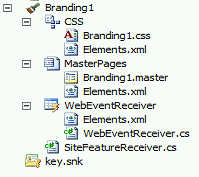
One main thing I did not know for not having developed in VS recently and will now add it to priority number 1 when opening Visual Studio 2010 on Sharepoint: install CKSDev, this will add additional tools for SharePoint into your Visual Studio. For instance a very useful Project Item is “Branding” which create master page, CSS and layout page, which will all be activated as a feature when deployed:
- What changed in deploying Solution to Sharepoint?
A must have as well is Powertool for 2010 to get additional tools for SharePoint.
Production deployment has not changed: give a WSP and deploy it via Powershell (or stsadm)
Development deployment has changed dramatically, to take advantage of sandboxed solution we can deploy directly Visual Studio to Sharepoint.
Pay attention at the option “view deployment configuration” in Visual Studio solution properties which allows us to configure all the steps that to be done at deployment time.
11:45. How we did it (about branding ) : Matt Hughes
- Download a custom masterpage and CSS from the community, some include comments and disable some feature by default which is useful for starting small and re-enabling features as needed.
example : http://freespmp.codeplex.com by Matt, or http://startermasterpages.codeplex.comby Randy Drisgill - One CSS class to note that I didn’t use : “S2-notdlg” anything within this class will not show in a Sharepoint modal dialog box, to use if we have a control to show everywhere but not duplicate its display in the dialog boxes.
Matt’ session was really interesting as a subject but I didn’t learn much except that it confirmed my experience in doing Sharepoint branding as he and Sam have had the same issues I had.
It was a little bit strange to focus on Matt’s face while he spoke, check the pic below, Movember Sharepoint style.

13:45. Why are we developing? : Nigel Price
I chose this session to check what others are doing Out-Of-The-Box in Sharepoint as opposed to building custom controls and webparts to reach business expectations. This is a rather vast subject because more often than not, my clients come to me and think that Sharepoint can do everything they want without the help of .net developers. The other side of the balance is that being a Sharepoint consultant I need to make sure that sites I design are not too far from Sharepoint architecture so that they will migrate easily and “anyone” (ie not developer) can maintain them, bringing a lot of out-of-the-box tools.
Again I mainly comforted what I usually do which is “Try OOB before going for managed code”, Nigel’s bullet list for “when do we have to develop” is :
- Need to action something with elevated privileges
- Use of an authentication mechanism outside AD
- LOB integration (BCS..)
- Write event receivers
- Custom Search protocol (if custom iFilter)
- Code repository, i.e. source versioning
15:00. Why branding intranet ? Gus Fraser (SharePoint 2010 Intranet Branding for Developers)
As we all know the main reason for branding an intranet site is so that it doesn’t look like SharePoint. This has been the subject of lots of discussion in the past weeks and surely will not end. Although my role is to advise my client in the concept of branding Sharepoint and why they should not remove all “Sharepoint-looking” features very often I just have to follow what the client’s creative agency (who never used Sharepoint) dictates.
Notes:
- Use prototyping tool like Balsamic more. specially that Balsamic includes “mockups to go” ribbons.

- Again : use Visual Studio 2010 CKSDev which includes branding item.
- Use control adapters.
- Use CSSReset by Kyle Schaeffer, which is a CSS to literally “reset” the existing style in Sharepoint 2010 so that we can start styling them as we want.
- Use ieTester tool to test your site with various IE versions
- Options in the Sharepoint Ribbon barre can be removed using Custom Action. Gus’ code to remove the font style option for instance can be downloaded here.
- Other link about branding in the pic below

Conclusion

Created by the #SharePoint community – The SharePoint 2010 Handbook #SP2010 #ProjectServer #MSProject #SPSUK #SUGUK #in
** UPDATE ** Thank you for the overwhelming feedback, A Kindle version of the book is in the works and we will keep you posted.
Back in June 2011 Paul Beck asked the community for authors to contribute to a community book on SharePoint 2010 (original post). Various authors have stepped up to the plate and the book has now been released. So without further ado…
A Collection of Short Chapters for Delivering Successful SharePoint Projects
 The SharePoint 2010 Handbook aims to explain some of the key topics of SharePoint 2010 as well as to broaden the understanding of SharePoint so that its full business effectiveness might be better exploited. Each topic has been written as a separate chapter by different authors, each drawing on their own real world experience.
Publication Date: 7th November 2011
ISBN/EAN13: 1466486740 / 9781466486744
Page Count: 448
Binding Type: US Trade Paper
Trim Size: 5″ x 8″
Language: English
Colour: Black and White
Related Categories: Computers / Documentation & Technical Writing

Authors & Chapter Titles:
- 01. Structuring a SharePoint 2010 Practice (John Timney)
- 02. SharePoint Test Environments (Justin Meadows)
- 03. SharePoint Adoption (Veronique Palmer)
- 04. Social SharePoint (Jasper Oosterveld)
- 05. The Art of SharePoint Success (Symon Garfield)
- 06. Exploring Different Options for Implementing SharePoint Solutions (Rene Modery)
- 07. SharePoint Server-based Data Storage and Data Access (Paul Beck)
- 08. SharePoint 2010 Automated Code Deployment (Suzanne George)
- 09. SharePoint Security and Authentication Notes (Conrad Grobler)
- 10. InfoPath 2010 – What is new? (Ashraf Islam)
- 11. Governance in SharePoint (John Stover)
- 12. Creating Dashboards using Business Connectivity Services, SharePoint Designer and other related technologies (Giles Hamson)
- 13. Building Business Intelligence Solutions with SharePoint 2010 (Mark Macrae)
Chapter Descriptions:
01. Structuring a SharePoint 2010 Practice (John Timney)
SharePoint 2010 is simply put, nothing like SharePoint 2007! It is vastly more scalable, significantly more complex, and hugely appealing as an information management hub. A consequence of the successful re-architecture of the product to such a strategic hub product and the core of the Microsoft tools strategy is that programmes and projects, and consequently employers and recruiters need to think carefully about the new range of planning roles and skill sets required to satisfy a successful end to end delivery of SharePoint 2010. This chapter will show the reader how (and equally as important why) to correctly structure a SharePoint Practice or programme of delivery to plan for internal career progression and assist with staff retention and to identify and exploit the correct roles to staff modern demanding SharePoint 2010 delivery programmes.
02. SharePoint Test Environments (Justin Meadows)
Test environments for most IT professionals are a no-brainer — major system changes should be tested once, twice, even three times to provide the best possible experience to end users with little to no interruption in service. Recent virtualization technologies have made this easier than ever; one only needs to spin-up a new instance of a virtual machine and off they go with an entire SharePoint environment at their disposal.
SharePoint administrators will painfully learn, however, that this testing model doesn’t adapt well to the componentized structure underlying a well-built SharePoint system. This chapter will make the case for building and maintaining a fully-scaled test environment that is architecturally similar to an organization’s production environment.
It will support this recommendation with lessons learned from the authors personal experience administering a small SharePoint farm. This case can be argued further to include more than one test environment. If an organization chooses to develop solutions for SharePoint they should consider building in one environment, certifying the build in another test environment, and then implementing the solution in the production environment.
Using one or more fully-scaled test environments is the only way to understand the implications of a major system change. They also provide a mechanism for rehearsing these system changes. With such a tool at their disposal, SharePoint administrators can maintain and administer their systems with confidence.
03. SharePoint Adoption (Veronique Palmer)
There is a common misconception that merely installing SharePoint makes for a successful implementation. It is how the people in the company effectively adopt the solution that is the true measure of success. Have you asked yourself how you will get people to use the solution?
Anyone can cope when there is only one table booked in a restaurant; but what happens when you are booked to capacity with a waiting list – are you geared to cope with that demand? What if you get no bookings at all? Could you explain to your investors why no-one is visiting?
SharePoint user adoption is about how to get to a full house, how to be prepared for the rush, and how to manage it once it happens. People will not magically adopt SharePoint, there are measures you need to put into place to ensure that happens. If this is done correctly, you will have a very high adoption rate and consequently good return on investment for the capital outlay of the infrastructure.
This chapter will cover what you need to do in order to achieve that.
04. Social SharePoint (Jasper Oosterveld)
The word ‘Social’ has become a very popular term over the last couple of years. Everyone is familiar with Facebook, Twitter and YouTube. These so-called Social sites attract (hundreds) millions of visitors per day! So how does this translate to SharePoint 2010? What Social features are available? Social features were also available (albeit limitedly) in the previous version Microsoft Office SharePoint Server 2007 (MOSS 2007).
The main feature was the My Site. This site is a personal page for every user within a SharePoint Intranet portal. The user was able to provide valuable information for colleagues, such as a mobile number, e-mail address, manager or skills. Other users were able to use the MOSS 2007 search engine to find a colleague with the skill ‘Writing marketing material’, for example. By using these features, users were able to connect and share information with each other.
This has been improved in SharePoint 2010 and loads of new features are now available. This chapter describes these features, and how they can improve the collaboration within your organisation. Talking points covered include My Sites, Tags and Notes, Ratings and Social Search. Most importantly, the author addresses how they are all connected and what advantages they provide for companies.
05. The Art of SharePoint Success (Symon Garfield)
Microsoft SharePoint products and technologies have been in the market for ten years the fourth version, SharePoint 2010, was released in November 2009. There is no doubt that SharePoint is a phenomenal success: It is Microsoft’s fastest selling server based product ever and has generated approaching two billion dollars in sales revenue for Microsoft. The only other Microsoft Server products to generate this level of revenue are SQL Server and Exchange Server, and SharePoint has reached this milestone more quickly than the others.
There have been over one hundred million SharePoint licenses have been sold worldwide and I.T. industry analysts such as Forrester Research and Gartner rank SharePoint as a leader in a number of different technology markets including Search, Enterprise Content Management, Social Computing, Collaboration, Information Access and Horizontal Portals.
SharePoint will be at the heart of Microsoft’s information worker strategy for many years to come. Yet despite its market success many organisations seem to struggle to realise the full value from investments in SharePoint products and technologies. In 2010 AIIM survey found that forty seven percent of organisations that have deployed SharePoint use it primarily as a file share. In May 2011 research commissioned by Fujitsu shows that SharePoint is the most common collaboration tool used by UK businesses, Ninety two percent of Enterprise organisations using collaboration technology use SharePoint. But the research also shows that on average only sixty percent of SharePoint sites are considered active, and forty percent of IT managers don’t believe that the collaboration platform is driving cost savings.
This chapter first explores the challenges facing organisations investing in SharePoint based initiatives, and then presents a framework for success consisting of four elements; Governance, Strategy, Transition, and Architecture. Governance relates to defining the accountability for the ensuring a return on the investment in SharePoint. Strategy discusses how SharePoint relates to organisational objectives. Transition considers the challenges of organisational change and user adoption and Architecture relates to the way that SharePoint is deployed to the business as a set of distinct but inter-related services.
06. Exploring Different Options for Implementing SharePoint Solutions (Rene Modery)
An important decision to make while planning the implementation of any SharePoint solution is how exactly it should be created. Two commonly used options are leveraging the out of the box available functionality through customization in the browser and development of solutions using custom code.
SharePoint’s out of the box functionality empowers end users to create simple solutions with little effort and in a short time frame, however with a limited customization scope. Development of custom code solutions provides the most flexibility, however at a higher cost in terms of complexity and resource requirements. Another option is to extend the standard SharePoint functionality with customizations that make use of JavaScript and the Data View Web Part.
Using JavaScript has become a very popular way of extending SharePoint without having to rely on custom code. It allows users with some basic development knowledge to create their own more advanced solutions easily.
Considering all these possibilities, when evaluating the correct course to take for a solution implementation, organizations need to take into account the pros and cons of the different approaches, and weigh them against each other.
This chapter will compare these approaches with each other and describe the capabilities, as well as the benefits and the drawbacks of each approach, allowing a decision maker to better understand which method is useful in which situation and choose the best option.
07. SharePoint Server-based Data Storage and Data Access (Paul Beck)
This chapter guides readers through the basic storage and data access options available in SharePoint 2010 application development projects. The matching of application business requirements with the appropriate storage and data access technique is vital for achieving a successful project.
08. SharePoint 2010 Automated Code Deployment (Suzanne George)
During the past several years SharePoint has quickly become one of the leading collaboration technologies. Businesses today are taking the SharePoint framework from the development labs into mission critical production environments which require application high availability. This chapter will describe methods and concepts which will ensure you will be able to build and deploy custom code into Intranet and/or Internet facing production farm(s) using Visual Studio 2010, Team Foundation Server 2010, and SharePoint 2010. Further, a description of the concepts and tools necessary to ensure code consistency throughout the development lifecycle will be included.
SharePoint Internet facing sites often have additional requirements, network bottlenecks, and limited downtime constraints which make deploying code from the development arena through QA/staging, and finally into production SharePoint farms more restrictive. The new capabilities provided in Visual Studio 2010, Team Foundation Server 2010, and SharePoint 2010 make this process much easier than before.
This chapter will provide examples for all flavours of deployments (timer jobs, page layouts, web parts, etc.) so you don’t have to learn as you go! You’ll get an in-depth look at how these tools can help you successfully deploy code into production SharePoint 2010 farms.
09. SharePoint Security and Authentication Notes (Conrad Grobler)
SharePoint 2010 provides different options for authentication of users as well as authentication to external line-of-business systems. During the design and implementation of a SharePoint 2010 solution, the chosen authentication method could impact or restrict the availability of some SharePoint functionality and the options for interacting with external systems.
This chapter will discuss the different options and architectural considerations for user authentication and for authenticating to external systems. It will cover classic mode authentication and claims based authentication. It will cover NTLM, Kerberos, Clear Text Authentication, Forms Based Authentication and Trusted Claims Providers, the Claims to Windows Token Service and the Secure Store Service Application. It will also give a brief overview of options for exposing
SharePoint 2010 sites securely across the Internet, such as using Microsoft Forefront Threat Management Gateway, and the implications of doing this and how to ensure the security of business data exposed using SharePoint.
The chapter will provide information on configuring and troubleshooting the authentication options such as Kerberos, Clear Text and Forms Based Authentication, the differences between the SharePoint 2010 FBA implementation and ASP.Net forms authentication and the implications for interoperability between SharePoint and ASP.net applications. It will also provide information on the limitations of certain functionality (such as search based alerts and the people picker) for Forms Based Authentication and Trusted Claims providers.
10. InfoPath 2010 – What is new? (Ashraf Islam)
This chapter is dedicated to exploring the capabilities of InfoPath 2010. What can InfoPath can do for you? What are the key improvements to InfoPath 2010 and the impact on form design and development.
InfoPath 2010 has interesting license implications and this deserves some attention. The chapter also discusses key concept and building blocks of InfoPath Forms (such as rules, data connection, design template and data validation) using scenario based solution. The chapter also demonstrates how to write c# code for control and form events.
InfoPath is an agile/rapid design tool for creating forms. InfoPath is intricately linked with SharePoint so it would be ideal if you know the basics of SharePoint 2010. This chapter will give you a solid foundation for people new to SharePoint and will allow more advanced users to see what is new in InfoPath 2010.
The chapter ends by discussing potential issues and what users might be expecting from Microsoft for the next release.
11. Governance in SharePoint (John Stover)
Governance relates to the process and plans used to define expectations, grant power, and verify performance. SharePoint Governance describes the specific plans and procedures for managing your SharePoint environment.
SharePoint’s widespread adoption, broad capabilities, ease of use, and multiple deployment and hosting options have made it easy for anyone to get started using SharePoint. It’s this same flexibility that can also make SharePoint difficult to effectively manage. In order to optimize the use and growth of SharePoint, your SharePoint Governance Plan should be used to define expectations, grant and restrict rights, as well as maintain and verify usage and performance.
Due to vast differences in SharePoint environments, a SharePoint Governance Plan should be adapted to your specific environment, regardless of how simple or complex your environment is. This chapter will serve as a guidebook outlining processes for the administration, maintenance, and support of your SharePoint solution.
There are three primary goals of this chapter: To provide a recommended structure for a SharePoint Governing Board responsible for governing and supporting the SharePoint solution. To provide recommended governing policies and procedures of the SharePoint environment within three distinct areas (IT Governance, Application Governance, and Information Governance) and to provide a recommended user adoption and training strategy for the people using and maintaining SharePoint.
12. Creating Dashboards using Business Connectivity Services, SharePoint Designer and other related technologies (Giles Hamson)
When I look back at my days of learning SharePoint and dashboards etc. in SPS 2003 & MOSS 2007, I had to learn from various articles on the internet about each specific component and then bring them together myself so that I could provide a cohesive end to end solution for my clients.
If I knew then what I know now, projects could have gone a lot smoother.
This chapter covers the end to end cycle of linking to 3rd party Line Of Business (LOB) applications, authentication and creating reports explaining the concepts along the way.
By completing this module the reader will have gone from end to end understanding the following subjects:
- Secure Store Service (previously Single Sign On service – MOSS 2007)
- Business Connectivity Services (previously Business Data Catalog (BDC) – MOSS 2007) connecting to SQL Server views via SharePoint Designer 2010
- Dashboard pages with drill downs using the BDC Web Parts
- Excel Services directly connected to the SQL and refreshable.
This chapter compliments chapter 13 (Building Business Solutions) by providing step by step instructions to achieve your solutions using key Enterprise features.
13. Building Business Intelligence Solutions with SharePoint 2010 (Mark Macrae)
In this chapter we will explore the variety of tools available in SharePoint 2010 to provide business intelligence to your business users. We will examine the pros and cons of each tool along the way, and look at a couple of methods of building a powerful dashboard from the items we construct.
Creating dashboards and drill downs using Business Connectivity Services, SharePoint Designer, Filter Web Parts and Reporting Technologies.
This chapter covers the creation of dashboards and drill downs utilising SharePoint Designer 2010, Business Connectivity Services, Secure Store Service, Business Data Catalog Permissions & Actions. It demonstrates Filtering Web Parts & Connections to List Web Parts and explores Excel Services.
The chapter will be a guide to using SharePoint Designer 2010 to connect to SQL Server data sources with External Content Types. It will discuss the rationale for using the Secure Store Service and the Business Data Catalog.
It does this by utilising a real world Customer Information Portal scenario for a Products & Service Company. The company has a requirement to bring together information from various disparate systems within the network to aid a number of departments.

#SharePoint Web Front-End HTTP 404 Response but no errors in the log #SP2010 #PS2010 #MSProject #ProjectServer #in
Recently we had to restore a content database from back up at a client. We were working on APP1 of a 2 WFE + Database configuration.
We followed the usual steps:
- Restore database into SQL Server from backup as a different name (<ServerName>_ContentDB_20111028)
- Log into Central Administration
- Go to Manage Content Databases
- Remove the existing Content Database
- Add the newly restored database (<ServerName>_ContentDB_20111028)
- Restart IIS (not required but just for good measure)
After doing this, APP1 worked find, but APP2 however kept giving the HTTP Response Error: 404.
We checked the usual places:
- ULS Logs
- Windows Event Logs
- IIS Logs
No other errors apart from the 404 Not Found error.
To try and force an error we went to some the standard SharePoint pages on the file system such as:
- /_layouts/settings.aspx
- /_layouts/create.aspx
This forced the following error to appear in the ULS logs:
- Unexpected System.NullReferenceException: Object reference not set to an instance of an object
A quick Google and the following came up:
The steps below are slightly modified from the one mentioned in the post but it ultimately resolved the issue:
- Stop the OWSTIMER service on the problem SharePoint WFE server in the farm.
- On the problem server, navigate to:
Server 2003 location: Drive:\Documents and Settings\All Users\Application Data\Microsoft\SharePoint\Config\GUID and delete all the XML files from the directory.
Server 2008 location: Drive:\ProgramData\Microsoft\SharePoint\Config\GUID and delete all the XML files from the directory. - Delete all the XML file in the directory. NOTE: ONLY THE XML FILES, NOT THE .INI FILE.
- Open the cache.ini with Notepad and reset the number to 1. Save and close the file.
- Start the OWSTIMER service on the server and wait for XML files to begin to reappear in the directory.
- IIS Reset (just for good measure)
Took us a good couple of hours to resolve this one, so hopefully it can help you too.
Full Log Example:
10/28/2011 09:30:41.30 w3wp.exe (0x1508) 0x1204 SharePoint Foundation Runtime tkau Unexpected System.NullReferenceException: Object reference not set to an instance of an object. at Microsoft.SharePoint.SPSite.PreinitializeServer(SPRequest request) at Microsoft.SharePoint.SPWeb.InitializeSPRequest() at Microsoft.SharePoint.WebControls.SPControl.EnsureSPWebRequest(SPWeb web) at Microsoft.SharePoint.WebControls.SPControl.SPWebEnsureSPControl(HttpContext context) at Microsoft.SharePoint.ApplicationRuntime.SPRequestModule.GetContextWeb(HttpContext context) at Microsoft.SharePoint.ApplicationRuntime.SPRequestModule.PostResolveRequestCacheHandler(Object oSender, EventArgs ea) at System.Web.HttpApplication.SyncEventExecutionStep.System.Web.HttpApplication.IExecutionStep.Execute() at System.Web.HttpApplication.ExecuteStep(IExecutionStep step, Boolean& complet… 97bd5397-9665-4f46-82ed-c5e702f8ccd0
10/28/2011 09:30:41.30* w3wp.exe (0x1508) 0x1204 SharePoint Foundation Runtime tkau Unexpected …edSynchronously) 97bd5397-9665-4f46-82ed-c5e702f8ccd0
#SharePoint You Tube web part now up on #codeplex #SP2010 #ps2010 #projectserver #MSProject
Although I don’t get to develop as much as I would like, I do occasionally spot a need and create a web part or two.
In this case my marketing department wants to put videos that are on our company You Tube channel on to our website.
Now to the techies of the world you may be thinking. This is easy, Content Editor Web Part, copy and paste the embed code and done. However, if the web site is being maintained by non-technical people, things can get into a muddle pretty quickly.
As a result of this I started to look at the You Tube iFrame Embed API and found all sorts of interesting options. So this web part provides access to most of the features found in the API. The most interesting of which is the playlist option with a comma separated list of Video ID’s.
Take a look at the video below:
Hopefully other people will find it useful also.
Details:
Title: SharePoint You Tube Web Part
Versions Supported: SharePoint Foundation 2010, SharePoint Server 2010, Project Server 2010
Type: Farm Solution (Hoping to make it a sandbox solution, but was having issues…)
URL: http://spyoutube.codeplex.com
Have fun!
#SharePoint 2010 Media Web Part–Options, FAQ’s and other useful information #SP2010 #PS2010 #MSProject #ProjectServer #SUGUK
As part of the standard Corporate Project Solutions project management process there always comes a time when you start to communicate the project to a wider audience than the project team, stakeholders and other key users / focus groups.
Typically this will be the time between completion of development / client testing and the go live date of your project.
Now the stakeholders, project members and focus groups will already be up to speed with how the solution works and training will be in place for key individuals as well. But what do you do when the training budget cannot extend to the whole organisation? Especially when that organisation could have over a hundred thousand users.
So to ensure that you have appropriate training material in place, you create videos, presentations, documentation and FAQ’s to help aid the user. This plus an effective search solution can bring down the cost of training and ensure that your users are appropriately informed.
One of the key aspects of this would be to ensure that video material can be played within the web page. This will allow the user to view the videos inline with the solution and can even be linked directly from the solution. This is where the SharePoint 2010 Media Web Part comes into play:

Through my consulting travels I have found that clients have issues with knowing what is and isn’t supported by this web part. So this blog post will hopefully shed some light and provide links to useful information.
So lets go through the web part options:

Change Media
The media web part supports Audio and Video formats.
Format support:
- Video: WMV (including VC-1), MP4 (H.264), 3GP
- Audio: WMA (Standard and Professional), MP3
- Supported sources are from within SharePoint or from an external web address:
- From Computer: The user will be asked to upload the file to a location within SharePoint such as a document library or a site asset library.
- From SharePoint: The file already exists in SharePoint and you can select the file from a document / site asset library
- From Address: Allows the user to specify an external web address for example:

Change Image
This option allows you to add some presentation to the media web part by showing a picture before the user clicks on the play button.
Format Support:
- Image: jpg, png, gif, bmp (most common image formats are supported)
- NB: Please note that the picture will not be shown if “Start media automatically” is checked
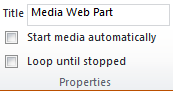
Properties
Title: The summary description for the web part and the video.
Whilst the video is stopped you will see this Title at the top within the web part as well as on the web part chrome. When you change the title within the Media Web Part the chrome title will be synchronised when the page is saved.
For example:

Start media automatically: When this is checked, as soon as the page loads, the video / audio will start.
Loop until stopped: When checked, the media will continue to play until the user stops it via the in-built controls.

Player Styles
Styles: Two options are available out of the box, light & dark.
NB: After various bits of research, these styles appear to be part of the Silverlight control and cannot be customised.


Size Options
Horizontal Size: Changing the width of the media player
Vertical Size: Changing the height of the media player
Lock Aspect Ratio: When checked the horizontal and vertical measurements will be kept in accordance with each other. So as you adjust the height, the width will change in keeping to maintain the aspect ratio.
NB: Please not that this also updates the width and height properties on the web part
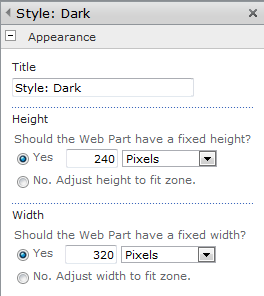
So there we go, all the options covered for the Media Web Part. I know that a number of people have had issues with some of the styling options on the TechNet forums so hopefully this provides a concise view of the options available.
Useful Links:
Media Web Part FAQ: http://blogs.msdn.com/b/sanjaynarang/archive/2010/05/20/media-web-part-in-sharepoint-2010-faq.aspx
Supported Media Formats: http://msdn.microsoft.com/en-us/library/cc189080(VS.95).aspx


 SharePoint (and Project Server) Shenanigans
You must be logged in to post a comment.