Archive
SharePoint its 1 step forward 2 steps backwards..
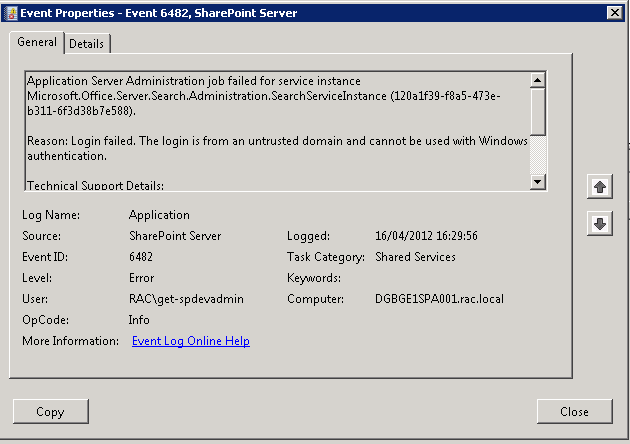
I was looking at a SharePoint 2010 farm recently to check out the Web-analytics reports and was quite shocked to not be able load the CA site I was simply getting a “Cannot connect to configuration database” error in the browser, and masses of Critical and Error warning messages in the WFE event logs, like the one below
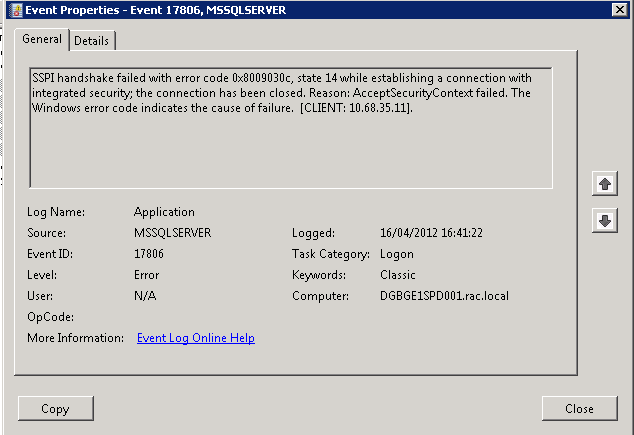
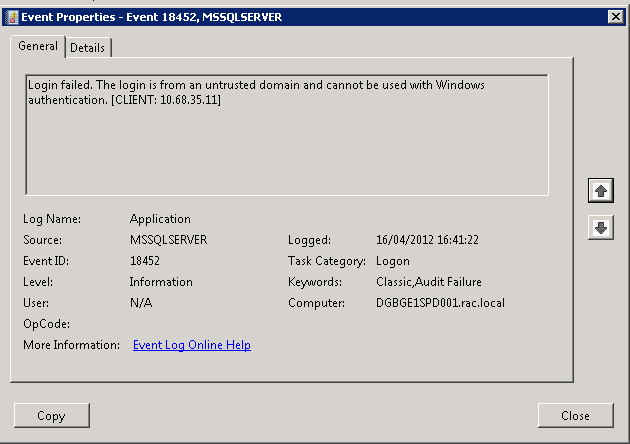
and mass of 17806 & 18452 SQL server errors in the application log on the SQL Server all for “untrusted domain” errors
But strangely enough the Portal site on this farm was still running so the users were unaware.
After much head scratching and several hours later we realised that the password for the account running the CA web app, the Farm account , had expired.. ( one of my colleagues logged on to one of the WFE’s as the farm account was prompted to change its password).
Once we had resolved that issue (changed the password back to its previous value and set it to non expiring ), I could get on and look at Web-Analytics..

SharePoint Patching and “Action Required”
The last 2 SharePoint 2010 systems I have looked at have displayed the “Action Required” status for one or more servers in the farm in the “Manage Servers in this Farm” page, which is normally caused by incorrect server patching.
When you apply a Service Pack or CU to your SP2010 farm, you are normally looking at performing a quite straight forward 3 stage process.
Stage 1: Obtain patch:
Download the latest Service Pack or CU from here:
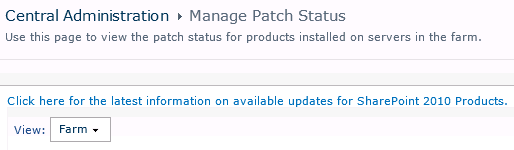
http://technet.microsoft.com/en-us/sharepoint/ff800847#LatestUpdates or use the “Use this page to view the latest patch status for products installed on servers in the farm” link on the CA site in Central Administration > Manage Patch Status
Stage 2: Install Patch
Once you have your Service Pack or CU, you will need to run it on each of the servers in your SharePoint Farm that has the SharePoint binaries installed, there is no special order to do this, but personally I like to run the patch on each WFE in turn, then on the application servers.
Once the patch has installed you will normally be prompted to run the Config wizard, if you are working on a single server farm, run the Config Wizard at this point, if you are working with a multi server farm cancel the Config Wizard and run the patch on each server on your farm.
Stage 3: Config Wizard
If you are running a single server system and have followed the instructions in stage 2, you should be finished. If you are running a multi-server farm you now need to run the Config Wizard to finalize the patch install. I like to run the wizard on the 1st server I patched and let it run to completion, then run the wizard on the rest of the servers in the farm, again there is no particular order to this but personally I like to run the wizard in the same order as I patched the servers, Once finished a quick reboot all round and we are done, and your status should be “No Action Required”


Managing Content Types in a Document Library
I was recently asked about the best way to manage large numbers of content types in a document library. The most simple way that I know of is to just add more document libraries and spread the content types among them, but what if your requirement is to only have one document library, in this scenario folders can help you.
When you set “Allow Management of content types” to Yes:

an extra item “Change New Button Order” is added to the bottom of the ECB menu for folders

This takes you to a “Change New Button Order” screen for the current folder not the document library.

You can now create logical groups of content types in separate folders, also as permission levels can be broken as folder level you can now create permissions at folder level and indirectly control who can use which content type in a document library.
** NOTE **
If you want to create a document library template or site template with content types in folders remember to tick the “Include Content”, button when you save your template or your folders will not be saved.


Documenting a SharePoint Farm
Anyone involved with the building / running / supporting of a SharePoint system will know how important documenting the original build configuration is.
If you build farms using the excellent AutoSPIntaller, then most of your work is already done as you have to plan things like your service accounts and database names for the inputs.xml file.
But what if you are called into look at a system that you know nothing about ?. in this case the equally excellent SPSFarmReport will come to your help.
The download zip file has versions for both WSS 3.0 / MOSS (32 & 64 bit) and SharePoint Foundation / SP2010 / Project Server 2010.
Once downloaded onto one of your servers with the binaries installed, simply run the appropriate executable under Farm account credentials, once ran you can delete the executable if needed.
The report output file is a nicely formatted HTML document that covers just about every single aspect of your farm configuration, this can be used to create your documentation guide, and as a timed snapshot of your configuration for future comparison.

The #SharePoint Saturday UK 2011 Experience #SPSUK #SP2010 #ProjectServer #MSProject #in
So this weekend was the 2nd SharePoint Saturday to be in the UK and my the 1st SharePoint conference I have ever been to and I have to say I was very impressed.

The setting, Nottingham University. Sitting there at the beginning of the day in one of the lecture theatres, memories of my university days came flooding back. A Robin Hood guide initially setting the scene and Todd Klindt starting with his keynote on stepping out of the comfort zone and gaining extra qualifications to become a more rounded consultant.
In his case, a SharePoint Administrator through and through but has always dabbled in scripting and other development work (not that he would publically admit to, until now). However his journey of studying for the SharePoint 2010 development exams has allowed him to not only become a better administrator with troubleshooting event logs etc. but to also gain further knowledge in PowerShell and the his fellow development colleagues.
Like other known SharePoint bloggers have stated (Joel Oleson, Bill Simser etc.), it is impossible to know everything about SharePoint, the product is just too big. However, learning more and more about SharePoint and the surrounding technologies is part of the fun and is certainly why I continue to love what I do and why SharePoint merges between by professional and personal life.

After the keynote, my colleague (Francois) and I went to see Becky Isserman (@mosslover) and her presentation on HTML 5, Silverlight and how they work in SharePoint 2010. The answer being clear cut where SharePoint is concerned. HTML 5 and SharePoint 2010 doesn’t really mix with the master pages provided out of the box and the current state of cross browser / platform compatibility of HTML 5 really means that as far as business applications within SharePoint are concerned, Silverlight is really your best choice (mobile browsers not withstanding).
The 2nd session I attended was Paul Grimley’s Global Deployment discussion. This not only validated in my mind the choices I have made in previous projects but really hit home that sometimes decisions around SharePoint deployment are just hard and is just as much about the political challenges as well as the technical challenges.
During this session, I met up with an old colleague and fellow blogger on this site, Paul Griffith. We had a good catch up about old times, current projects and challenges and decided to go to the next session together: Chris O’Brien’s Custom Ribbon Development.

This session really showed off the power of the fluent UI ribbon functionality and the level of customisation that could be achieved but left me wondering… With the kind of clients I deal with, how can I justify the cost of developing these customisations. Perhaps I need to spend some time out learning these techniques to ensure value can be perceived with this development work.
 During lunch I met up with my colleagues and we exchanged details about the sessions we attended before moving on to the next sessions. For this I decided to attend the Ask The Experts session. Although I didn’t have any questions myself, it was a good time to digest what I had seen already and also time to catch up with Paul Beck.
Paul Beck, myself and several other bloggers have over the last 6 months been writing chapters for a community book (The SharePoint 2010 Handbook). Having only ever spoken to Paul over email, it was an absolute pleasure to meet the man who has been embarking on this ambitious project. The good news is of course that the book is now finished, published and available on Amazon.com as of yesterday! This was also the first time I got to see the printed book in real life. I know have this copy proudly sitting on my shelf at home. (a full blog post about this will be following this week).

During the Ask The Experts session I also found myself in conversations with various other people I read blogs or listen to podcasts about. The sense of community between the bloggers, presenters etc. is amazing and long may it continue.
My last session before the final keynote was Todd Klindt’s PowerShell session. Many unanswered questions came out of this and I know I shall be using this knowledge again and again (I feel my Linux scripting days coming on again).
The final keynote with Steve Fox from Microsoft Consulting Services discussed how SharePoint Online, Business Intelligence and Azure comes together to truly provide a complete cloud based solution. The session went off without a hitch and showed off the power of what we will all be involved in for future projects.

To end the day, prizes were given out by the sponsoring vendors many of the attendees ended up in the centre of Nottingham for a SharePint and while others went off to ensure the night followed through to morning, I went back to my hotel room and went out to dinner with my partner who had spent all day in the hotel spa.
All in all, a very successful event and a big thank you to those who co-ordinated, supported and presented at the 2nd SharePoint Saturday event in the UK.

How I Got Into SharePoint – Giles Hamson
Just a quick note to say that I shall also be doing some blog post posts for Matt over at SharePoint 365, starting with this post.
I suspect the posts I do for SharePoint 365 will be more focused than this blog which tends to be a collection of my thoughts as I work through my projects on a daily basis.
URL: http://sp365.co.uk/2011/11/how-i-got-into-sharepoint-giles-hamson/
Details:
How long have you been using SharePoint?: 7 years
What’s your current role: Senior SharePoint Consultant / Information Architect at Corporate Project Solutions
Your Story: Whilst working as a Technical Developer at Rentokil-Initial, I helped head quarters move from a Windows to a Linux based server environment (including custom developed modules on phpGroupware, Novell Groupwise and a number of other collaboration platforms). Whilst completing the project an old colleague of mine put me in contact with a recruiter who was looking for a collaboration specialist with business analyst and technical skills at Microsoft Business Solutions (now Microsoft Dynamics) in Reading, UK.
After learning .NET 1.0 for the role and taking a couple of exams I won the contract and was introduced to SharePoint Portal Server 2003 where I created a BI portal reporting on bugs in the Dynamics product set (Great Plains, Navision & Axapta) in pre-release versions of the products.
Excel Services wasn’t around at the time, so I used the Office Web Components as part of Microsoft Office 2003 to create graphs on the fly.
At the end of the contract I moved to a Microsoft Education Partner in Oxfordshire (European Electronique) where I created a learning platform based on Microsoft Office SharePoint Server 2007, Moodle (Virtual Learning Environment) and various other 3rd party products as part of the Academy and Building Schools for the Future programmes.
After 3 years of implementing Virtual Learning Platforms I moved into specialising in SharePoint and Project Server with Corporate Project Solutions.
What’s next for you: Currently on a long term project which started in the SharePoint / Project Server 2010 public beta. The system is now live to the proof of concept users and is in the process of being rolled out globally which is slated to end by mid next year. In the meantime I am concentrating on Project Server certification and community efforts where I can. Also hoping to be at the Project Conference 2012 in Phoenix, Arizona next March.
#SharePoint Web Front-End HTTP 404 Response but no errors in the log #SP2010 #PS2010 #MSProject #ProjectServer #in
Recently we had to restore a content database from back up at a client. We were working on APP1 of a 2 WFE + Database configuration.
We followed the usual steps:
- Restore database into SQL Server from backup as a different name (<ServerName>_ContentDB_20111028)
- Log into Central Administration
- Go to Manage Content Databases
- Remove the existing Content Database
- Add the newly restored database (<ServerName>_ContentDB_20111028)
- Restart IIS (not required but just for good measure)
After doing this, APP1 worked find, but APP2 however kept giving the HTTP Response Error: 404.
We checked the usual places:
- ULS Logs
- Windows Event Logs
- IIS Logs
No other errors apart from the 404 Not Found error.
To try and force an error we went to some the standard SharePoint pages on the file system such as:
- /_layouts/settings.aspx
- /_layouts/create.aspx
This forced the following error to appear in the ULS logs:
- Unexpected System.NullReferenceException: Object reference not set to an instance of an object
A quick Google and the following came up:
The steps below are slightly modified from the one mentioned in the post but it ultimately resolved the issue:
- Stop the OWSTIMER service on the problem SharePoint WFE server in the farm.
- On the problem server, navigate to:
Server 2003 location: Drive:\Documents and Settings\All Users\Application Data\Microsoft\SharePoint\Config\GUID and delete all the XML files from the directory.
Server 2008 location: Drive:\ProgramData\Microsoft\SharePoint\Config\GUID and delete all the XML files from the directory. - Delete all the XML file in the directory. NOTE: ONLY THE XML FILES, NOT THE .INI FILE.
- Open the cache.ini with Notepad and reset the number to 1. Save and close the file.
- Start the OWSTIMER service on the server and wait for XML files to begin to reappear in the directory.
- IIS Reset (just for good measure)
Took us a good couple of hours to resolve this one, so hopefully it can help you too.
Full Log Example:
10/28/2011 09:30:41.30 w3wp.exe (0x1508) 0x1204 SharePoint Foundation Runtime tkau Unexpected System.NullReferenceException: Object reference not set to an instance of an object. at Microsoft.SharePoint.SPSite.PreinitializeServer(SPRequest request) at Microsoft.SharePoint.SPWeb.InitializeSPRequest() at Microsoft.SharePoint.WebControls.SPControl.EnsureSPWebRequest(SPWeb web) at Microsoft.SharePoint.WebControls.SPControl.SPWebEnsureSPControl(HttpContext context) at Microsoft.SharePoint.ApplicationRuntime.SPRequestModule.GetContextWeb(HttpContext context) at Microsoft.SharePoint.ApplicationRuntime.SPRequestModule.PostResolveRequestCacheHandler(Object oSender, EventArgs ea) at System.Web.HttpApplication.SyncEventExecutionStep.System.Web.HttpApplication.IExecutionStep.Execute() at System.Web.HttpApplication.ExecuteStep(IExecutionStep step, Boolean& complet… 97bd5397-9665-4f46-82ed-c5e702f8ccd0
10/28/2011 09:30:41.30* w3wp.exe (0x1508) 0x1204 SharePoint Foundation Runtime tkau Unexpected …edSynchronously) 97bd5397-9665-4f46-82ed-c5e702f8ccd0
Community #SharePoint and #ProjectServer application is fully compatible with #iOS5 on #iPhone and #iPad #SP2010 #PS2010 #MSProject
Just a quick post to say that the mobile app SharePoint (and Project Server) Shenanigans is fully compatible with iOS 5 on the iPad and iPhone.
As far as I am aware, it was not responsible for this: http://thenextweb.com/apple/2011/10/13/demand-for-ios-5-and-icloud-was-so-high-apple-almost-broke-the-internet/
 Have fun!

SPC11 – SharePoint 2010 Design Content Packs (Unreleased, yet) #SPC11 #SharePoint
During a session being hosted by a rep from Sketchers (yep, the shoe people) – we were told that Microsoft is in the process of finalising Design Content Packs which will provide master pages, CSS and other design collateral for people wanting to re-brand SharePoint 2010.
They are expected during Q1 of 2012 and according to Sketchers (who I believe must have been involved in their development) they will be what ‘Themes’ (which are rubbish) should have always been.
I would hope that at the very least, they will be a good jump start for anyone looking to re-brand SharePoint.
As soon as they are released I will update this post.
Twitter: @pcgriffiths
SPC 2011 – SharePoint Network Topology Visio Addin #SPC11 #SharePoint
Twitter: @pcgriffiths
So as I’m waiting for my 12 hr flight home, I thought I’d start the process of trying to share some of the mountain of information I’ve acquired this week in California. Firstly it’s important to say that Microsoft and all the presenters did a fantastic job, it really was a great week.
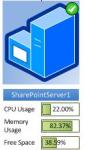
This first item is very cool – particularly if you’re an admin/architect. How good would it be if you could render near to real time SharePoint 2010 Farm health information, directly to Visio – then publish it into SharePoint?
Well you can, with the SharePoint Network Topology Diagram Add-in for Visio 2010.
Using a combination of Visio Services, a SharePoint Timer Job and Visio 2010 you can make this happen:



 SharePoint (and Project Server) Shenanigans
You must be logged in to post a comment.