Archive
Don’t be fooled by InfoPath login prompt
A short sharing since I was amazed of the quality of feedback I received today from InfoPath and could have spent hours on this.
Steps:
- Create an infopath form (here 2013, but may be the same in previous versions as it hasn’t moved that much at all since 2007)
- Publish it to Sharepoint (2013) as a Content Type
- Bang ! Infopath prompts for a login/password for the Webs.asmx web service

- Entering any login still fails.
After a bit of thinking I went back a few step on that Publishing dialog box and noticed that I pasted some text that my client wanted to see displayed and it was just that: InfoPath didn’t like to transform the Description of the form or Sharepoint refused it because some characters were incorrectly formatted.

So don’t be fooled by InfoPath / Sharepoint, the error doesn’t always lays where you think it is.


via François on Sharepoint http://sharepointfrancois.wordpress.com/2013/10/18/dont-be-fooled-by-infopath-login-prompt/
   French native Sharepoint Consultant living in London. A crossway between a designer, developer and system architect. Prefers stretching the limit of out-of-the-box features rather than breaking them into code. When not working with Microsoft Sharepoint François is often found on Web2.0 News sites and related social networking tools.
This article has been cross posted from sharepointfrancois.wordpress.com/ (original article) |

Better logging in SharePoint
Just a very quick post so i can remember this post which describes 5 different approaches to custom logging within SharePoint.
http://spdevlab.com/2013/06/21/5-suggestions-to-implement-a-better-logging-in-sharepoint/

via Buzz Blog http://paulbuzzblog.wordpress.com/2013/10/01/better-logging-in-sharepoint/
 Paul is a an expert SharePoint and Project Server developer and is responsible for designing and implementing custom solutions on client systems using the latest SharePoint and .NET technologies.
Paul has extensive experience with SharePoint systems across all sizes of implementation, ranging from small to large farms and has an excellent understanding of all the elements of SharePoint. This article has been cross posted from paulbuzzblog.wordpress.com (original article) |

Recursive rules in InfoPath–How to prevent
A while ago I had a scenario in an InfoPath form where the user could either enter an amount or a percentage value. This value would then get added to a total already in the form. The requirement is that the user enters either value and the form then calculates the other one.
So if I enter a number then the percentage gets calculated. If I entered the percentage then the number value gets calculated.
So I quickly setup some rules so that when the value changed the percentage or the whole numbers gets calculated and updates the relevant field. This creates a loop of continually updated fields.
I had hoped that some clever InfoPath “stuff” would just make this work and I wouldn’t have to worry about the issue. This didn’t work and caused the form to fail or the fields would not update correctly.
The solution to this problem is that you need a third field to control the updates. Mine is called “Calculating” and is a simple Boolean field.
Now in the rules for Field1 (number) and Field2 (percentage) the first thing to do is to check that calculating = 0 then set calculating = 1 and then set your field. At the end set Calculating back to 0.
This is just a very simple implementation of a lock but it stops the InfoPath rules going crazy.

Pictures explain everything

via Buzz Blog http://paulbuzzblog.wordpress.com/2013/09/24/recursive-rules-in-infopathhow-to-prevent/
|
Paul is a an expert SharePoint and Project Server developer and is responsible for designing and implementing custom solutions on client systems using the latest SharePoint and .NET technologies.
Paul has extensive experience with SharePoint systems across all sizes of implementation, ranging from small to large farms and has an excellent understanding of all the elements of SharePoint. This article has been cross posted from paulbuzzblog.wordpress.com (original article) |

Programmatically Disable Event Firing on List Item Update in SharePoint 2010
All credit to the original post here
The short version for my future reference is
Create a simple class
public classEventFiring : SPItemEventReceiver
    {
       public void DisableHandleEventFiring()
        {
           this.EventFiringEnabled =false;
        }

       public void EnableHandleEventFiring()
        {
           this.EventFiringEnabled =true;
        }
    }
Then use this to disable events
 using (SPWeb web = site.OpenWeb())
                {
                    SPList list = web.Lists.TryGetList("Custom");
                    SPListItem item = list.GetItemById(34);
                    item["Title"] ="Updated Successfully";
                    EventFiring eventFiring = newEventFiring();
                    eventFiring.DisableHandleEventFiring();
                    item.Update();
                    eventFiring.EnableHandleEventFiring();
                    Console.WriteLine("Updated Successfully");
                    Console.ReadLine();
                }
            }

via Buzz Blog http://paulbuzzblog.wordpress.com/2013/09/19/programmatically-disable-event-firing-on-list-item-update-in-sharepoint-2010/
|
Paul is a an expert SharePoint and Project Server developer and is responsible for designing and implementing custom solutions on client systems using the latest SharePoint and .NET technologies.
Paul has extensive experience with SharePoint systems across all sizes of implementation, ranging from small to large farms and has an excellent understanding of all the elements of SharePoint. This article has been cross posted from paulbuzzblog.wordpress.com (original article) |
Always open Visual Studio 2012 in admin mode
So i have just started again using windows server 2012 and Visual Studio 2012. I had forgotten that you always have to run as an admin or lots of things don’t work. After this i forgot this twice i figured there must be a better solution.
Google to the rescue and all credit to the answer from this stack overflow question. These steps work great.
In Windows 8, you have to right-click devenv.exe and select "Troubleshoot compatibility".
1. select "Troubleshoot program"
2. check "The program requires additional permissions"
3. click "Next", click "Test the program…"
4. wait for the program to launch
5. click "Next"
6. select "Yes, save these settings for this program"
7. click "Close"

via Buzz Blog http://paulbuzzblog.wordpress.com/2013/09/13/always-open-visual-studio-2012-in-admin-mode/
|
Paul is a an expert SharePoint and Project Server developer and is responsible for designing and implementing custom solutions on client systems using the latest SharePoint and .NET technologies.
Paul has extensive experience with SharePoint systems across all sizes of implementation, ranging from small to large farms and has an excellent understanding of all the elements of SharePoint. This article has been cross posted from paulbuzzblog.wordpress.com (original article) |
Attachment is missing from an e-mail message #SharePoint #SP2007 #SP2010 #SP2013
At a client recently, we were having the issue of emails being sent to a list but the attachments were not appearing with the email.
In this scenario, it was working if we sent it directly to the list email address, but if we forwarded from Exchange via a contact, no attachments came through.
Anyway, it would appear the following needs to be set:
If attachments are missing from email messages that are sent to a SharePoint document library, it might be because you associated the document library with an email address. When you do this, Directory Management Service may not add the following two attributes to the user associated with the email address:
-
internet Encoding = 1310720
-
mAPIRecipient = false
- Full details are below.
Windows SharePoint Services 3.0 / Microsoft Office SharePoint Server 2007
- http://support.microsoft.com/kb/926891
- http://technet.microsoft.com/en-us/library/cc287879(v=office.12).aspx#section8
SharePoint Foundation 2010 / SharePoint Server 2010
SharePoint Foundation 2013 / SharePoint Server 2013
Business Intelligence in the cloud, phew thank goodness… #Office365 #BI #SharePoint #PowerBI
So the Worldwide Partner Conference is going on in Houston at the moment and as much as I would love to be there, unfortunately projects here in London have to continue. Still early starts and watching the world go by in Pret (coffee shop for those outside of the UK) is always interesting before the hub-bub of the day starts.
Anyway, as with every year at WPC, there are always exciting announcements and this year is no different. We can hail this as official business intelligence in the cloud day!
Now many of the projects I work on consider Office 365 as a platform, however the more enterprise you go, the more the requirements tend to need some level of business intelligence. I was excited before with the release of SQL Reporting Services Online, however as functional as it is, limitations and costs current pose this solution to be only for the fully cloud invested.
My new hopes for BI in the cloud however seem to be starting to be answered in the form of Power BI for Office 365.
Using the capabilities already available on premise (Data Explorer, GeoFlow, Power Pivot and Power View) with tweaking, some re-branding and a little bit of mobile love (mobile apps to be available also (Windows 8, RT and iPad, HTML5) it looks like we may have an answer.
This to my mind almost completes the Office 365 capabilities to truly propel the cloud for use in the projects I get involved in. (Project Management, Business Intelligence, Intranets, ECM solutions).
I urge you all to read up on the following and register for the preview coming “later this summer”. I have a feeling this is going to be major!
Details:
- Main Announcement Blog: http://blogs.office.com/b/office-news/archive/2013/07/08/announcing-power-bi-for-office-365.aspx
- What powers Power BI in Office 365 (O365 Blog): http://blogs.office.com/b/office365tech/archive/2013/07/07/what-powers-power-bi-in-office-365.aspx
- Introducing Power BI (SQL Server Blog): http://blogs.technet.com/b/dataplatforminsider/archive/2013/07/08/introducing-power-bi-for-office-365.aspx
- Register your interest here: http://office.microsoft.com/en-us/excel/power-bi-FX104080667.aspx
- Download the preview add-ins for Excel here: http://office.microsoft.com/en-us/excel/power-bi-download-add-in-FX104087144.aspx
- Tutorial: http://blogs.msdn.com/b/powerbi/archive/2013/07/07/getting-started-with-pq-and-pm.aspx

As I try things out, I will post my findings and any limitations I come across, but hopefully with the new OData / REST capabilities of Excel and SSRS, we should be able to have some fun with SharePoint list data!
Enjoy…

#CSS Change the style of the View Selector in lists/libraries breadcrumb
As part of a site branding exercise the breadcrumbs that is displayed when a list or library is open on a view was causing issue. When hovering the current view name its font was bigger and the CSS was not obvious to target.
not good hover:

good hover:

Having spent a good hour on that single issue and Googled for solution, here is my finding for later reference.
/* keep same font and position when hovering on view name  */
.ms-ltviewselectormenuheader .ms-viewselector{
 padding-bottom:0px;
 padding-left:5px;
 padding-right:3px;
 padding-top:2px;
 margin-right:0px;
}
.ms-ltviewselectormenuheader .ms-viewselectorhover A{
 border:0px !important;
 font-family: Verdana, Helvetica ;
 color: #0060ad;
 font-weight: normal;
 background-color: transparent;
 font-size: 9px;
 text-decoration: underline !important;
 background-image: none;
 padding-bottom:0px;
 padding-left:0px;
 padding-right:3px;
 padding-top:2px;
 margin-right:0px;
}
/* down arrow to select view */
.ms-ltviewselectormenuheader .ms-viewselector-arrow{
margin:0px 5px 2px 0px !important;
}
References:
- http://sharepoint.stackexchange.com/questions/27507/disabling-javascript-from-overriding-breadcrumb-navigation-styling
- http://www.ericjochens.com/2012/11/css-style-sharepoint-2010-branding.html
- http://sharepointexperience.com/csschart/csschart.html

via François on Sharepoint http://sharepointfrancois.wordpress.com/2013/06/06/css-change-the-style-of-the-view-selector-in-listslibraries-breadcrumb/
|
French native Sharepoint Consultant living in London. A crossway between a designer, developer and system architect. Prefers stretching the limit of out-of-the-box features rather than breaking them into code. When not working with Microsoft Sharepoint François is often found on Web2.0 News sites and related social networking tools.
This article has been cross posted from sharepointfrancois.wordpress.com/ (original article) |

Group has Full Control but you cannot add a user to the group? #SharePoint
So we had an interesting support call come in today which had us stymied for about 5 minutes until we realised the obvious.
Essentially the user was in a SharePoint group that had a Permission Level with Full Control of the SharePoint site, however they could not add users to the group.
Site Collection Administrators of course could add users without issue.
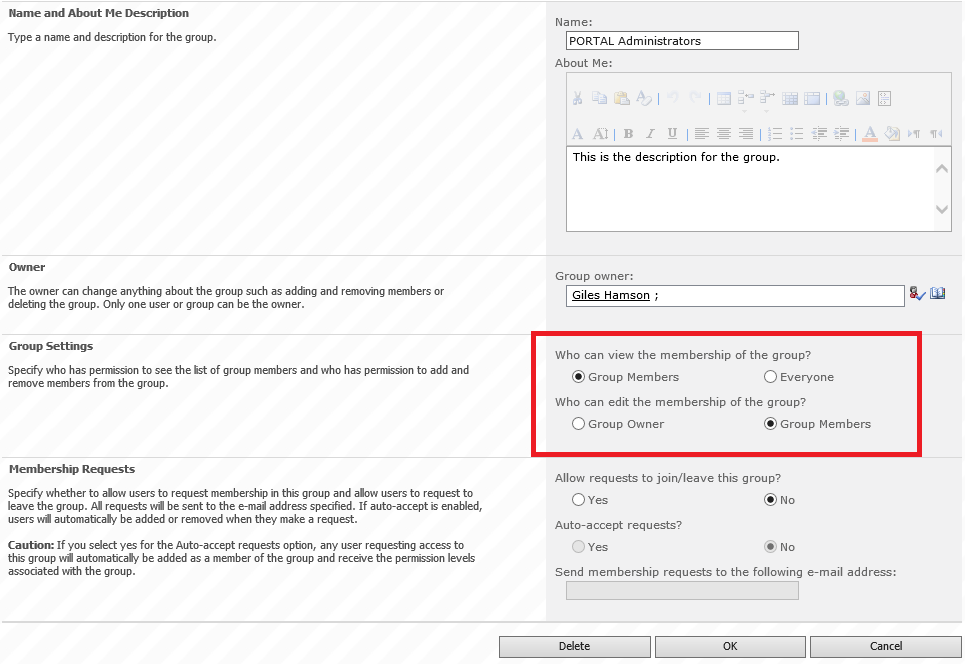
The answer is of course to update the Group Settings to allow Group Members to edit.
In detail
- Go to the group “Portal Administrators” in this case (Site Actions (or Cog in SP2013) > Site Settings > Site Permissions)
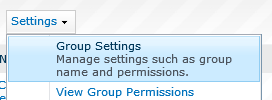
- Under Settings select Group Settings
- Under the Group Settings section
- Who can edit the membership of this group? Group Members
And we’re done… just a little tidbit for today… till the next time.

If Edgar Allan Poe wrote JavaScript
This is something I came across that is a little more light-hearted than usual.
Taken from Twitter Engineer Angus Croll’s blog.
Once upon a midnight dreary, while I struggled with JQuery,
Sighing softly, weak and weary, troubled by my daunting chore,
While I grappled with weak mapping, suddenly a function wrapping
formed a closure, gently trapping objects that had gone before.Ah, distinctly I remember, it was while debugging Ember,
As each separate dying member left its host for ever more.
Eagerly I wished the morrow–vainly I had sought to borrow
(From my bookmarked trail of sorrow), APIs from Underscore.There I sat engaged in guessing the meaning of each cursed expression,
Endless callbacks in procession; nameless functions, nothing more,
This and more I sat divining, strength and spirit fast declining,
Disclose the value we’re assigning! Tell me – tell me, I implore!
via Chris on SharePoint http://spchris.com/2013/05/if-edgar-allan-poe-wrote-javascript/
 SharePoint and Project Server Consultant
This article has been cross posted from spchris.com (original article) |


 SharePoint (and Project Server) Shenanigans
You must be logged in to post a comment.