Archive
SharePoint and Document Versioning within Word.
I was working with a client recently and looking at how they were using (or not in this case) versioning in document libraries, they were still in the NTFS mind-set, as shown by the example below.

To client was using the versioning that Word supplies and manually updating the document version number in the title each time a new version was uploaded into SharePoint.
I introduced them to the Major / Minor versioning settings within a document library, so we could at least get document versions working.

The only problem with this was that the client still wanted to have a version number on the document, as these were quite often printed.
This is a problem that I have seen before with SharePoint 2007 and have addressed with Information Management Policies, this is the first time I have had to set this up for SharePoint 2010, but the steps are similar. From your Doc Lib, go to Library Settings, –> Information management policy settings.


In this example I am using the Document content type, but you should be looking to use your own custom content type, to make the final solution more flexible.
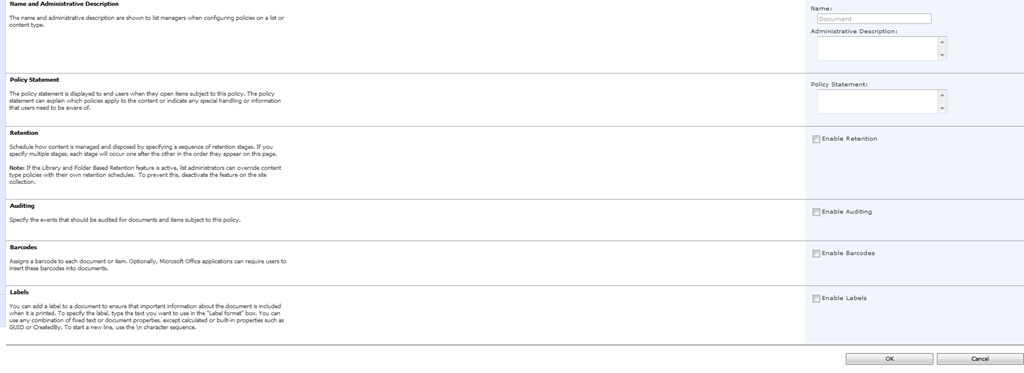
Tick the Enable Labels box, and in the label format type {Version}, click the Refresh button and make sure you see {_UIVersionString} in the Preview box.


We have now created a custom Label that will appear as a Quick Part within Word (the Word Doc has to be opened from SharePoint) that contains the SharePoint Version number.
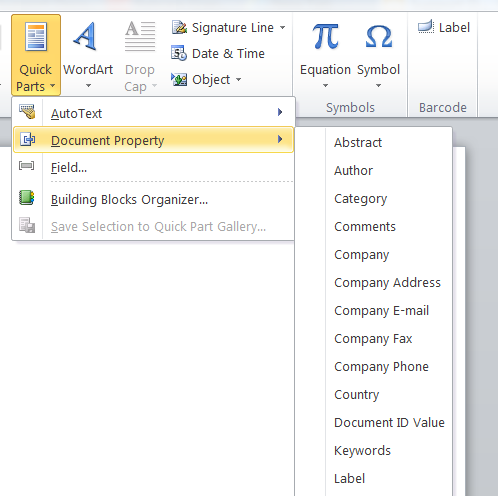

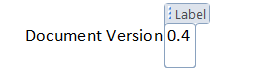
Once you have saved and re-opened your document you will now have a Label field linked to your SharePoint Version Number.
Enjoy the SharePoint Goodness.

More fun with SharePoint Web Analytics
Following on from yesterdays post regarding problems with getting into the CA site, today we got on with the job of looking at Web Analytics, and the reports that we can provide to end users.
So we checked the Web Analytics reports and could see good graphs like the ones below, very nice.

Just the sort of thing you could hand to a client.
So the next stage was to get the Schedule Web Analytics Reports workflow running and send the reports to a test user for analysis, this is when the fun started, no matter what we did the workflow simply refused to work, all we were getting was “An error has occurred in” and no reports, nothing in the ULS logs, nothing in the Event Viewer and nothing of any help in the Workflow History list, really handy, we knew that ‘normal’ workflows such as Approval worked fine on this system, so it was a bit baffling.

After a few(more) hours of head scratching I decided to try the Schedule Web Analytics Alerts workflow instead, which still failed, but at least gave out a more helpful error.

Of course it turned out that our test account didn’t have a mailbox (duh!), so we used a different account (with a mailbox) and the Schedule Web Analytics Reports worked fine
But it really annoyed me that 2 workflows related to the same area in SharePoint have clearly been developed by different teams in Microsoft and both show different failure messages for the same event.
We go the reports out finally, and they are just straight Excel exports, so we might not even use them, another fun packed day working with SharePoint !

SharePoint its 1 step forward 2 steps backwards..
I was looking at a SharePoint 2010 farm recently to check out the Web-analytics reports and was quite shocked to not be able load the CA site I was simply getting a “Cannot connect to configuration database” error in the browser, and masses of Critical and Error warning messages in the WFE event logs, like the one below
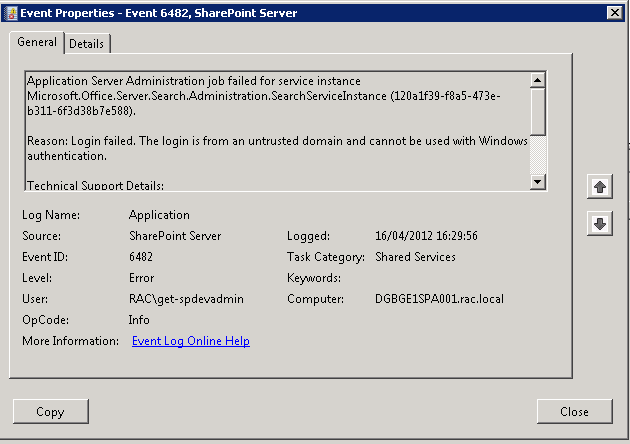
and mass of 17806 & 18452 SQL server errors in the application log on the SQL Server all for “untrusted domain” errors
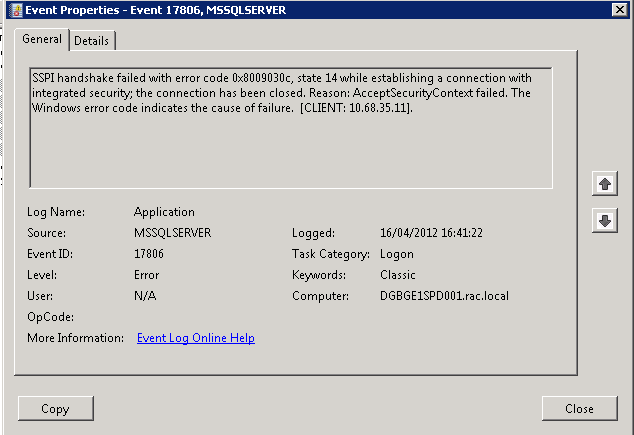
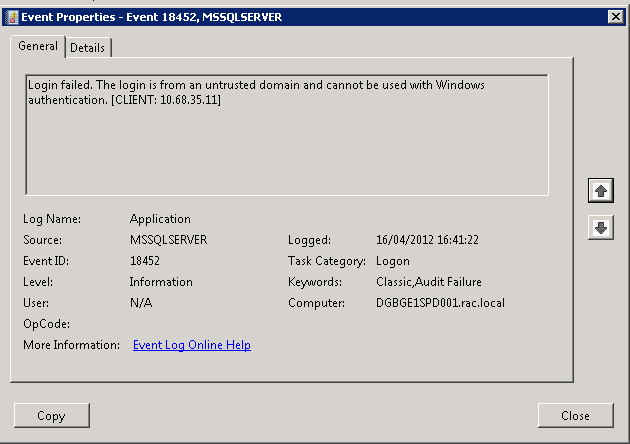
But strangely enough the Portal site on this farm was still running so the users were unaware.
After much head scratching and several hours later we realised that the password for the account running the CA web app, the Farm account , had expired.. ( one of my colleagues logged on to one of the WFE’s as the farm account was prompted to change its password).
Once we had resolved that issue (changed the password back to its previous value and set it to non expiring ), I could get on and look at Web-Analytics..

Managing Content Types in a Document Library
I was recently asked about the best way to manage large numbers of content types in a document library. The most simple way that I know of is to just add more document libraries and spread the content types among them, but what if your requirement is to only have one document library, in this scenario folders can help you.
When you set “Allow Management of content types” to Yes:

an extra item “Change New Button Order” is added to the bottom of the ECB menu for folders

This takes you to a “Change New Button Order” screen for the current folder not the document library.

You can now create logical groups of content types in separate folders, also as permission levels can be broken as folder level you can now create permissions at folder level and indirectly control who can use which content type in a document library.
** NOTE **
If you want to create a document library template or site template with content types in folders remember to tick the “Include Content”, button when you save your template or your folders will not be saved.


Documenting a SharePoint Farm
Anyone involved with the building / running / supporting of a SharePoint system will know how important documenting the original build configuration is.
If you build farms using the excellent AutoSPIntaller, then most of your work is already done as you have to plan things like your service accounts and database names for the inputs.xml file.
But what if you are called into look at a system that you know nothing about ?. in this case the equally excellent SPSFarmReport will come to your help.
The download zip file has versions for both WSS 3.0 / MOSS (32 & 64 bit) and SharePoint Foundation / SP2010 / Project Server 2010.
Once downloaded onto one of your servers with the binaries installed, simply run the appropriate executable under Farm account credentials, once ran you can delete the executable if needed.
The report output file is a nicely formatted HTML document that covers just about every single aspect of your farm configuration, this can be used to create your documentation guide, and as a timed snapshot of your configuration for future comparison.

Feedback from the few sessions I attended at Sharepoint Saturday UK, 12th Nov 2011
As Giles Hamson mentioned I too went to the “Sharepoint Saturday” meet-up in Nottingham for the first time. Since I was on a course this week and driving 3 hours every day I didn’t get much chance to give my feedback, so with a lot of delay here are my personal notes I jotted down in mymemory.
To my surprise, or just because I didn’t actually read the Sharepoint Saturday website much when I registered, I was amazed by the venue, the quality of the speakers (a lot US citizens Sharepoint faces coming just for the occasion) and the attendance. I thought not many professionals would sacrifice a Saturday to come and “think Sharepoint” since I know I was in that case last year but indeed it was quite a success, not a full room in the opening keynote but still a good number, a few bloggers have already reported about the event and a lot of noise on Twitter too, so this one is extra.
To my experience for having attended 2 Sharepoint Best-Practice conferences in London, once as a guest and once as a vendor, Sharepoint Saturday is very similar except that it’s free !
The quantity of knowledge session after session is very intense and if we had a way of attending 2 rooms at the same time it would be quite useful, like a download of information into our brain. Actually there kind of is a way to attend 2 sessions in 1… if you read the Twitter post of next room while listening to your room, but it is quite tiring.
The other point of such event is purely to take the opportunity of networking with the Sharepoint community in the UK and internationally, it’s rare to have people involved into Sharepoint, the ones who blog and write books under the same roof.
The reality is that meeting this close-knit Sharepoint community in real life in just one day does not give much time but it helps to put a face and personality behind a name or nickname when engaging each other on twitter and reading blogs.
Right, so now for the content and what I gathered from that day:
9:15. Silverlight vs. html5: Becky Isserman
This session was a demo of how to create a very basic project in Silverlight and the same in HTML5, but it was really a discussion with Becky and the attendees about the feeling around chosing either platform for development. The conclusion was a BIG “no idea”, “we don’t know” “Microsoft didn’t tell us anything”. So not very useful except to confirm our feeling of uncertainty.
Note to self :
- HTML5 = still no Microsoft tool so use Adobe Edge (alpha),
- Silverlight = Microsoft Expression Blend as before.
10:20. Customizing the SharePoint Packaging and Deployment Process in Visual Studio 2010: Eric Schupps
I am not a Visual Studio developer since I usually design an application, write my views on what a webparts, event handler or piece of custom-code should do, then the developer would write the managed code and deliver me the packaged solutions to deploy on a Sharepoint environment. However I occasionally have to organise the solutions, re-factor a bit of code or add comments and re-compile and I recently also had to write a few SSRS reports in VS Business Intelligence therefore I needed to make sure I was in sync with other’s Sharepoint professionals’ way of packaging Sharepoint solutions.
- CKS.DEV
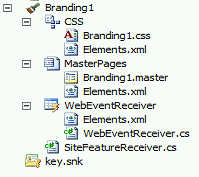
One main thing I did not know for not having developed in VS recently and will now add it to priority number 1 when opening Visual Studio 2010 on Sharepoint: install CKSDev, this will add additional tools for SharePoint into your Visual Studio. For instance a very useful Project Item is “Branding” which create master page, CSS and layout page, which will all be activated as a feature when deployed:
- What changed in deploying Solution to Sharepoint?
A must have as well is Powertool for 2010 to get additional tools for SharePoint.
Production deployment has not changed: give a WSP and deploy it via Powershell (or stsadm)
Development deployment has changed dramatically, to take advantage of sandboxed solution we can deploy directly Visual Studio to Sharepoint.
Pay attention at the option “view deployment configuration” in Visual Studio solution properties which allows us to configure all the steps that to be done at deployment time.
11:45. How we did it (about branding ) : Matt Hughes
- Download a custom masterpage and CSS from the community, some include comments and disable some feature by default which is useful for starting small and re-enabling features as needed.
example : http://freespmp.codeplex.com by Matt, or http://startermasterpages.codeplex.comby Randy Drisgill - One CSS class to note that I didn’t use : “S2-notdlg” anything within this class will not show in a Sharepoint modal dialog box, to use if we have a control to show everywhere but not duplicate its display in the dialog boxes.
Matt’ session was really interesting as a subject but I didn’t learn much except that it confirmed my experience in doing Sharepoint branding as he and Sam have had the same issues I had.
It was a little bit strange to focus on Matt’s face while he spoke, check the pic below, Movember Sharepoint style.

13:45. Why are we developing? : Nigel Price
I chose this session to check what others are doing Out-Of-The-Box in Sharepoint as opposed to building custom controls and webparts to reach business expectations. This is a rather vast subject because more often than not, my clients come to me and think that Sharepoint can do everything they want without the help of .net developers. The other side of the balance is that being a Sharepoint consultant I need to make sure that sites I design are not too far from Sharepoint architecture so that they will migrate easily and “anyone” (ie not developer) can maintain them, bringing a lot of out-of-the-box tools.
Again I mainly comforted what I usually do which is “Try OOB before going for managed code”, Nigel’s bullet list for “when do we have to develop” is :
- Need to action something with elevated privileges
- Use of an authentication mechanism outside AD
- LOB integration (BCS..)
- Write event receivers
- Custom Search protocol (if custom iFilter)
- Code repository, i.e. source versioning
15:00. Why branding intranet ? Gus Fraser (SharePoint 2010 Intranet Branding for Developers)
As we all know the main reason for branding an intranet site is so that it doesn’t look like SharePoint. This has been the subject of lots of discussion in the past weeks and surely will not end. Although my role is to advise my client in the concept of branding Sharepoint and why they should not remove all “Sharepoint-looking” features very often I just have to follow what the client’s creative agency (who never used Sharepoint) dictates.
Notes:
- Use prototyping tool like Balsamic more. specially that Balsamic includes “mockups to go” ribbons.

- Again : use Visual Studio 2010 CKSDev which includes branding item.
- Use control adapters.
- Use CSSReset by Kyle Schaeffer, which is a CSS to literally “reset” the existing style in Sharepoint 2010 so that we can start styling them as we want.
- Use ieTester tool to test your site with various IE versions
- Options in the Sharepoint Ribbon barre can be removed using Custom Action. Gus’ code to remove the font style option for instance can be downloaded here.
- Other link about branding in the pic below

Conclusion

SPC11 – SharePoint 2010 Design Content Packs (Unreleased, yet) #SPC11 #SharePoint
During a session being hosted by a rep from Sketchers (yep, the shoe people) – we were told that Microsoft is in the process of finalising Design Content Packs which will provide master pages, CSS and other design collateral for people wanting to re-brand SharePoint 2010.
They are expected during Q1 of 2012 and according to Sketchers (who I believe must have been involved in their development) they will be what ‘Themes’ (which are rubbish) should have always been.
I would hope that at the very least, they will be a good jump start for anyone looking to re-brand SharePoint.
As soon as they are released I will update this post.
Twitter: @pcgriffiths
SPC 2011 – SharePoint Network Topology Visio Addin #SPC11 #SharePoint
Twitter: @pcgriffiths
So as I’m waiting for my 12 hr flight home, I thought I’d start the process of trying to share some of the mountain of information I’ve acquired this week in California. Firstly it’s important to say that Microsoft and all the presenters did a fantastic job, it really was a great week.
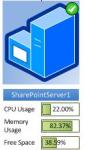
This first item is very cool – particularly if you’re an admin/architect. How good would it be if you could render near to real time SharePoint 2010 Farm health information, directly to Visio – then publish it into SharePoint?
Well you can, with the SharePoint Network Topology Diagram Add-in for Visio 2010.
Using a combination of Visio Services, a SharePoint Timer Job and Visio 2010 you can make this happen:



 SharePoint (and Project Server) Shenanigans
You must be logged in to post a comment.