SharePoint 2007 6641 Errors : Logon Type 4
Recently I was asked to look at SharePoint 2007 install that was throwing 6641 “Logon failure: the user has not been granted the requested logon type at this computer” errors every few minutes and filling up the Application log.

We went through he normal steps of checking the service and SSP accounts, we did find that the Office Search Service had hung, but this wasn’t the problem, we checked various blogs on the web that seemed to point towards Kerberos being the problem, but this particular farm was only using NTLM. Thinking about the error “the user has not been granted the logon type at this computer”, got me thinking about logon types and failures, so a look in the Security log turned up these errors that were coinciding with the 6641’s in the Application log.

Logon type 4 is a Batch logon, the farm account was calling this but the User Name called was for a secondary SSP that we didn’t think was used. The best way to fix this would be to give the secondary SSP account the ‘Logon as a batch Job’ right via local security policy, so preserving the principle of least rights for a service account, unfortunately we couldn’t do this so a temporary measure we added the secondary SSP account to the local admins group and the 6641 errors immediately stopped.
An unfortunate side effect of the above that that we started getting the IIS WAMREG DCOM activation errors in the System event log while not a problem in itself we fixed those as well, steps outlined here for Windows 2003 / WSS 3.0 (as this system was), just make sure ALL your accounts are in the WSS_WPG group.
Once those steps were taken all 3 event logs were error free.

Documenting a SharePoint Farm
Anyone involved with the building / running / supporting of a SharePoint system will know how important documenting the original build configuration is.
If you build farms using the excellent AutoSPIntaller, then most of your work is already done as you have to plan things like your service accounts and database names for the inputs.xml file.
But what if you are called into look at a system that you know nothing about ?. in this case the equally excellent SPSFarmReport will come to your help.
The download zip file has versions for both WSS 3.0 / MOSS (32 & 64 bit) and SharePoint Foundation / SP2010 / Project Server 2010.
Once downloaded onto one of your servers with the binaries installed, simply run the appropriate executable under Farm account credentials, once ran you can delete the executable if needed.
The report output file is a nicely formatted HTML document that covers just about every single aspect of your farm configuration, this can be used to create your documentation guide, and as a timed snapshot of your configuration for future comparison.

InfoPath 2010 People picker control
New with InfoPath 2010 is a People Picker control, this acts like the People Picker in SharePoint and allows you to choose contacts from AD.


I was using this control recently and wanted to promote the chosen person value to a list when the form is submitted, to my surprise I found that the submitted value was just a text value, not a presence aware name, so had none of the rich integration that OCS or Lync offers.

To get around this drawback I had to write a small workflow that fired when the form was submitted.

The workflow read the list value into a variable and then wrote it back to another column in the same list, but was key was to make the return field data type an Email Address.

Now we have a presence aware Name value.

Fun with PowerShell and Feature Activation
I was recently working on a system where we wanted to create a site based on a previously saved site template, unfortunately when trying to create the site we were getting the error.
Error creating site: The site template requires that the Feature {some-or-other-GUID} be activated in the site collection.
Hmm, oh well, off to Site Collection Administration and I switched on all the features I could find, but still no joy, time to crack open PowerShell.
First thing to do is find the name of the feature we are looking for, this excellent post on MSDN lists all the SP2010 features and their GUID’s.
Now we know the name of the feature we are looking for its time to get PowerShelling…
Firstly lets list all the features we have installed and activated, open PowerShell from the Microsoft SharePoint 2010 Products folder from the start menu.

the Cmdlet Get-SPFeature is the one we are going to use, this gives us a massive amount of output, so lets add the –Site switch, so we now have Get-SPFeature –Site <myurl>,

again we have lots of output, so let use the Out-File Cmdlet to pipe the output to a text file called “features.txt”, so our command is now Get-SPFeature –Site <myurl> | Out-File c:\features.txt

now from PowerShell all we have to do is type Notepad c:\features.txt

and we have a notepad file with all our site scoped features listed, a quick search for our missing GUID shows no entry, so we have to activate the feature with PowerShell, this is simply a case of typing Enable-SPFeature –Identity <FeatureName> –url <myUrl>,

Job done.

Writing History events from a SharePoint designer Workflow
Most SharePoint 2010 solutions will have some form of workflow associated with them.
Workflows written in SharePoint designer can be powerful, but tricky to troubleshoot if they do not work correctly.
Some workflows will complete but not perform as expected, and some will simply fail with the ever helpful An error has occurred in <Workflow Name> written to the history list.
To help us out with this is the Log to History List core action in our workflow designer Action List.

This allows us to write a message to the workflow history, and as such we could write back the value of a workflow parameter or variable that we can check on.
To illustrate this I have written a one step workflow with one Variable and one Parameter, the workflow has an Initiation Form that allows a user to select a colour.

We set the variable varColour to be the value of the colour the user selected which is stored in the parameter ParamColour , on the second line we use the Log to History List to output the value of varColour to the workflow history.

This is what it looks like, firstly we choose a colour from the Initiation Form

The workflow processes and completes, when we check the History list we can see that our message and the value of varColour have been recorded in the Workflow History list

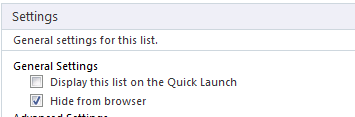
Normally the Workflow History list is hidden from the browser, but you can change this setting in SharePoint Designer.

Excel Services Problem. “An unexpected error has occurred”
I was recently asked to look at an Excel Services problem, where rather then a spreadsheet opening in the browser we were getting the ever helpful “An unexpected error has occurred” screen.
Checking in CA the Excel Services service application seemed to be provisioned, the settings seemed okay and the service was running, a quick check in Windows event log soon found the problem
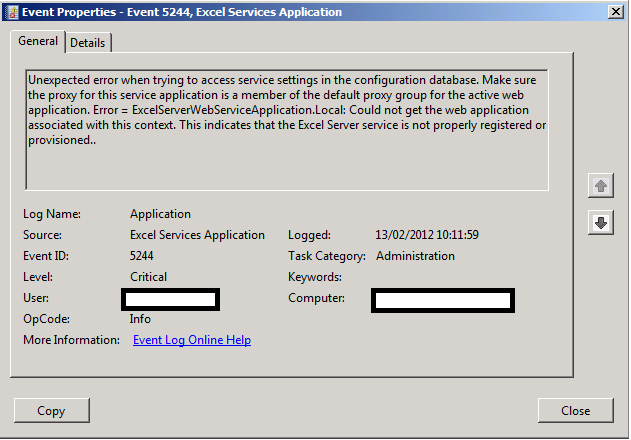
The service application was not registered with the default web application.

As soon as we set the association, Excel Services sprang into life

I passed the #MSProject and #ProjectServer exams #in #MSPC12 #SharePoint #PS2010 #SP2010
Just a quick blog post to say that I took the Microsoft Project and Project Server 2010 exams last week and I am pleased to say that I passed.
Details:
70-177 – Microsoft Project Server 2010, Configuring
- Certification Type: Microsoft Certified Technical Specialist
- URL: http://www.microsoft.com/learning/en/us/exam.aspx?id=70-177
70-178 – Microsoft Project 2010, Managing Projects
- Certification Type: Microsoft Certified Technical Specialist
- URL: http://www.microsoft.com/learning/en/us/exam.aspx?id=70-178
For those who are interested in taking the exams and learning more about Microsoft Project / Project Server can I recommend that you don’t miss out on the event of the year:

Not only will various speaker sessions be available (including myself and my client!) but you will have an opportunity to try for these exams yourself for free!:
Mark the location & date in your calendar: Phoenix, Arizona (March 19th – 22nd 2012) and if you decide to come, let me know and we’ll meet up.

Missing Server Side Dependencies–Useful links for diagnosis and removal #SP2010 #PS2010 #SharePoint #ProjectServer #in
Some quick links to help diagnose the “Missing server side dependencies” errors from the health check analyzer in SharePoint 2010.
Helps remove features via a GUI interface (be careful with this tool!)
- MissingFeature Codeplex Solution: http://featureadmin.codeplex.com/
Removes feature dependencies from the database via PowerShell (be care with this script!)
- MissingFeature Removal PowerShell: http://get-spscripts.com/2011/06/removing-features-from-content-database.html
Once you have removed the dependencies, re-run the health check analyzer for the “Missing server side dependencies” rule and you may have some residual files to clean up in the content database.
Use the following PowerShell scripts to analyse the location of the files and then you can clear them up appropriately:
- Missing WebPart Diagnose: http://get-spscripts.com/2011/08/diagnose-missingwebpart-and.html
- Missing Assembly Diagnose: http://get-spscripts.com/2011/08/diagnose-missingwebpart-and.html
- MissingSetupFile Diagnose: http://get-spscripts.com/2011/06/diagnosing-missingsetupfile-issues-from.html
I’m speaking at Project Conference 2012 – Integrating #SP2010 and #PS2010 #PC12 #SharePoint #ProjectServer #in
Apologies for the lack of updates on the blog, the Christmas / New Year holidays have been really busy. Anyway, just a quick blog post to announce that I will be presenting at this years Microsoft Project Conference in Phoenix, Arizona in March this year.
 |
|
| My Company: Corporate Project Solutions |

If you are attending the conference and you would like to meet up, just let me know. You can contact me here.
Further Details:
Session Title: Integrating SharePoint and Project Server 2010 – Deployment Approaches, Integration Options and making the most of the SharePoint Enterprise Features.
Track: Deployment, Administration & Developer
Level: 300
Audience: IT Professionals, Developers & Consultants
Products: Project Server 2010 & SharePoint 2010
Now that Project Server 2010 is built on top of SharePoint 2010 Enterprise, a new series of options are available with various choices around implementation.
Although integration was possible between Microsoft Office SharePoint Server 2007 Enterprise and Project Server 2007, this was not seen as a standard implementation for many companies and those implementing this approach were defining the rules.
Corporate Project Solutions is one such company who have been taking advantage of these SharePoint Enterprise Features for companies such as ID Business Solutions and ARM to deliver tight integration along with Business Intelligence (self-service dashboards), Document Management and Collaboration.
Solutions created with this approach provide a level of visibility and collaboration previously unseen by these clients and genuinely provide business value for all stakeholders and management / reporting lines.
As a Senior SharePoint Architect who has moved into the Project Server arena in the last 3 years, I initially made many assumptions in the way Project Server works based on the fact it was built on top of SharePoint. This presentation discusses the deployment approaches / configurations of programme and project sites. It outlines 4 options, how they support business intelligence and the pros / cons of each implementation in relation to the project management maturity of the client.
However, during trialling of various implementation approaches, CPS has found a number of pitfalls that do not conform to what is encountered in a SharePoint-only implementation. This demonstration discusses some key difficulties and how to provide a solution that is in accordance with Microsoft best practice and supportable.
Section One – Implementation approach definitions:
Option 1 – Out of the box Project Web Access and Project Sites
Option 2 – Project Web Access as installed with Project Sites customised outside of the standard Project Server 2010 configuration
- Allow custom styles to be applied
- Full use of Search capabilities
- Site Content Types can be utilised to centrally control key lists such as Risks, Issues, Actions and Deliverables
- Workflows can be attached and rolled out by Content Type
- Lists can be updated whilst projects are in-flight centrally as project management maturity evolves.
Option 3 – Project Web Access as installed with centralised lists for all projects / programmes
- Allows all dashboards to be kept in sync as project maturity evolves
- Project and programme roll up dashboards can be implemented using standard out of the box list views and filter web parts (Enterprise Feature)
- Business intelligence reporting becomes easier due to all lists being in sync for all projects / programmes o Reporting is always comparing apples with apples.
However, depending on the approach taken various pitfalls need to be taken into account such as loss of client / server integration features between the Project client and Project Server, cross project security etc.…
A demonstration of each option will show the power and pitfalls of each approach as they are discussed during the presentation.
Section Two: Maintaining consistency and integrity between SharePoint and Project Server
The focus here will move to customisation options using Enterprise Features, taking account of Microsoft best practice.
Examples include:
PSI Web Service integration
- Resource Synchronisation between ERP and Project Server solutions
Project Server Event Handlers
- Linking tasks to SharePoint data and keeping them in sync via Project Server Event Handler
Business Intelligence
- Reporting Services in SharePoint Integration mode and SharePoint Enterprise filters for parameters.
- Complementing the standard BI options of Excel Services & PerformancePoint provided as part of the out of the box Business Intelligence Center site template.
Look and Feel customisation
- Customising the look and feel and adding jQuery to Project Web Access whilst maintaining best practice and supportability. (I.E. Without modifying the Master Page, Page Layouts or using SharePoint Designer)
Section Three: Breaking the rules – discussing key differences between Project Server and SharePoint and how they can be overcome.
For the final section of the presentation, we shall discuss how Project Server doesn’t conform to the techniques that SharePoint consultants use during implementations:
- User Profile Service versus the Resource Pool
- Permission Model
- Project Server vs. SharePoint – Browser compatibility comparisons
- List content types vs. Site Content Types
- Attaching workflows to Risks and Issues
Conclusions
In finish off we shall tie the three separate sections together to discuss end-to-end implementations utilising the most appropriate features of SharePoint and Project Server allowing clients to achieve the best possible solution with the options available.

#SPSUK 2011 Slides and Blog Links #SharePoint #SP2010 #PS2010 #MSProject #ProjectServer #in

Apart from the usual networking you can do at a SharePoint conference, it is also all about the learning of new products, techniques and experiences from fellow like minded individuals.
I personally found the presentations I went too invaluable in confirming decisions I had taken in my own projects as well as learning new subject matters.
So with this in mind I have set about trying to collate the various slides from the events so that I can refer back to them in the future and I thought I would share my results.
Not all slide decks are up yet, but I will endeavour to update this list as they get released.
Enjoy!
Slides from the event:
09:15 to 10:15
| Presenter | Title | Twitter Tag | Slides | Blog |
| Becky Isserman | HTML 5 vs. Silverlight 5 | #spsuk01 |  |
|
| Martin Hatch | Configuring Kerberos in a SharePoint 2010 Farm | #spsuk06 |  |
 |
| Kanwal Khipple | Practical Tips to Increase SharePoint Adoption | #spsuk11 |  |
 |
| Wes Hackett | Putting you at the centre of the Social Intranet | #spsuk16 |  |
 |
| Mark Macrae | Case Study: Delivering SharePoint 2010 BI Dashboards for the Queensland Government | #spsuk21 |  |
 |
| Symon Garfield | How We Did It: Collaboration at a European Central Bank (& what happened next…) | #spsuk26 |  |
 |
| Anders Rask | Developing with Custom Web Templates | #spsuk30 |  |
 |
10:20 to 11:20
| Presenter | Title | Twitter Tag | Slides | Blog |
| Eric Shupps | Customizing the SharePoint Packaging and Deployment Process in Visual Studio 2010 | #spsuk02 |  |
 |
| Paul Grimley | Deploying SharePoint 2010 Globally – The options | #spsuk07 |  |
 |
| Penny Coventry | Automating Business Process with SharePoint Online | #spsuk12 |  |
|
| Ant Clay | Measuring the Intangible, SharePoint Social ROI | #spsuk17 |  |
 |
| Alex Pearce | I’m new to SharePoint for Power Users | #spsuk22 |  |
 |
| Chirag Patel | SharePoint Application Showcase | #spsuk27 |  |
|
| Brett Lonsdale | Comparing Content Aggregation Methods | #spsuk31 |  |
 |
11:45 to 12:45
| Presenter | Title | Twitter Tag | Slides | Blog |
| Chris O’Brien | Custom Ribbon Development | #spsuk03 |  |
 |
| Ben Athawes | Dodge the Bullet – 10 common SharePoint administration mistakes | #spsuk08 |  |
 |
| Matt Hughes | How we did it – Combined Knowledge SharePoint Design | #spsuk13 |  |
|
| Phill Duffy | Introducing Business Connectivity Services | #spsuk18 |  |
|
| Chris Forbes | Extending SharePoint 2010 LOB Apps to Windows Phone 7 | #spsuk23 |  |
|
| Daniel Haywood | SEO for SharePoint 2010 Internet Sites | #spsuk28 |  |
 |
| Marc Anderson | Developing in SharePoint’s Middle Tier  (Demo Site Download) (Demo Site Download) |
#spsuk32 |  |
 |
| Ant Clay and Andrew Woodward | SharePoint Innovation Games workshop | #spsuk39 |  |
 |
13:45 to 14:45
| Presenter | Title | Twitter Tag | Slides | Blog |
| Ben Robb | Client Object Model | #spsuk04 |  |
 |
| Brian Culver | FAST Search | #spsuk09 |  |
|
| Hrayr Diloyan | Advanced Business Connectivity Services | #spsuk14 |  |
|
| Christian Buckley | The connection between metadata / social tools and social productivity | #spsuk19 |  |
 |
| Nigel Price | Why are we developing… | #spsuk24 |  |
|
| Denise Wilson | How SharePoint is being used to manage content at the world’s largest airline | #spsuk29 |  |
|
| Mark Miller | Something Awesome | #spsuk34 |  |
15:00 to 1600
| Presenter | Title | Twitter Tag | Slides | Blog |
| Arri Bakker | Developing for SharePoint Online | #spsuk05 |  |
|
| Todd Klindt | PowerShell | #spsuk10 |  |
 |
| Ian Woodgate | Sort your processes with easy, effective InfoPath Forms and SharePoint Workflows | #spsuk15 |  |
|
| Matt Groves | The most important social feature of SP isn’t in SP – making SP social with Lync | #spsuk20 |  |
|
| Gus Fraser | SharePoint 2010 Intranet Branding for Developers | #spsuk25 |  |
 |
| Dave Coleman & Mike Herrity | Scaling your Architecture from 150 – 150,000 | #spsuk30 |  |
|
| Alan Richards | Using SharePoint 2010 to cut costs | #spsuk35 |  |
 |
16:00 to 16:45
| Presenter | Title | Slides | Blog |
| Steve Fox | SharePoint and the Cloud: Crash or Convergence? |  |
 |


 SharePoint (and Project Server) Shenanigans
You must be logged in to post a comment.